Fortnite on Switch 2 nails 60FPS and mouse input, rewriting the handheld rhythm for competitive play.
The game’s Switch 2 version is a noticeable leap forward that makes the battle royale experience far more playable, responsive, and good-looking than it ever was on the original console. Let’s break down what’s new, why it matters, and how these improvements finally bring the Switch version closer to its console counterparts.
Before we jump into the details, here is a quick rundown on what is available on the Switch 2 version of Fortnite:
- 60 FPS gameplay
- Higher resolution (2176×1224 docked, 1600×900 undocked)
- Greater view distances (See more things in the distance!)
- Higher-quality textures, higher-quality shadows, and higher-quality water rendering (nice water)
- Clothing physics enabled
- The Replay system is here – relive your best Battle Royale matches from another perspective!
- Capture video clips using the Capture button
- GameChat* supported – stream your Fortnite gameplay with up to three other friends
- For the hardcore tech folks: full “desktop” renderer, high-detail geometry, distance field ambient occlusion in docked mode, shadow casting point lights, high-quality effects
- Mouse controls supported with Joy-Con 2 (Starting June 7)
Fortnite on Switch 2 Performance Boost
Fortnite takes advantage of the Switch 2’s stronger hardware with a much smoother experience. The game now runs at 60 frames per second, making battles and building feel more responsive. Textures and draw distances look cleaner, and loading times are shorter, giving players a noticeable upgrade from the original Switch version. Combined with improved input options, the performance boost makes Fortnite on the new console far closer to its counterparts on other platforms.
One of the most frustrating parts about playing Fortnite on the original Switch was the 30FPS cap and muddy visuals. The gameplay was functional, but barely. That changes completely with the latest Nintendo console.
Fortnite now runs at a stable 60 frames per second, which brings smoother gameplay and more responsive controls. The resolution also sees a bump as 2176×1224 runs in docked mode and 1600×900 undocked. That’s a significant jump from the old 1560×880/1170×660 combo. This not only results in Sharper visuals, cleaner UI, and better gameplay readability, but you also get great performance, especially in competitive scenarios where every pixel matters.
Fortnite Finally Looks Good on a Nintendo Console
Fortnite finally runs the way fans hoped on Nintendo hardware. The Switch 2 version delivers smooth 60FPS performance, sharper visuals, and full mouse support, making each match more precise and responsive. Epic Games has clearly optimized the experience, closing the gap between handheld play and console-quality performance. It feels like the first time Fortnite truly meets its potential on a Nintendo device.
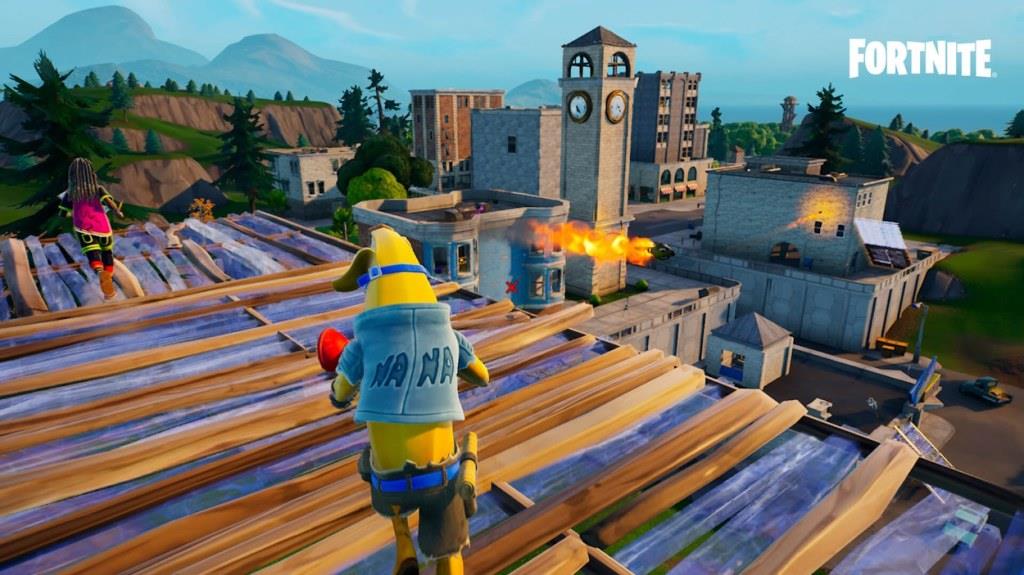
Fortnite on Switch 2 doesn’t just run better – it looks better. Epic Games has completely revamped the visuals to take advantage of the new hardware. You’ll immediately notice:
- Longer draw distances (easier to scout enemies and plan movements)
- Higher-quality textures and shadows
- Realistic water rendering
- Clothing physics (a small but nice touch for immersion)
Add in the upgraded lighting effects like distance field, ambient occlusion, and shadow-casting point lights, and Fortnite looks like a different game altogether on this platform. This is beyond being eye candy, as these improvements help during combat too. Spotting enemies across terrain is easier now, and smoother animations make fast-paced action feel more satisfying.
Fortnite on Switch 2 Uses Mouse Controls and GameChat
Fortnite on the Switch 2 introduces full mouse and keyboard compatibility, giving players more precise control similar to PC gameplay. The update also integrates GameChat support, allowing voice communication directly through the console without needing external apps or devices. These additions make cross-platform play smoother and give Switch 2 users more freedom in how they interact and compete online.
This is where things get even more exciting. Ever since the Switch 2 was revealed, the conversation was, How do we see the use case of the mouse functionality of the Joy-Con 2? Well, starting June 7, Fortnite on Nintendo Switch 2 will support mouse-style aiming using the Joy-Con 2 controllers. That means you can now move and aim like you would on a PC – a huge change for precision players who want to maximize the use of Fortnite weapons.
Also Read: All Weapons in Fortnite Chapter 6 Season 3
You’ll be able to pick between left, right, or both Joy-Cons to control a cursor and rotate your character. If you are using the right or both controllers as a mouse, the ZR button will work as the primary click, and when using the left controller as a mouse, ZL will be treated as the primary click. It’s a unique control scheme that’s bound to shake up how Switch players approach combat. To enable mouse controls on Switch 2 while playing Fortnite, you can follow the steps below:
- Go to the Settings in the Lobby.
- Navigate to the Mouse tab from the options.
- Select Right, Left, or Both under “Mouse Controls.”
A Swap Movement Thumbstick option available in the settings allows left-handed players using left mouse controls to swap their character’s movement from the left thumbstick to the right thumbstick, which often improves the gameplay experience. On top of that, Nintendo’s new GameChat is added to Fortnite. You can now talk to your squad without needing a phone or an external app. GameChat supports up to three friends and works natively through the console.
Fortnite Switch 2 Replay System, Emotes, and More
The new version of Fortnite for Switch 2 expands its features with a smoother replay system, updated character emotes, and improved customization options. Players can now review their matches with better playback tools, making highlight creation easier than before. Emotes benefit from higher frame rates and refined animations, while new cosmetic additions tie into the upgraded performance and graphical fidelity of the console.
Alongside the launch, Epic Games listed some important takeaways for the game’s Switch 2 release. Here is a list of important things you should know from it:
- The replay system, something that was never available on the original Switch, is finally in. Now you can rewatch your best (or worst) moments, analyze strategies, and even create content more easily.
- Players logging into Fortnite on Nintendo Switch 2 before March 31, 2026, will receive the exclusive Wishing Star Emote, a fun cosmetic that may later be available for purchase.
- After a system transfer to Switch 2, users must delete and re-download Fortnite from the Nintendo eShop to play.
- Nintendo Switch controllers, including the Pro Controller, are compatible with Fortnite on Switch 2, though original Joy-Con controllers do not support mouse controls.
- Existing linked Nintendo and Epic accounts will carry over automatically to Switch 2, eliminating the need for re-linking.
- While Save the World is not available on Nintendo Switch 2, all other Fortnite game modes, including Battle Royale, Reload, LEGO, and more, can be played from day one.

Fortnite on Nintendo Switch 2 is what the original version should have been all along. It plays smoother, looks better, and introduces new features like Joy-Con-based mouse controls and built-in GameChat. These updates won’t shock longtime PS5 or PC players, but for handheld and hybrid fans, this feels like a proper next-gen leap.
How do Joy-Con 2 mouse controls work in Fortnite
Joy-Con 2 mouse controls in Fortnite emulate PC-style aiming by using the controllers’ optical sensors to track movement on surfaces, like a traditional mouse.
Activation Steps
Access settings from the lobby or in-match, then select the Mouse tab. Choose Right, Left, or Both Joy-Con 2 under Mouse Controls; Right is default, disabling the right analog stick while enabling cursor movement and character rotation via Joy-Con motion. For left-handed use, enable Swap Movement Thumbstick so the character moves with the right stick.
Key Functionality
ZR acts as primary (left) click on Right or Both setups, while ZL serves this role for Left-only; sensitivity adjustments are available. Gyro aiming must be disabled, as it conflicts with mouse mode. A Joy-Con strap accessory aids grip, and USB mice are also compatible via Switch 2 ports.
Supported Modes
Controls function in Battle Royale, Zero Build, Team Rumble, Reload, and Fortnite OG after patch 36.00 (June 7, 2025). Players note the slim Joy-Con profile feels narrow compared to PC mice but offers responsive aiming after adjustment.
Best sensitivity settings for Joy-Con 2 mouse controls
Joy-Con 2 mouse controls in Fortnite use system-level sensitivity settings with three options: Low, Medium, and High, adjustable via Switch 2’s Controllers & Accessories menu.
Recommended Settings
Medium sensitivity balances speed and precision for most players, avoiding overly twitchy High or sluggish Low. For Fortnite’s competitive aiming in Battle Royale or Zero Build, Low provides finer control during flicks and tracking, mimicking lower DPI on PC mice. Test in Creative mode or Team Rumble to fine-tune based on your surface (e.g., mouse pad or leg).
Fortnite-Specific Tips
In-game, pair Low system sensitivity with Fortnite’s Mouse Sensitivity at 0.4-0.6 (X/Y Axis) and Targeting at 0.3-0.5 for smooth 60FPS tracking. Disable Gyro Aiming and set ZR as primary fire; use a Joy-Con strap for grip. Many pros favor Low for precision shots, adjusting up if playing casually.