Roblox players can now fill their virtual carts with real products, turning in-game shopping into an actual checkout. Through a partnership with Shopify, developers can sell physical merchandise directly inside experiences-blurring the boundary between play and purchase.
Well, all this is turning into reality with the latest Roblox feature that allows buying and selling merchandise inside a gaming experience. On that note, let’s check out more about this new Roblox feature.
Roblox Will Let You Shop for Real Products In-Game
Roblox players can now purchase actual merchandise straight from in-game storefronts powered by Shopify. This integration lets users buy apparel, gadgets, and collectibles without leaving the game, blending virtual fun with real-world shopping. Creators earn commissions on sales, while brands reach millions of young gamers directly through immersive experiences. The feature rolls out to select games first, with plans to expand soon.
Roblox has recently rolled out the Commerce APIs, which will allow creators and brands to sell real-world products to players directly from the experience. Moreover, thanks to the integration of Shopify, creators don’t require any custom backend, and these merchants can join the Roblox community seamlessly.
So, from fashion and beauty to toys and entertainment, the possibilities seem endless. For instance, Fenty Beauty recently released an exclusive limited edition Gloss Bomb that can only be purchased from inside the game. Meanwhile, creator studio Twin Atlas generated six-figure revenue from its in-game merchandise through titles like Creatures of Sonaria, World // Zero, and Dragon Adventures.
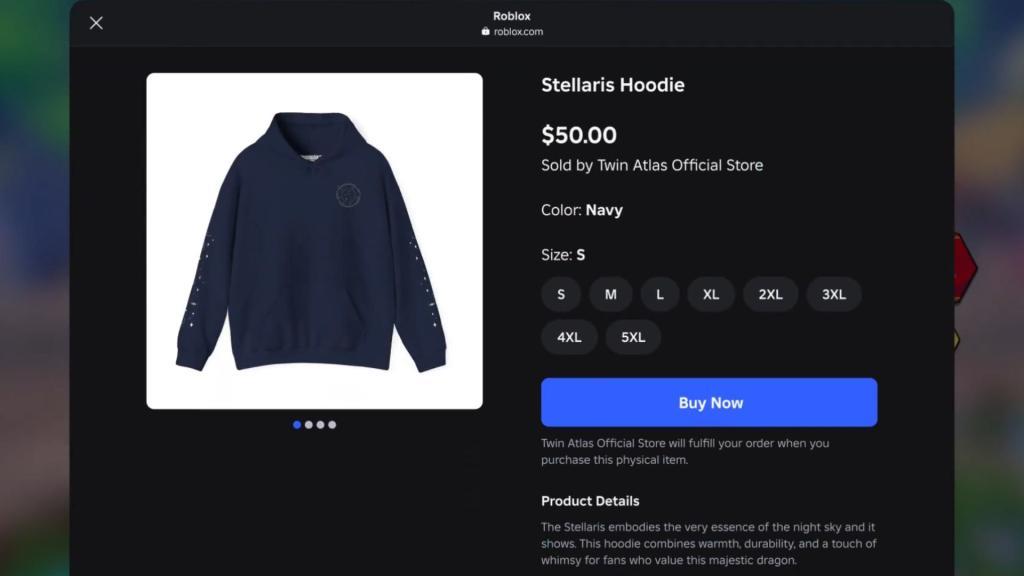
As of now, this feature is exclusively released for users in the U.S.
How do creators set up Shopify sales in Roblox games
Roblox creators set up Shopify sales in their games by integrating Shopify stores with Roblox’s Commerce APIs through the Creator Dashboard. This process links physical products to in-game storefronts, enabling seamless purchases via embedded Shopify Checkout.
Eligibility Requirements
Creators must meet strict criteria to enable commerce features.
-
Be 18+ years old with ID and email verification (including 2FA enabled).
-
Maintain a Shopify merchant account in good standing.
-
For bundling physical items with digital rewards (like avatar items), achieve 100K average DAUs and 1M Robux earnings over the last 3 months, or spend $50K USD on Roblox ads.
Step-by-Step Setup
Follow these steps in Roblox Studio and Creator Dashboard to integrate Shopify sales.
-
Create or link your Shopify store, add physical products with images, variants (e.g., sizes, colors), and inventory details.
-
In Creator Dashboard (create.roblox.com), connect your Roblox account to Shopify under the Commerce section and import specific catalog items to your experience.
-
Build in-game storefronts or UI prompts using Roblox Commerce APIs to display products and trigger Shopify Checkout flows.
-
Optionally, create virtual twins of products in Roblox Studio (e.g., 3D models for avatars) and bundle them as purchase incentives.
-
Publish your experience and advertise via Roblox Ads Manager to drive traffic.
Purchase Flow and Earnings
Players interact with in-game elements to view products, select variants, and complete real-money checkouts without leaving Roblox. Creators earn full Shopify margins on physical sales (no Roblox cut), plus potential fees from bundled virtual items. Early adopters like Twin Atlas saw six-figure revenue quickly.
What are the eligibility requirements for Roblox commerce APIs
Roblox Commerce APIs have specific eligibility requirements for creators, experiences, and users to ensure compliance and quality.
Creator Requirements
Creators must meet ongoing criteria to access Commerce privileges.
-
Be 18 years or older with an ID-verified and email-verified Roblox account, plus 2-step verification enabled.
-
Own or have written authorization for the linked Shopify store, and submit complete Business Information via Creator Dashboard.
-
Stay in good standing with Roblox’s Terms of Use, Community Standards, Advertising Standards, and Commerce Standards.
Experience Requirements
Experiences hosting commerce must comply fully.
-
Be public with completed content maturity labels from the Experience Guidelines questionnaire.
-
Adhere to Roblox’s Community Standards, Advertising Standards, and Commerce Standards on an ongoing basis.
Bundling Requirements
Additional hurdles apply for pairing physical products with digital items (like avatar rewards).
-
Experience averages over 100,000 daily active users (DAUs) in the last 90 days and over 1,000,000 Robux in monthly earnings during that period.
-
Sell at least one bundle within three months of approval, or commit to $50,000 USD in Roblox ad spend via written agreement.
User Requirements
Purchases are limited to eligible players.
-
U.S.-based users aged 13+ (18+ in Texas); creators can check eligibility via PolicyService API.
