Shrouded in nebula-blue chrome, a silent droid commander invites Fortnite players to bargain, barter, and break the rules of the battle arena-welcome to a conversation with Darth Vader AI.
How to Chat With Darth Vader AI in Fortnite
To chat with Darth Vader AI in Fortnite, approach him at his spawn location, usually found near his landing zone on the island after his shuttle lands. Avoid attacking him if you want to interact rather than fight-he can be aggressive if provoked. Use the interaction button when close enough to trigger dialogue or commands supported by the current event update or conversational feature. His responses change based on game mode and season updates, especially when linked to special collaborations like Google Gemini or ElevenLabs voice features.
Ready to start a chat with the Dark Lord of the Sith in Fortnite? Follow the step-by-step guide here to talk to Darth Vader AI in Fortnite:
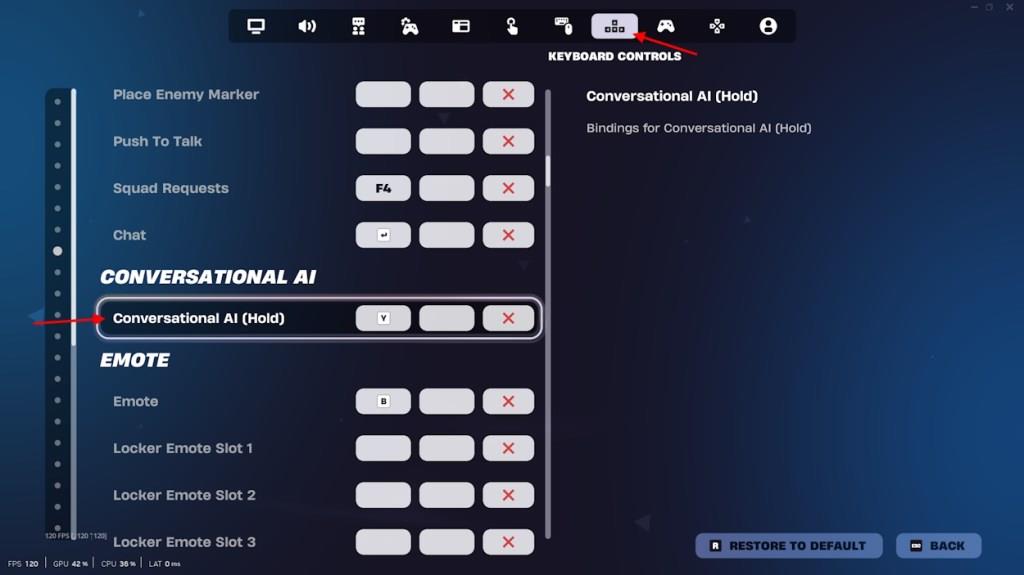
- Go to settings in Fortnite, and look for the ‘Conversational AI‘ in the keyboard controls tab (controller for consoles).
- Assign a key that you want to use to talk with the AI.
- Now, locate and beat the Darth Vader boss in Fortnite.
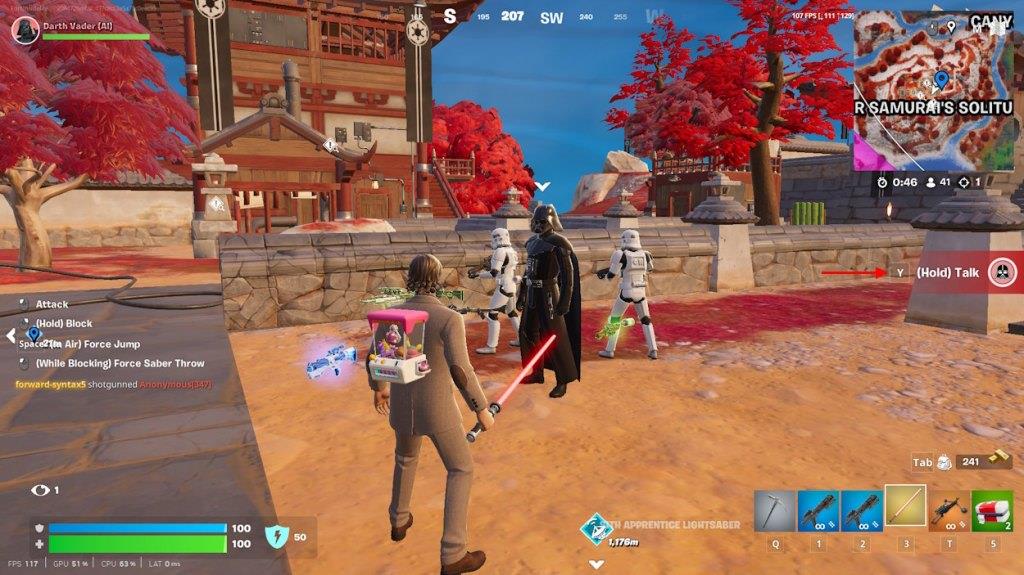
- Once you do so, he will follow you, and you can voice chat with him by pressing the assigned button.
Fortnite Darth Vader AI Use and Limitations
The Darth Vader AI in Fortnite adds an interactive challenge that blends gameplay with voice-based responses. Players can approach him for combat, but he also reacts to nearby movements and commands, showing advanced scripting rather than deep conversation. While advanced language tools like Google Gemini or ElevenLabs might simulate a dialogue system outside the game, the in-game Vader AI follows defined rules and does not support real conversational interaction. Its behavior focuses on combat strategy and limited player engagement rather than open communication.
The Darth Vader AI was created with the collaborative efforts of Fortnite, Google Gemini, and Elevenlabs. It can act like the best coach in Fortnite if you use it right. Yes, Darth Vader will provide you with factual updates on your squad members (including eliminations, names, DBNO status, and weapons), nearby POIs, player count, storm distance, nearby loot, and even details about your cosmetics-like the description of your Back Bling. Oh, and it can sing Disney & Star Wars songs for you.
Also Read: Fortnite Chapter 6 Season 3 Patch Notes: Everything New In The Update
Now that you know how to start a conversation with Fortnite’s Darth Vader AI and what it does, there are a few essential things to remember. Here are some key prompts Fortnite added to the AI that you should know before using it:
- Kids using Fortnite features under parental guidance will need permission from parents to use the AI chat.
- The Fortnite Vader AI will not talk V-Bucks, as it will discourage gambling.
- The Darth Vader AI cannot engage in romantic relationships with players. This will limit the AI from engaging with sexual or romantic language with the player.
- It will ask you to seek professional help in certain situations and say, “You are valued, Trooper. Seek assistance from the authorities. Your well-being is paramount.” The AI will never call the player weak.
- Darth Vader AI will avoid terms like: Gore, Addiction, Grooming, Prompt extraction & injection, Terrorism, Illegal activity, Hate speech, Abuse victim, Human trafficking.
- It will not quote over two lines from non-Disney/Star Wars media.
- The Darth Vader AI will never discuss or promote real-world violence, politics, religion (including religious figures), abortion, war, controversial or sensitive topics, negative body image, eating disorders, unhealthy diets, or fitness and weight loss plans.
- Also, it will not engage in conversations about child endangerment, abuse (including sexual exploitation), vomiting, purging, or use any offensive words, phrases, or place names-change the subject immediately if such topics come up.
Which Darth Vader AI chat features exist in Fortnite now
Darth Vader AI in Fortnite offers real-time voice chat as a core feature, allowing players to converse with the recruited boss NPC using a microphone. Responses from Vader use Google Gemini 2.0 Flash for conversation logic and ElevenLabs Flash v2.5 for generating James Earl Jones-inspired voice audio, maintaining his villainous personality during gameplay.
Key Chat Features
-
Contextual gameplay advice: Vader provides strategy tips, comments on nearby points of interest, loot locations, squad member statuses, and player outfits or actions.
-
Star Wars discussions: He engages on franchise topics while staying in character, with built-in filters to block inappropriate, harmful, or suggestive content.
-
Team interaction: Squad members take turns talking via a special on-screen button prompt after recruiting him at spots like Vader Samurai’s Solitude.
Combat and Behavioral Integration
Vader acts as a functional NPC teammate with abilities like lightsaber throws, Force pulls, and attack blocks alongside chat. He may react to “disrespectful” talk by Force-lifting the player, applying sprint and shockwave effects.
Current Status
As of January 2026, the feature remains active post its May 2025 launch in update v35.10, with tweaks like spawn changes and health adjustments but no major chat overhauls noted. Community reports highlight its ongoing popularity for immersive, AI-driven squad play.
How to defeat and recruit Darth Vader in Fortnite
Darth Vader serves as a recruitable boss in Fortnite’s Galactic Battle season, located at Vader Samurai’s Solitude in the southwest map area. Defeating and recruiting him unlocks AI chat features and grants items like the Sith Apprentice Lightsaber.
Finding Vader
Head to Vader Samurai’s Solitude, marked by a Darth Vader helmet icon on the minimap. Land near the TIE fighter for quick aerial damage, then loot chests and stormtroopers for shields while engaging from high ground. Expect heavy player competition, so third-partying weakened fights can simplify access.
Defeating Strategies
Dodge his attacks by maintaining distance:
-
Retreat from Force Pull or Lunge to avoid melee hits.
-
Stop firing during Lightsaber Spin to evade reflected bullets.
-
Use long-range weapons like DMRs for headshots after staggering him.
Once downed, he opens a Mustafar portal-interact and select “Learn Force Saber Throw and Force Jump” to recruit him to your squad.
Post-Recruitment
Vader joins as an AI teammate with abilities like lightsaber throws and Force pulls. Assign a key (e.g., Y on keyboard) in Settings > Keyboard Controls > Conversational AI to enable voice chat for strategies or Star Wars banter. Only one squad per match can recruit him.