Turn your clutter into cash and style up your stall with the latest Yard Sale codes for May 2025-grab those bonuses before they vanish!
The only catch is that early on, it can be tough to get quality boxes. That’s where we come in. Below, you’ll find all the latest Yard Sale codes, packed with free cash and rare boxes. Use them and work your way to becoming the richest auction house on Roblox.
All New Yard Sale Codes
Players can use the latest Yard Sale codes to claim free in-game rewards such as cash, boosts, and special items that make managing their virtual shop easier. These codes are released by the developers to celebrate updates or milestones, and they often expire after a short time. Check the list below frequently to grab new codes before they stop working and keep your sales growing.
- CREATURES: Mythical Creature box (NEW)
- THOUSAND: 1000 Cash
- GODLY: 3x Godly boxes
- OP: 1x OP box
- UNKNOWN: 3x Unknown boxes
- CELESTIAL: 2x Celestial boxes
- EARLY: 3x Premium boxes
- ALPHA: 200 Cash
Expired Yard Sale Codes
- UNICORN
- OCEAN
Waiting for your next buyer? While you pass the time, why not check out other fun simulation games like Fisch or Beaks, where you dive into the fish or bird trade instead of rare collectibles? Done being the businessman? Flip the script and become a top scorer in Blue Lock Rivals or Basketball Zero. And if you’re just looking for something new, our master list of Roblox game codes has tons of fresh experiences to explore.
How to Redeem Yard Sale Codes
Open Roblox Yard Sale and locate the Settings icon, usually a gear in the top-right corner. Click it to open the menu, then find the Codes or Redeem section. Enter a working code exactly as shown, without spaces or extras, and hit the Redeem button. If valid, rewards appear right away in your inventory. Check for new codes monthly since they expire fast.
On your way to get the rarest finds that you can sell? Hold up; learn how to redeem the codes for Yard Sale from the steps below, and guarantee your free rewards:
- Launch the Yard Sale experience on Roblox.
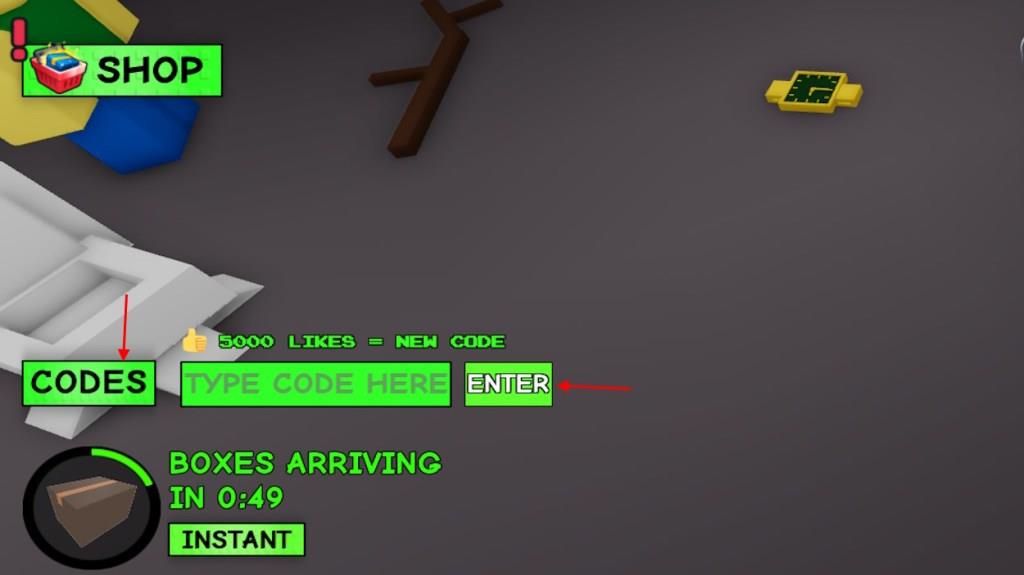
- Click the Codes button on the bottom left of the screen.
- Input a working code in the Type Code Here area.
- Click the Enter button to claim your rewards.
How to Get More Yard Sale Codes
New Yard Sale codes usually appear on the game’s official social media pages, including Twitter, Discord, and the Roblox group. Checking these platforms often helps players catch newly released codes before they expire. Developers may also post codes during events, updates, or milestones, so following announcements and community posts is a good way to stay informed.
Hey, I get it-running your own auction house in Yard Sale can be exhausting. Between flipping items and chasing profits, who has time to hunt for new codes? That’s where we come in. We love cracking open every update to reveal the latest codes for Yard Sale as soon as the devs drop them. So do yourself a favor-bookmark this page and check back often. You won’t want to miss out on the next big freebie.
If you’d rather hunt down the Yard Sale codes yourself, just join the official Gloez Studios Discord. Once you’re in, check out the #announcements and #codes channels. Whenever a new update drops, the devs usually post fresh code in the announcements-so keep an eye out!
How to redeem Yard Sale codes step by step
Yard Sale codes in Roblox are redeemed through a straightforward in-game menu accessible after loading the experience. Follow these steps precisely to claim rewards like cash or boxes.
Redemption Steps
-
Launch Yard Sale on Roblox via PC, mobile, or tablet.
-
Locate and click the Codes button in the bottom-left corner of the screen.
-
Enter a valid code exactly (case-sensitive) into the “Type Code Here” text box.
-
Press the Enter button to submit and receive rewards instantly.
Troubleshooting Tips
Codes may fail due to typos, expiration, or prior use-copy-paste directly from lists and verify active status first. Complete any initial tutorial if prompted, as some guides note this unlocks the feature. Rewards like boxes appear in your inventory or spawn nearby upon success.
Open Yard Sale on Roblox and show where the Codes button is
Open Yard Sale on Roblox by searching for it in the Discover page or via a direct link, then click Play to load the experience. The Codes button appears prominently in the bottom-left corner of the screen once in-game.
Finding the Button
The button is labeled “Codes” (sometimes shown as green or abbreviated “CODES”) and sits at the lower-left side of the main UI, near other quick-access icons. It remains visible after completing any brief tutorial.
Visual Layout Tips
-
On PC/mobile: Look below the center HUD for tools/signs-it’s directly left-aligned.
-
Clicking it opens a small redemption window with a text field and Enter key.
-
YouTube demos confirm its fixed spot, easy to spot even in busy gameplay.