Grow Your Farm players can boost progress fast with fresh May 2025 codes-collect coins, upgrades, and exclusive rewards before they expire and watch your Roblox farm thrive.
Starting on the journey can be quite slow as you have just a few coins and a single crop. So, here is a list of active Grow Your Farm codes that will give you free Watering Can and Feed for livestock to help boost your progress.
All New Grow Your Farm Codes
The latest Grow Your Farm codes bring new rewards to boost your progress and make managing your virtual farm more fun. Players can redeem these codes for useful bonuses such as extra coins, tools, and special items that speed up farming tasks. Keep checking for new updates, as codes often change and can help you expand your fields or upgrade your equipment faster.
- 5KSTANS: Redeem for Feed (NEW)
- 1KLikes: Redeem for Watering Can
- 100LIKES: Redeem for Feed
- NEW: Redeem for Watering Can
Expired Grow Your Farm Codes
Currently, there are no expired codes since it is a fairly new experience on the platform. So, I recommend you to redeem the working codes right now before they expire.
If you’re more of a farmer and like to play such games to chill out and pass the time, check out Grow a Garden codes and Cultivation Simulator codes to get you started. However, if you want a taste of every popular game available on this platform, check out our Roblox game codes master list.
How to Redeem Grow Your Farm Codes
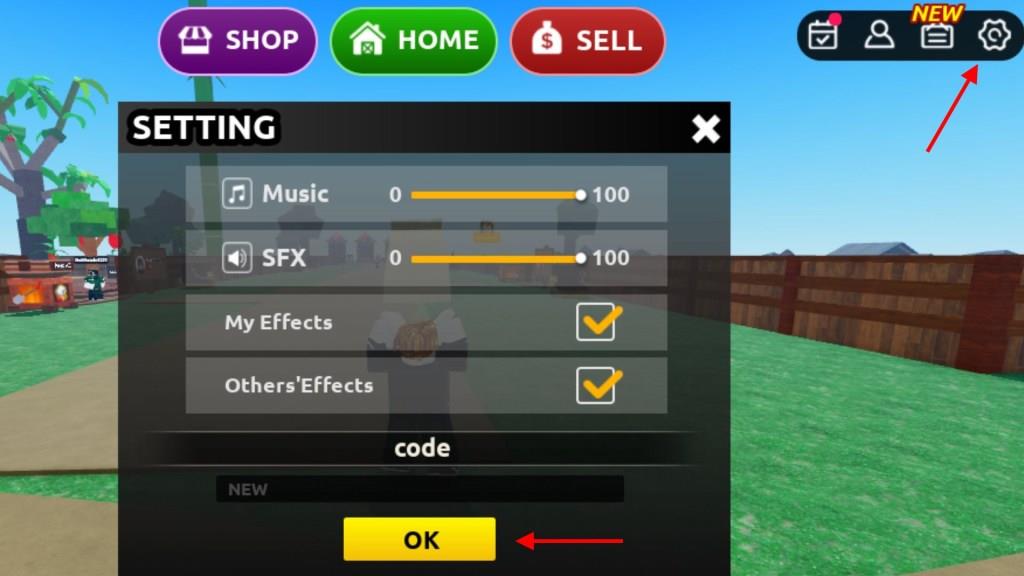
To redeem Grow Your Farm codes, open Roblox and launch the game. Once loaded, tap the Codes button on your screen to open the redemption menu. Enter a valid code exactly as shown, including any capital letters or symbols, then press Redeem. If the code is active and correctly entered, your rewards-such as coins, boosts, or items-will appear in your inventory immediately.
If you’re ready to head into the game, grow your beautiful farm and get some free gift, redeem all the active codes for Grow Your Farm in the following simple steps:
- Launch Grow Your Farm on the Roblox app.
- Click on the Gear icon at the top right of the screen.
- Input a working code in the text box under the Code section.
- Click the OK button to grab your free rewards.
How to Get More Grow Your Farm Codes
Players can find new Grow Your Farm codes by checking the official Roblox game page, joining the developer’s Discord server, or following their social media accounts for announcements. Many YouTubers and fan groups also share fresh codes as they appear. It helps to bookmark trusted sources and revisit them often, since some codes expire quickly.
Looking up codes and keeping track of them by yourself can be a laborious task. So, I suggest you bookmark this page as we will make sure to update this list whenever new codes for Grow your Farm are released by the developers.
However, if you feel like taking on this endeavor, consider joining the official Grow Your Farm Discord server and keep an eye on the ‘game-code‘ channel for all new codes. Moreover, you can join the BloxFarmersClub Roblox community to get updates on the game’s development.
How to redeem Grow Your Farm codes
Redeeming codes in Grow Your Farm is straightforward and works across PC, mobile, or tablet. Follow the consistent steps from multiple guides to claim rewards like Watering Cans or Feed instantly.
Step-by-Step Guide
Launch Grow Your Farm on Roblox. Click the gear icon in the top-right corner to open Settings. Enter or paste a valid code (case-sensitive) into the “Code” text box at the bottom, then click the yellow “OK” button.
Troubleshooting Tips
Codes may fail if expired, already used on your account, or mistyped-copy-paste exactly and check capitalization. No rewards appear? Verify you’re in-game and connected; new codes often come from the game’s Roblox page or Discord. Active codes from prior updates like 50Klikes remain valid per recent checks.
Where is the Code box located in Grow Your Farm settings
In Grow Your Farm on Roblox, the code box appears in the settings menu after clicking the gear icon. Sources consistently place it at the bottom of the dialog or menu panel for easy access.
Exact Location Details
Open the game and locate the gear/settings icon in the top-right corner (some variants note top-left). Click it to reveal the menu, then scroll down if needed-the text box is labeled “Code” or “Type code here…” directly above the yellow “OK” or “Claim” button. Paste your code (e.g., 50Klikes) into this box and confirm.
Visual Confirmation
Videos confirm the box sits at the menu’s lower section amid options like toggles or sliders, ensuring quick redemption without clutter. If the menu updates shifted it slightly, check under a “Redeem Codes” heading.