Rumors about fresh Project Power codes have sparked curiosity among Roblox players, but are any still active after April 2025? Here’s what you need to know before spending time searching for freebies.
However, the beginning can be a whole lot smoother by using some code for goodies. But are there any? Keep on reading as we explore everything about Project Power codes here.
All New Project Power Codes
New Project Power codes are highly anticipated, but as of April 2025, there haven’t been any fresh releases from the developers. Players continue to check for updates in the hope of new rewards such as boosts, coins, or unique abilities. It’s always smart to keep an eye on official Roblox pages or the game’s social media accounts, where any new codes will appear first. Staying alert ensures fans won’t miss out if new codes drop in the future.
Currently, there are no active Project Powercodes because the game is in its testing phase and has no code redemption system. Furthermore, only the game’s testing phase is out right now. So we will have to wait for the full version and the codes themselves.
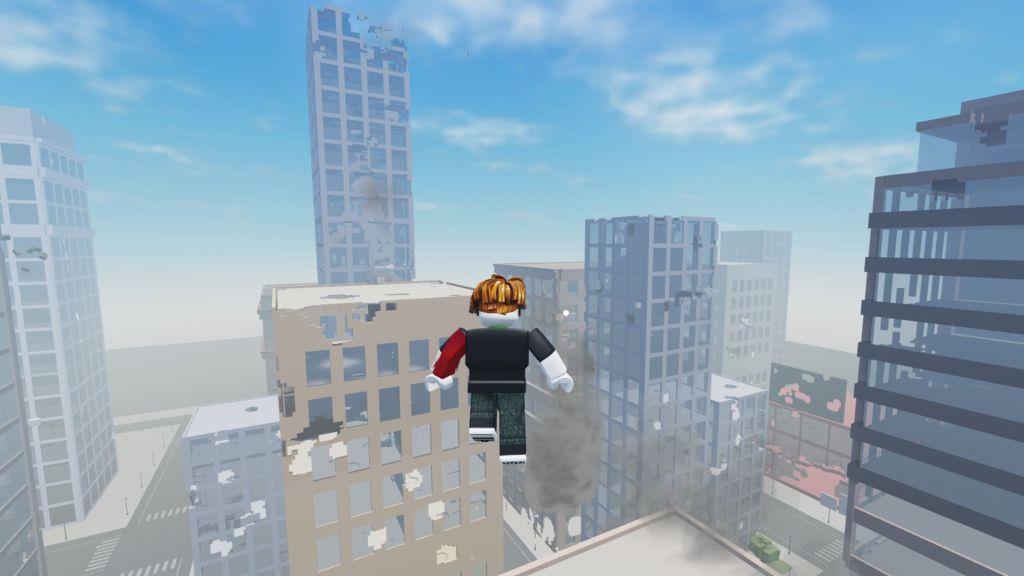
If you’re a fan of such open-world fighting games, do check out Strongest Battlegrounds, Blox Fruits, and Project Smash. However, if playing such titles might bore you, have a look at our Roblox game codes master list, where you will find more unique games.
Project Power Kill Sound ID Codes
Project Power features several sound ID codes that players can use to customize the game’s audio experience. These codes allow you to change sound effects for abilities or actions, giving your gameplay a more personal touch. Each ID corresponds to a specific sound file from Roblox’s library, so experimenting with different codes can add variety and create a unique atmosphere while playing.
- 4544601361: Pls Subscribe Kill Sound Effect
- 937885646: Ultra Kill Sound Effect
- 8508727445: Death Kill Sound Effect
- 8243098911: Do you feel sorry for me? Kill Sound Effect
- 6286038151: Birb Kill Sound Effect
- 5700183626: Blood Splash Kill Sound Effect
- 8233569802: Ara Ara Kill Sound Effect
- 8140095101: 2010 Song Kill Sound Effect
- 7393653993: Don’t Get Mad! Kill Sound Effect
- 7147847068: You Lie Kill Sound Effect
- 8721555368: Fetch Kill Sound Effect
- 6879335951: Android Kill Sound Effect
- 8235260386: Another Fatherless Child Kill Sound Effect
- 7291000847: Blue Passport Kill Sound Effect
- 6185331235: Acne Sad Kill Sound Effect
- 3168087931: Telephone Roar Kill Sound Effect
- 6835794541: Sponge Bob! Kill Sound Effect
- 9057023555: Leave Me Alone Kill Sound Effect
- 7727945686: Slice Kill Sound Effect
- 4702564143: Mini Jam Kill Sound Effect
- 8649450925: You Going to Cry? Kill Sound Effect
- 2661731024: Windows Crash Kill Sound Effect
- 8550333107: Beat with a Stick! Kill Sound Effect
- 7345224995: Welcome to the Shadow Realm Kill Sound Effect
- 5304557205: Ah!!!! Kill Sound Effect
- 7187643697: MM2 Win Sound Kill Sound Effect
- 7361085557: Boom Headshot Meme Kill Sound Effect
- 9073674876: Bone Cold Kill Sound Effect
- 2618158728: Children Scream Kill Sound Effect
- 6927310432: Prowler Kill Sound Effect
- 6467894576: Scary Scream Kill Sound Effect
- 2261507666: Cool Remix Kill Sound Effect
- 130783046: Godzilla Kill Sound Effect
- 8974751426: Head Shot Kill Sound Effect
- 5951474720: Naruto Pain! Kill Sound Effect
- 9117321903: Gojo from Wish Kill Sound Effect
- 7355090174: Toxicity Kill Sound Effect
- 7118312248: Fishing Blow Kill Sound Effect
- 1832576951: Pathetic Kill Sound Effect
- 7109386510: Dababy? Kill Sound Effect
- 3200130016: You Are an Idiot Kill Sound Effect
- 9064673560: Man Shut Up! Kill Sound Effect
- 6087891128: Toilet Fart Kill Sound Effect
- 132366334: Pac-Man Death Kill Sound Effect
- 8395383233: Lego Brick Breaking Kill Sound Effect
- 7405233417: Sorry About That! Kill Sound Effect
- 792323017: Alarm! Kill Sound Effect
- 6649017583: Gambare Gambare Kill Sound Effect
- 8223869886: I will send you to Jesus Kill Sound Effect
How to Redeem Project Power Codes
To redeem codes in Project Power, open Roblox and launch the game. Once you’re in, look for the Twitter or Codes button on the screen and click it to open the redemption window. Type or paste a valid code into the text box and press the Confirm or Redeem button. If the code is active, your reward will appear instantly in your account. Be sure to double-check spellings and watch for expired codes, as they won’t grant any rewards.
Although there are no codes for Project Power that give you free goodies, you can certainly get some cool kill sound effects by purchasing the Kill Sound through the following steps:
- Open the Project Power game page on the Roblox site.
- Scroll down and under the Passes section, click on the Buy Kill Sound Pass.
- Purchase the pack for 45 Robux and launch your game.
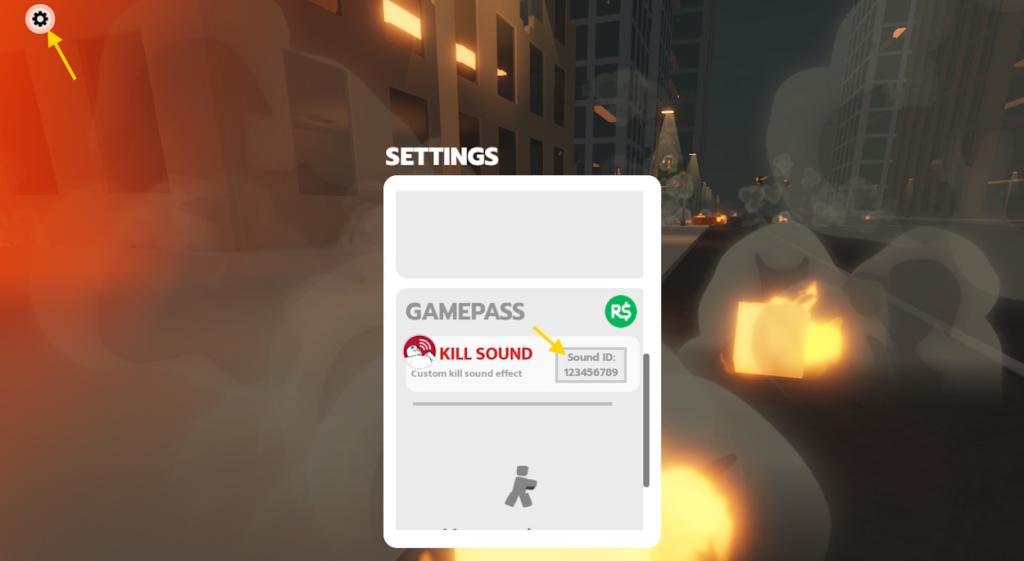
- Now, click on the Gear icon on the top left of the screen to open the Settings menu.
- Scroll down to the Kill Sound category and enter a valid code.
- Press Enter and claim the kill sound effect.
Where to Get More Project Power Codes
You can often find new Project Power codes through the game’s official Roblox page, Discord server, or social media channels such as Twitter and YouTube, where developers occasionally post updates or event rewards. Fans also share working codes on community forums and gaming websites, so checking those regularly can help you spot active ones before they expire. Always make sure the source is trustworthy to avoid expired or fake codes.
Although Project Power has not yet been released in a stable version, consider bookmarking this page. Since we keep our code list up to date, you can always revisit this page and find Project Power codes when they are finally out.
We also recommend that you join the official InVision Games Discord server. Keep checking the ‘announcements‘ and the ‘update-log‘ channel for any new codes released in the game. Finally, you can join the InVision Games Roblox community for all kinds of news.
How to Get More Rewards in Project Power
Earning more rewards in Project Power often comes down to regular play and smart strategy. Completing daily missions, joining special events, and participating in boss battles usually grant extra items or currency. Joining an active group on Roblox can also boost your bonuses, as developers sometimes give group-exclusive perks. Keep an eye on the game’s official social channels, since developers sometimes announce reward multipliers or limited-time giveaways there.
As of now, Project Power does not have many features and lacks quests or any way to earn additional rewards. All you can do is join the game with a few of your friends, hone your fighting skills, and find out who’s the best fighter among all of you.
Sadly, we have to wait for the developers to finish making this game. Once it’s launched in a stable version, we can hope for a code redemption system, additional quests, and more rewards and freebies.
How to redeem codes in Project Power step by step
Project Power on Roblox does not currently support standard code redemption. The game remains in testing with no dedicated codes menu available as of late 2025.
Current Status
No active codes exist, and the full redemption system has not launched. Developers plan to add it later via updates announced on Discord. YouTube claims of steps often refer to unverified demos or require group membership without rewards.
Workaround Steps
For kill sound effects (closest to rewards):
-
Visit the Project Power Roblox page and buy the Kill Sound Pass for 45 Robux under Passes.
-
Launch the game, click the gear icon (Settings) in the top left.
-
Scroll to Kill Sound, enter a sound code, and press Enter.
Stay Updated
Join the official InVision Games Discord for announcements on true code redemption. Comprehensive Roblox code lists through January 2026 omit Project Power.
Join the Secret Game Roblox group for Project Power
No official “Secret Game Roblox group” exists specifically for Project Power based on available information.
Associated Groups
Project Power connects to InVision Games, the primary developer group-search “InVision Games” on Roblox and click “Join Group” if open. Videos mention developer Discords or personal groups like WCKD Productions for updates, but none match “Secret Game.”
Joining Steps
-
Log into Roblox.com or the app.
-
Click the menu (three lines), select “Groups.”
-
Search “InVision Games” or “Project Power,” then hit “Join Group” (may require approval).
Recommendations
Monitor the Project Power game page (https://www.roblox.com/games/103072644129928/Project-Power-DEMO) for group links in descriptions. TikTok and YouTube often hype unverified groups, so verify via official channels to avoid fakes.