Pedal your way to exclusive rewards with the latest BikeWorld codes for April 2025-boost your speed, upgrade your gear, and race past the competition in Roblox’s high-octane cycling simulator.
All New BikeWorld Codes
All New BikeWorld codes for April 2025 give players free rewards such as coins, boosts, and exclusive items to enhance their rides through the Roblox game. These active codes are released by the developers during updates or events and can be redeemed directly in the game’s code menu. Make sure to use them soon, since some codes expire quickly after release.
- BIKER: Free XP (NEW)
- EASTER: 10k Cash
- LOOTCRATES: 30k Cash
- 500KVISITS: Free XP
- 1KLIKES: Free XP
- ILiked: 10k Cash
- BETA: 10k Cash
- CLAPD: Free XP
- UNIX: Free XP
Expired BikeWorld Codes
- 2KACTIVE UPDATE
- 300ACTIVE**
- RIEJUANDUPGRADE
Doing stunts on your bike can be fun, but it can get boring pretty fast. Why not try a change of genre and play games like Anime Last Stand, Blue Lock Rivals, and Arise Crossover? Not interested? Check out our Roblox game codes master list and find a game that caters to your tastes.
How to Redeem BikeWorld Codes
To redeem BikeWorld codes, open Roblox and launch the BikeWorld game. Once you’re in the main lobby, find and click the Twitter icon or the codes button on your screen. Enter an active code exactly as it appears and press the confirm or redeem button. If the code is valid, your rewards, such as coins, boosts, or items, will be added to your account immediately.
Before you speed your way to the top by winning races, learn how to redeem codes for BikeWorld by following the steps below:
- Launch BikeWorld in the Roblox player.
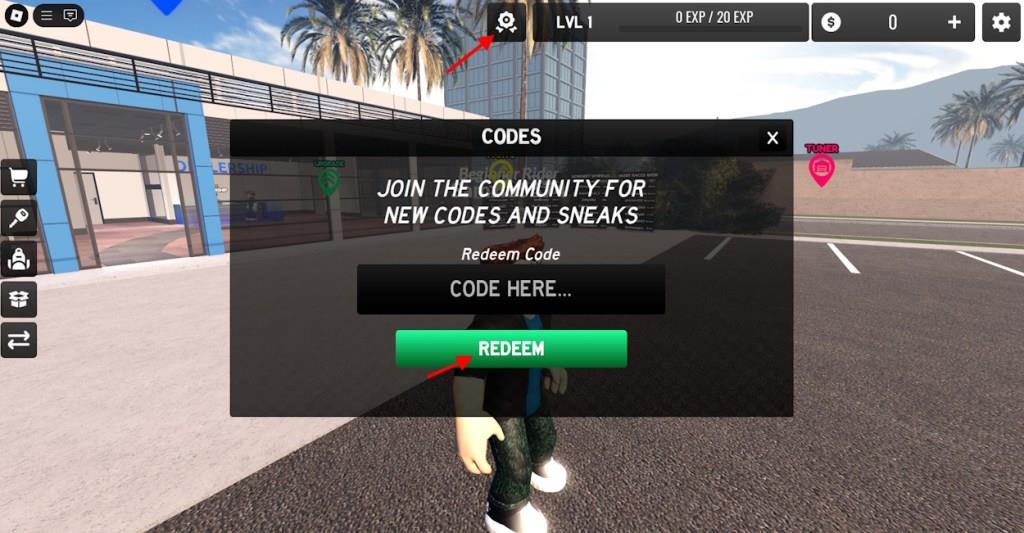
- Click on the Medal icon at the top of the screen.
- Now, click the Codes option.
- Input a working code in the ‘CODE HERE’ section.
- Click Redeem to claim your rewards.
How to Get More BikeWorld Codes
Here are some straightforward ways to obtain more BikeWorld codes: participate in official events and giveaways, follow BikeWorld on social media and subscribe to newsletters for announcements, check in-game daily rewards and limited-time promos, and trade or collaborate with trusted community members who share valid codes.
The best way to get the latest BikeWorld codes without a hassle is to bookmark this post. As master craftsmen at regularly keeping updating the Roblox codes, be sure to check back here for the latest ones.
However, you can always go the official way and join the official BikeWorld Discord server and look for the “announcement” channel. The developers generally reveal codes on this channel among the game update news. You can also check out the “changelog” channel for more game updates.
How do I redeem BikeWorld codes step by step
To redeem codes in Roblox’s BikeWorld game, follow these straightforward steps based on consistent guides from multiple sources.
Step-by-Step Guide
-
Launch BikeWorld on Roblox via the official game page and wait for it to fully load until your avatar spawns in the main area.
-
Locate the Rewards, Medal, or Ribbon icon (typically a trophy or medal symbol) at the top of the screen, usually to the left of your level indicator.
-
Click the icon to open the Playtime Rewards menu, then select the Codes button (often blue, in the upper-left corner of that menu).
-
Enter a valid code exactly as listed (case-sensitive; copy-paste to avoid errors) into the Code Here or text input field.
-
Press the green Redeem button to claim rewards like cash, EXP, or levels-instantly added if valid.
Troubleshooting Tips
Codes redeem once per account and may expire, triggering an invalid message-check for updates via the game’s Roblox group or Discord. Play on PC, mobile, or tablet; no external apps needed.
Open BikeWorld in Roblox and show me the Rewards icon location
Launch BikeWorld on Roblox and ensure the game fully loads with your avatar spawned in the main area.
Rewards Icon Location
The Rewards icon appears as a medal, ribbon, or trophy symbol positioned at the top of the screen, specifically to the left of your level indicator (e.g., “LVL 1”). This placement remains consistent across PC, mobile, and tablet views per multiple guides.
Visual Description
Look for a small golden or silver medal button next to your player level bar-clicking it opens the Playtime Rewards menu, where the blue Codes tab sits in the upper-left corner. No screenshots are available here, but video guides confirm this exact top-left spot.
