Collect free rewards and boosts with the latest My Anime Life codes for April 2025! Level up faster, summon powerful heroes, and make your Roblox adventure with Boxmoji even more exciting before these codes expire.
Use our new My Anime Life codes to get cash and gold bars that you can use to buy swanky new vehicles and other amazing items.
All New My Anime Life Codes
Stay ahead in My Anime Life with the newest April 2025 codes that grant valuable boosts, coins, and exclusive rewards. Players can redeem these codes in the game menu to progress faster, summon stronger heroes, and collect rare items. Keep checking this list regularly, as new codes from Boxmoji are released often and can give you an edge in upcoming challenges.
- update2: 150k Cash and 50 Gold Bars
- two_millionvisits: 500k Cash and 100 Gold Bars
- update1: 150k Cash and 50 Gold Bars
- 1mthankyou: 400k Cash and 50 Gold Bars
- 500kvisits: 200k Cash and 50 Gold Bars
- secretgold: 40 Gold Bars
- thankyoufor100k: 100k Cash and 20 Gold Bars
- RELEASE: 20k Cash and 20 Gold Bars
Expired My Anime Life Codes
As of writing this, there are no expired codes for this Roblox experience. However, because of so many codes above, we recommend you redeem them before they move to the expired section.
Our Roblox game codes master list houses many more RP experiences if you’re into it. Games like Brookhaven RP or Adopt Me are titles you should try out.
How to Redeem My Anime Life Codes
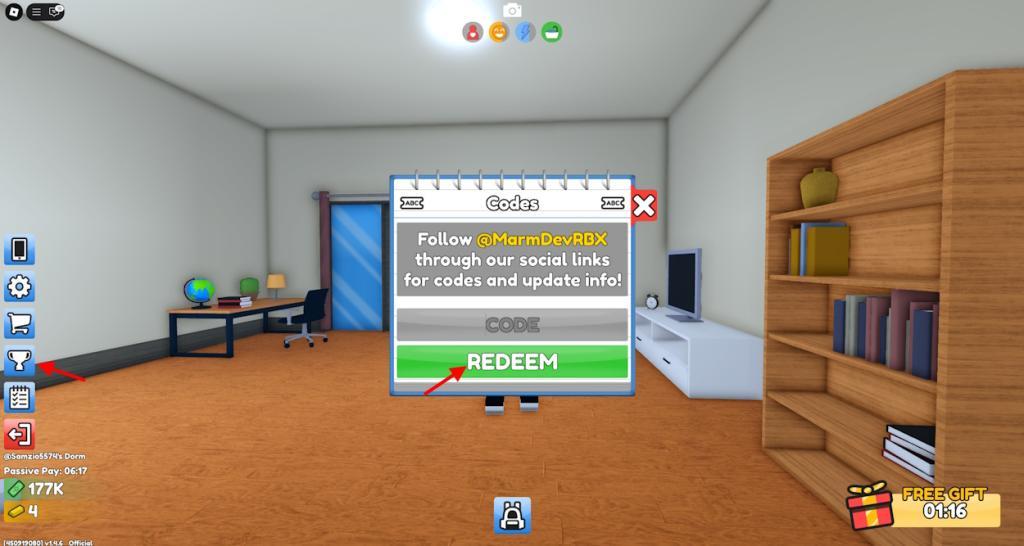
To redeem your My Anime Life codes, open Roblox and launch the game. Tap the Twitter or Codes button on the main screen, then copy and paste a valid code from the active list into the text box. Press the Redeem button to claim your rewards instantly. Make sure to check for typos and use the codes before they expire, as old ones may no longer work.
Being a student again might be tiresome, but redeeming codes for My Anime Life is easy enough. Follow the steps below to learn how to do so:
- Start My Anime Life on the Roblox player.
- Click on the Trophy icon and then on the Codes icon.
- Input a working code in the pop-up window.
- Click on Redeem and collect your cash.
How to Get More My Anime Life Codes
New My Anime Life codes are typically shared through the game’s official channels, such as the developer’s Boxmoji Roblox group, the game’s official Discord server, and their social media profiles. Players can also check the game’s description page frequently, as new codes often appear there during updates or special events. Keeping an eye on community forums and fan pages can help you spot new codes before they expire.
The best place to get more codes for this Roblox experience is this article, as we add them in real-time. As such, we recommend you bookmark it so you never miss a new game update.
Those inclined for even more can join the developer Boxmoji’s Discord server. Once here, head over to the ‘announcements‘ channel and keep an eye out for new codes for My Anime Life. You can also follow the official @MarmDevRBX X account or subscribe to the devs’ YouTube channel.
How to redeem codes step by step in My Anime Life
To redeem codes in My Anime Life on Roblox, follow these straightforward steps derived from reliable guides. The process uses the in-game phone menu for quick access.
Step-by-Step Redemption
-
Launch My Anime Life on Roblox and wait for the game to fully load.
-
Press the Phone button (or M key) on the left side of the screen to open the menu.
-
Select the Rewards or Trophy icon within the phone interface.
-
Click the Codes, ABC Codes, or Codes ABC option to open the redemption box.
-
Enter a valid code exactly as shown (case-sensitive) into the text field.
-
Hit Redeem to claim your rewards, such as cash or gold bars, which appear instantly if active.
Troubleshooting Tips
Codes may fail due to typos, expiration, or server issues-try rejoining a different server if needed. Bookmark official sources like the developer’s Discord for updates, as codes expire with game patches.
Open the Rewards or Codes menu in My Anime Life where is it located
To open the Rewards or Codes menu in My Anime Life on Roblox, access the phone interface first, then navigate to the specific icons within it.
Menu Location
The phone button appears on the left side of the screen once the game loads. Press M on your keyboard or tap the Phone icon to open the main menu.
Opening Rewards/Codes
-
Inside the phone menu, click the Rewards icon (often marked as #1 or a trophy symbol).
-
Next, select the Codes, ABC Codes, or Codes ABC button (typically marked as #2) to reveal the redemption text box.
Visual Tips
Look for trophy or reward icons in the phone’s lower section; guides confirm consistency across updates. If missing, ensure the game fully loaded or try rejoining the server.