New codes have surfaced in Brainrot Evolution this April, giving Roblox players fresh ways to boost progress, grab rare rewards, and power up faster than before. Here’s the full list so you don’t miss a single advantage.
Find it in our list of new Brainrot Evolution codes you can redeem to get free Wins and XP potions. You can then use these rewards to level up on your brain-melting journey faster.
All New Brainrot Evolution Codes
All New Brainrot Evolution codes give players fresh rewards to boost their progress and customize their experience. These April 2025 updates include bonuses like extra coins, boosts, and cosmetic items that help you advance faster and stand out in matches. Redeem the latest codes quickly, as many of them are available only for a short time before expiring or being replaced by newer ones.
- lolgame1: 2x EXP Potions (NEW)
- release: 1x Wins Potion (NEW)
Expired Brainrot Evolution Codes
As of now, there are no expired codes for this Roblox experience. This is because the game is fairly new. As such, we also suggest you take advantage and redeem the working ones above.
If you’re already tired of this title, Roblox has no shortage of clicker games. Our Roblox game codes master list houses many such experiences, like Race Clicker and Push-Up Training Simulator.
How to Redeem Brainrot Evolution Codes
To redeem Brainrot Evolution codes, open Roblox and launch the game. Once it loads, tap the Codes button on the main screen to open the redemption window. Copy a valid code from the latest list and paste it into the text box without any extra spaces. Press Redeem to confirm and instantly receive your rewards in-game. If a code does not work, it might have expired or been entered incorrectly, so check for typos before trying again.
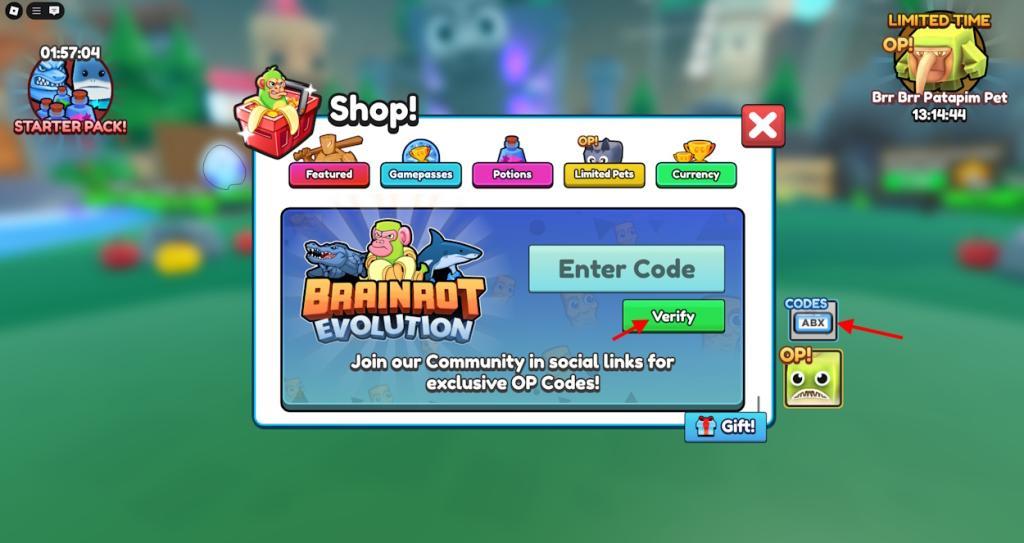
Thankfully, redeeming codes for Brainrot Evolution is as easy as going crazy while playing it. Follow the steps below to do so:
- Launch up Brainrot Evolution on the Roblox app player.
- Click on the Shop icon on the left side of the screen.
- Now, click on the Codes icon on the right side of the window.
- Enter a working code in the text box.
- Finally, click on Verify and get your rewards.
How to Get More Brainrot Evolution Codes
Players can find new Brainrot Evolution codes through the game’s official social media channels, such as Twitter, Discord, and Roblox group posts, where developers share updates and giveaways. Joining these platforms or turning on notifications helps you grab fresh codes before they expire. You can also check fan communities or trusted Roblox news sites that frequently post verified codes and event details.
As it always goes, the best way to get the latest Brainrot Evolution codes is by bookmarking this article right here. As someone who keeps a keen eye on all Roblox codes, we will update you with new ones first.
However, that’s not all you can do. For starters, begin by joining the official Brainrot Evolution Discord server. Here, keep an eye out for the ‘announcements‘ channel and look out for new codes. Furthermore, you can also follow the developer xFrozen Studio’s X account and subscribe to the official i2Perfect YouTube channel.
How do I redeem codes in Brainrot Evolution on Roblox
Redeeming codes in Brainrot Evolution on Roblox follows a straightforward process through the in-game shop interface. Codes are case-sensitive and can often be claimed from the main menu without entering a match. Follow the steps below for quick redemption.
Step-by-Step Guide
-
Launch Brainrot Evolution via the Roblox player.
-
Click the Shop icon on the left side of the screen.
-
Tap the Codes icon (or button) on the right side of the Shop window.
-
Enter a valid code exactly as listed in the text box.
-
Press the green Verify button to claim rewards instantly.
Troubleshooting Tips
Rewards like EXP Potions or crates appear as notifications if successful. Ensure exact capitalization, as codes fail otherwise; expired ones show an error. Redeem promptly since codes rotate frequently.
Open the Shop in Brainrot Evolution where is the Codes button located
In Brainrot Evolution on Roblox, the Codes button appears inside the Shop menu after opening it from the main interface. Guides consistently place it on the right-hand side of the Shop window.
Exact Location
The Shop icon (a red shopping basket) sits on the left side of the screen in the main menu or lobby. Once opened, look to the right-hand side of the Shop menu for the Codes icon or button, often labeled directly as “codes.” Some players note it may require scrolling down to the bottom section in longer menus.
Quick Access Tips
Clicking Codes brings up a text entry field and Verify button below. If the interface updates, check the shop’s right edge first, as positions remain stable across recent patches.
