Jujutsu Evolution keeps players hooked with fresh codes that grant boosts, spins, and rewards to power up their sorcerers. Here’s the latest list for April 2025 to help you stay ahead in your battles across Roblox’s supernatural arenas.
Let us help you out with a list of new Jujutsu Evolution codes that can help you earn free crates and boxes. These mystery boxes contain potions and fruits to help you progress faster in the game.
All New Jujutsu Evolution Codes
Check back here for the freshest Jujutsu Evolution codes added in April 2025. Redeem them fast in Roblox to claim free spins, yen, and other boosts before they expire. Our list stays current with active rewards straight from the developers.
- Update0: Redeem to get 2x Mystery Box I (NEW)
- RESTART1: Redeem to 1x Fruit Crate (NEW)
- RELEASE: Redeem to get 3x Luck Potion I and 500 Coins (NEW)
Expired Jujutsu Evolution Codes
As of writing this, there are no expired Jujutsu Evolution codes. Hence, it’s best to claim all the rewards from the above codes as soon as possible.
If you are looking for for games in other genres, do check out our Roblox game codes master list to get a variety of options on this platform. However, if you are an avid anime fan and games like this one attracts you the most consider playing Jujutsu Infinite and Ghoul RE.
How to Redeem Jujutsu Evolution Codes
To redeem Jujutsu Evolution Codes, open the game and locate the Rewards or Codes section in the main menu; enter your code exactly as shown, then confirm to receive your in-game rewards immediately.
Now that you are ready to jump into action, learn how to redeem the codes for Jujutsu Evolution through the simple steps below:
- Launch Jujutsu Evolution on Roblox.
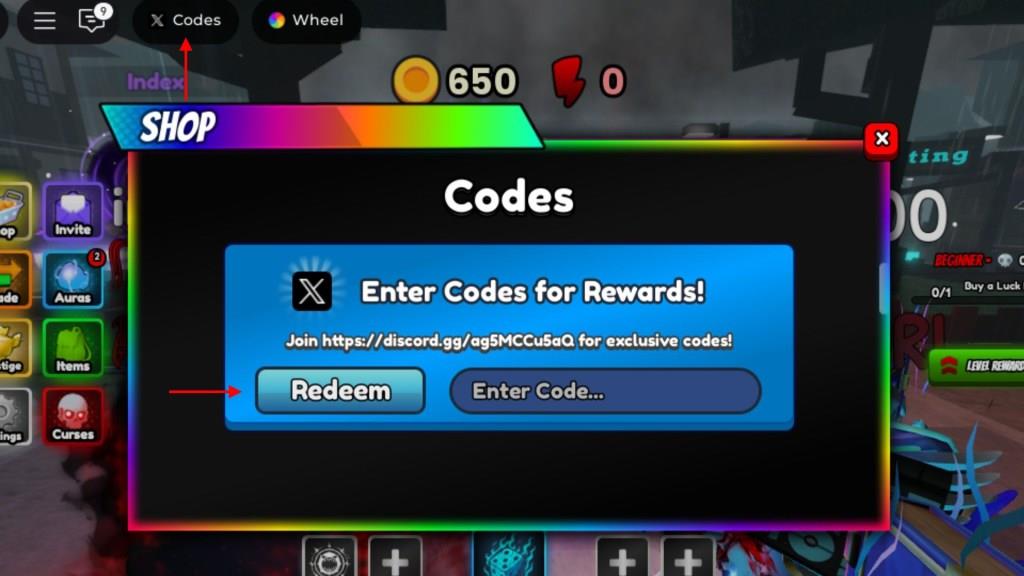
- Click on the Codes icon on the top left of the screen.
- Enter a working code in the pop-up window.
- Click the Redeem button to get the rewards.
How to Get More Jujutsu Evolution Codes
Players can find new Jujutsu Evolution codes by following the game’s official social media pages, such as Twitter, Discord, or the Roblox group, where developers often post fresh updates and rewards. Checking these platforms regularly ensures you don’t miss limited-time codes. It’s also helpful to join community discussions or fan groups, as players often share active codes shortly after they’re released.
The best way to get new Jujutsu Evolution codes is to bookmark our page. We keep our article up to date whenever new codes and game updates are released.
Moreover, we also recommend that you join the developer More & More Games’ Discord server, where you can get a full list of active codes by keeping an eye out for the ‘codes‘ channel. Finally, you may also join the More & More Games Roblox community to stay updated on all sorts of news and announcements related to the game.
How to redeem Jujutsu Evolution codes step by step
To redeem Jujutsu Evolution codes, follow these steps in order:
Step-by-step redemption
-
Open the game
-
Launch Jujutsu Evolution (also listed as Anime Evolution in the Roblox experience menu).
-
-
Find the Codes button
-
Once you load into the game, look at the top-left of your screen for a “Codes” button/icon.
-
-
Open the code window
-
Click the Codes button to open a small pop-up window with a text box.
-
-
Enter your code
-
Click in the “Enter Code” text box.
-
Type the code exactly as shown (respect capitalization), or paste it in to avoid typos.
-
-
Redeem the code
-
Press the “Redeem” button (usually a blue button next to or below the text box).
-
If the code is valid and active, your rewards (Coins, crates, potions, etc.) will be added instantly to your account.
-
-
If the code doesn’t work
-
Double-check spelling and capitalization.
-
Try rejoining a fresh server, then redeem again.
-
If it still fails, the code is likely expired or disabled.
-
Show where the Codes button is located in the game interface
In Jujutsu Evolution (also listed as Anime Evolution in Roblox), the Codes button is found in the same general place in every guide and video: near the top-left corner of the in-game screen, just under or beside the main UI bar.
Where the Codes button is
-
The button appears as a small UI icon labeled “Codes” at the top-left of your HUD once your character loads into the game world.
-
It sits among other interface buttons (like shop or settings), so look along the top-left row of buttons until you see the one that literally says Codes.
How to visually confirm it
-
Stand still in the spawn area and look toward the upper-left edge of your screen; you should see the Codes button there without opening any menus.
-
If you do not see it, try zooming your camera out or switching to full-screen, as some UIs can appear partially off-screen at lower resolutions.
