Brace yourself for a new era of strategy and chance as Anime Kingdom Simulator reveals its freshest codes, shaping you from hopeful recruit to reigning champion.
One of the easiest ways to gain strength is by using potions. Use our list of new Anime Kingdom Simulator codes to obtain potions that can increase damage, XP, or even drop rate.
All Active Anime Kingdom Simulator Codes
All active Anime Kingdom Simulator codes for April 2025 give players extra rewards like coins, boosts, and special items to speed up their progress. These codes are regularly updated, so check them often before they expire. Redeeming them is simple-enter the code in the game’s code menu to claim your free bonuses and strengthen your kingdom faster.
- 40kOMG: 2 All Potions Tier 1 (NEW)
- THXFOR30K: 1 All Potions Tier 1 (NEW)
- 20klikes: 1 All Potions Tier 1 (NEW)
- Release: 1 All Potions Tier 2 (NEW)
Expired Anime Kingdom Simulator Codes
- OpenBeta
Anime Kingdom Simulator is definitely a dream game for Demon Slayer fans who love building a team of their favorite characters. But this isn’t the only Demon Slayer-focused game in Roblox. Games like Pixel Slayer, Project Slayers, or Anime Fantasy Kingdom can be equally fun.
But why stop there? Roblox has a ton of anime-oriented games that would completely blow you away. Check our Roblox game codes master list to find new and better anime games.
How to Redeem Anime Kingdom Simulator Codes
To redeem codes in Anime Kingdom Simulator, open the game and click the gear icon to access the settings menu, then enter your code in the redeem box and confirm to claim your rewards.
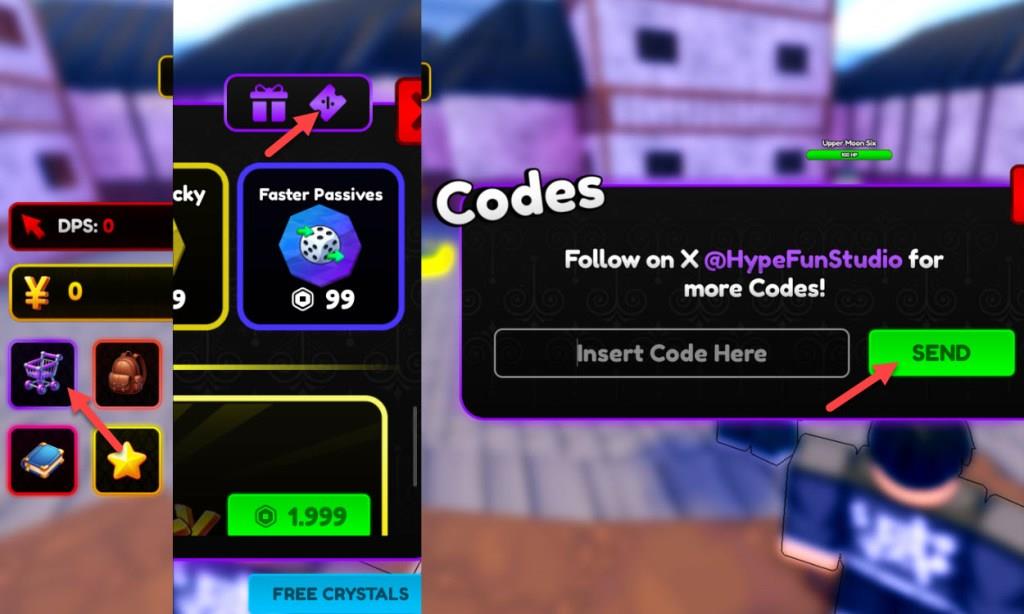
- Launch Anime Kingdom Simulator in the Roblox app.
- Click on the Shop icon on the right side of the screen.
- Now select the Coupon icon from the top of the Shop menu.
- Enter a working code in the ‘Insert Code Here‘ section.
- Click on Send to claim your rewards.
How to Find More Anime Kingdom Simulator Codes
Players can find new Anime Kingdom Simulator codes by following the game’s official Roblox page, where the developers often post updates and special event codes. Joining the game’s Discord server or community groups on social platforms can also help, as active members and moderators frequently share the latest codes there. Checking reliable Roblox fan sites or code guide pages regularly is another good way to stay updated with fresh codes before they expire.
The developers share new codes for Anime Kingdom Simulator through their social accounts. You can follow the Twitter X account or join the Anime Kingdom Discord server to stay on top of all the latest updates and sneak peeks. If you want more information about the game, you can also join the HypeFun Games Roblox community instead.
Sadly, HypeFun X accounts are known to tweet often, which makes it hard for normal users to find the codes. You can spare yourself the hassle by simply bookmarking our post with codes for Anime Kingdom Simulator to find the latest active codes instead. We keep an eye on all the game’s social platforms and also make sure the added codes are working.
Redeem codes steps in Anime Kingdom Simulator on mobile
Redeeming codes in Anime Kingdom Simulator on mobile follows the same straightforward process as on other platforms, since Roblox’s mobile app uses a touch-friendly interface. The steps remain consistent across devices, ensuring accessibility for mobile players.
Step-by-Step Guide
-
Launch Anime Kingdom Simulator on the Roblox mobile app and wait for it to fully load.
-
Tap the purple shopping cart icon (Shop menu) on the left side of the screen.
-
In the Shop, tap the purple ticket or coupon icon (often next to a gift icon) at the top right to open the code entry window.
-
Enter the code exactly as shown (case-sensitive) in the “Insert Code Here” text box, then tap the green Send button.
-
Rewards appear instantly if valid; otherwise, check for typos or expiration.
Mobile Tips
Touch controls make navigation precise-zoom out if icons feel small. Copy-paste codes from lists to avoid errors on your device’s keyboard. This method works reliably on iOS and Android as of mid-2025 updates.
Open the Shop menu in Anime Kingdom Simulator mobile where is it located
In Anime Kingdom Simulator on mobile, the Shop menu opens via a purple shopping cart icon located on the left side of the screen. This touch-friendly button is always visible in the main game lobby after loading.
Visual Location
The icon appears in the vertical sidebar of UI buttons along the screen’s left edge, typically midway down among other menus like quests or inventory. It resembles a standard cart symbol in purple to stand out on smaller mobile displays.
Access Tips
Tap it directly- no swiping or zooming required, even on busy screens. If hidden by animations, wait a moment or tap the area again for responsiveness. Once open, the coupon tab sits top-right for codes.