Ghasts roar through the overworld once more as Minecraft Snapshot 25W15A lands, adding eerie new encounters, a clever player locator bar, and subtle tweaks that reshape how adventurers explore and survive.
In addition, we have the new Player Locator Bar in the Java edition, along with a couple of new advancements that all crafters can expect. Read on to know what’s what.
Minecraft Snapshot 25W15A Brings Ghasts That Can Fly You to the Sky
Ghasts can now fly you to the sky in Minecraft Snapshot 25W15A, adding a new aerial twist to exploration and combat.
Brand new variants of the Ghasts are making their way into Minecraft. Unlike its hostile cousin found inside the Nether dimension, this one’s a rather friendly creature. The best thing about them is that you can ride this cute flying mob along with your three other friends using a Harness, which is also coming to the game.
However, before you take to the skies, do note that these creatures can be crafted from Ghast Tears and bone blocks found only in the Nether. This recipe will give you a Dried Ghast. Once you waterlog this little grumpy thing for 20 minutes, it will turn into a small and cute Ghastling.
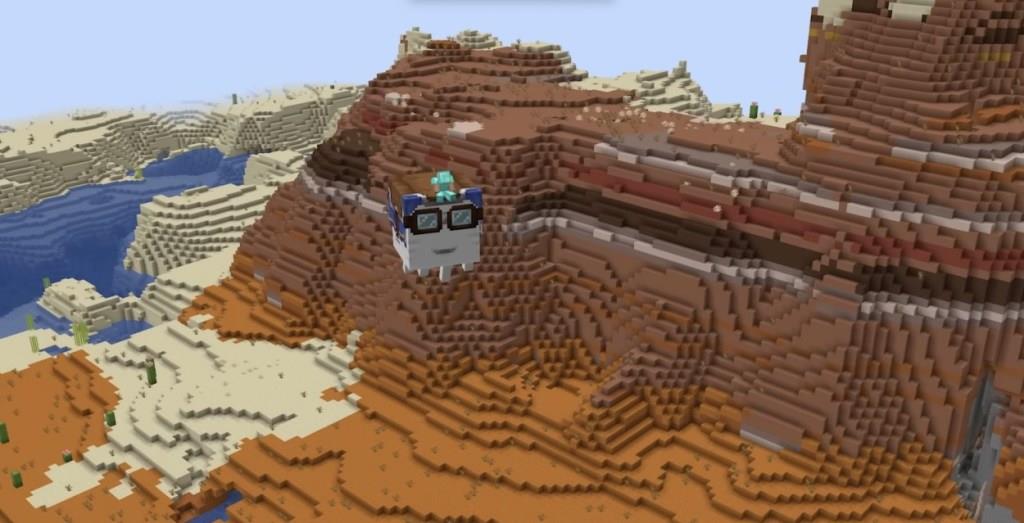
Feeding this Minecraft mob further will turn it into a Happy Ghast, which can give you and your friends a unique flying experience. If you’re curious about the Harness, it can be crafted using leather, glasses, and wool. Moreover, it comes in 16 different colors and becomes a new collectible for players.
Also Read: A Minecraft Movie Review: Lots of Fun, Lots of Chaos
Player Locator Bar Adds a New Layer to Minecraft Multiplayer
The new Player Locator Bar introduces a clear and convenient way to track other players’ positions during multiplayer sessions. Displayed at the top of the screen, it shows directional indicators and approximate distances to teammates, making coordination much smoother. Whether exploring, building, or engaging in PvP, this feature reduces confusion and helps groups stay connected without relying on constant chat updates.
Another major highlight of the Minecraft Snapshot 25W15a is the new Player Locator Bar. Once enabled, this new UI feature hovers over the XP bar and shows directional indicators pointing towards the waypoints, which are typically other players or team affiliations.
However, if you don’t want your present location to be shown publicly, you can always choose to sneak, wear a mob head, or a carved pumpkin, or apply the potion of invisibility upon yourself.
Finally, there are a couple of new advancements: Stay Hydrated and Heart Transplanter.
How do I enable the Locator Bar in an existing world
To enable the Player Locator Bar in an existing Minecraft world (from Snapshot 25w15a or later versions like 1.21.6), use the gamerule command as a server operator or in single-player with cheats enabled.
Steps to Enable
Open chat and run /gamerule useLocatorBar true (or /gamerule locatorBar true in some references). This toggles it on immediately for that world, as it’s controlled server-side via gamerules rather than world creation settings.
Verification and Notes
Type /gamerule useLocatorBar to check its status-it defaults to true in new snapshots but may need enabling in older worlds. The bar appears below the hotbar in multiplayer when other players are nearby (within range), replacing the XP bar temporarily, and works in existing worlds without recreating them.
Disabling or Hiding
Use /gamerule useLocatorBar false to turn it off world-wide. Players can hide individually by sneaking, using Invisibility, wearing mob heads/pumpkins, or spectator mode, but can’t disable it personally via settings.
Enable Locator Bar without restarting world
Yes, you can enable the Locator Bar in an existing Minecraft world without restarting or recreating it.
Enable Command
Open chat (with cheats enabled in single-player or as an op on a server) and type /gamerule locatorBar true (or /gamerule useLocatorBar true in some snapshots). The change applies instantly across all dimensions without needing a reload or restart.
Instant Activation
The gamerule takes effect immediately for all players in the world-no server reboot or world reload required, unlike some settings that reset on restart. Verify with /gamerule locatorBar to confirm it’s true.
Troubleshooting
If it doesn’t appear, ensure you’re in multiplayer range of another player (not earning XP) and not hidden (e.g., sneaking). Changes persist per dimension but apply world-wide upon command execution.