New Delay Latch codes for April 2025 bring fresh rewards that boost your Roblox gameplay. Grab these limited-time bonuses before they expire and power up your next match with exclusive in-game perks.
But like all other games, you need cash to look cool. Find it using our list of Delay Latch codes. You can then use this cash to buy new animations, styles, and even emotes.
All New Delay Latch Codes
The April 2025 update brings a fresh set of Delay Latch codes that players can redeem for free rewards and in-game boosts. These codes offer useful items to enhance progress and make gameplay smoother for both new and returning users. Players should redeem them soon, as most are available for a limited time before expiring or being replaced with newer ones.
- RINSOONTRUSTME: 5000 Cash (NEW)
- SorryForRollback: 50,000 Cash (NEW)
- SAEREWORK3TIME: 10,000 Cash
- sorryforlatency: 10,000 Cash
- AMMISTHEOWNERNOTLEFTRIGHTTH: 10,000 Cash
Expired Delay Latch Codes
As of now, there are no expired Delay Latch codes, so jump into this game and redeem the active ones as soon as you can.
If football is not the sport for you, do check out our Roblox game codes master list that houses a huge variety of different kinds of sports games. However, if you really love Blue Lock and want to play more games like these try Blue Lock Rivals and NFL Universe Football if you are more into American football.
How to Redeem Delay Latch Codes
To redeem Delay Latch codes in Roblox, open the game and select the Twitter or Codes icon on the main screen. Copy a working code from the list and paste it into the designated text box. Press the Redeem or Submit button to confirm. If the code is valid, your rewards-such as in-game items or currency-will appear immediately. Be sure to enter each code exactly as shown, as typos or expired codes will prevent successful redemption.
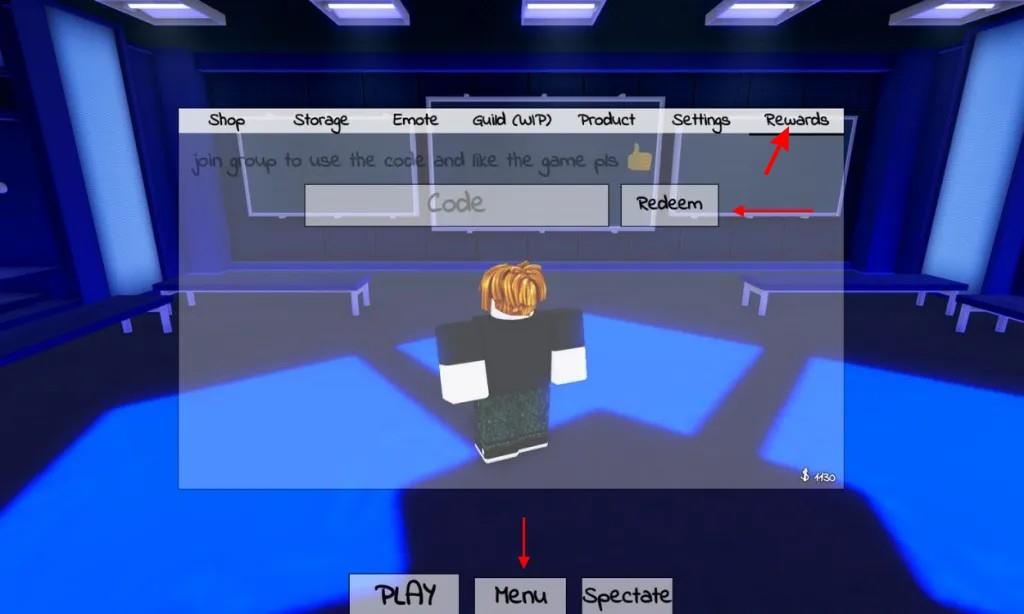
Before you go ahead and redeem codes for Delay Latch, do note that you need to like the game and join its Roblox community through the links below. Once done, follow the steps below:
- Launch Delay Latch on Roblox.
- Click on the Menu button at the bottom of the screen.
- Now, click on the Rewards tab.
- Input a working code in the textbox.
- Click the Redeem button to receive all your rewards.
How to Get More Delay Latch Codes
Players can find new Delay Latch codes by following the game’s official Roblox page, joining the developer’s social media accounts, and checking community servers where codes are often shared first. It’s helpful to revisit these sources regularly, as codes may expire quickly. You can also subscribe to update notifications or join fan groups that post new codes as soon as they appear.
The best way to get more codes for Delay Latch is to bookmark this page by pressing the Ctrl D or Cmd D shortcut key on your keyboard. This way, you don’t need to worry about checking several social links and wasting your time once a new update is live. We keep our code list updated so you don’t miss out on valuable rewards.
However, if you want to do the code hunting yourself, then consider joining the official Delay Latch Discord server and keep checking the updates channel for new codes. Finally, I would recommend you to join the Twi Game Roblox community and like the game to redeem codes and be up to date.
How to redeem Delay Latch codes step by step
To redeem codes in Delay Latch (also known as Azure Latch) on Roblox, start by joining the official Twi Game Roblox group and liking the game, as these steps are often prerequisites. Follow these steps carefully in the lobby.
Step-by-Step Redemption
-
Launch Delay Latch (Azure Latch) on Roblox and ensure you’re in the lobby.
-
Tap the Menu button at the bottom of the screen.
-
Select the Rewards tab in the upper right of the menu.
-
Enter the code exactly as shown (case-sensitive) in the text box.
-
Click Redeem to claim your cash or rewards.
Troubleshooting Tips
Codes may fail if expired, already used, mistyped, or if group membership/likes are missing-double-check these first. For “follow” codes, exit the game after entering, follow the specified Roblox user via their profile, rejoin, and wait 10-15 minutes for verification.
What are the current active Delay Latch codes
Current active codes for Delay Latch (Azure Latch) as of January 2026 include several new ones granting Style Coins, emotes, and cash rewards.
Active Codes
Verify these in-game, as they expire quickly; rewards vary by code (e.g., 5k-15k Style Coins or emotes).
-
MYANIMEFANSMAN – 10,000 Style Coins or emote (NEW)
-
BROTHERNOAH – 10,000 Style Coins or emote (NEW)
-
TheAceEater – 10,000 Style Coins
-
GambleShot – 7,500 Style Coins
-
LetsGoUbers – 5,000 Style Coins
-
WINTERUPDATE2025 – 10,000 Style Coins
-
AJOLLYDAYISCOMING – 5,000 Style Coins
-
QUIET – X Emote
-
GIMMEDINERO… – 10,000 Cash
-
WELLTHATSVERYNICE – 15,000 Style Coins
-
ANOTHERPATCHNOTE – 5,000 Style Coins
-
DoubleConversion – 10,000 Style Coins
-
CALLMETHECHAMELEON – 5,000 Style Coins
Redemption Reminder
Join the Twi Game Roblox group, like the game, then use the Menu > Rewards menu in the lobby to enter codes case-sensitively.
Notes on Expired Codes
Older codes like RINSOONTRUSTME, SorryForRollback, and RankedRelease no longer work-lists from April 2025 are outdated.