New plant species, rare evolutions, and hidden bonuses await in Plants Evolution. Grab the latest Roblox codes for April 2025 and grow your garden empire faster than ever.
However, starting the journey as a small mushroom can be difficult, and you might need some help. Find that boon through our list of Plants Evolution codes that grant you free potions, gems, and even pets. You can use these to get the best pets that stay by your side during the fight.
All New Plants Evolution Codes
All new Plants Evolution codes for April 2025 bring fresh rewards that can boost your progress in Roblox. Players can redeem these codes for coins, boosts, and other in-game items to grow their plants faster and reach new stages of evolution. Keep an eye on updates, as developers release new codes during events or special milestones to keep gameplay exciting and rewarding.
- 10000LIKES: Redeem for 3x Luck Potions (NEW)
- 5000LIKES: Redeem for 500 Gems (NEW)
- 3000LIKES: Get 3x Luck Potions
- 2000LIKES: Redeem for 3x Luck Potions
- 1500LIKES: Redeem for 3x Luck Potions
- WORLD3: Redeem for 200 Gems
- UPD2: Redeem for 100 Gems
- Dave: Redeem for 10 Gems
- Garden: Redeem for 1 Luck Potion
- PVZ: Redeem for 1 Pet
Expired Plants Evolution Codes
For the time being, there are no expired Plants Evolution codes. This is the moment when you should launch up the game and redeem the above codes as soon as you can.
If you want to enjoy more such fun games to pass your time, go check out our Roblox game codes master list. But if you like leveling up your way to become the strongest, consider trying Train to Fight and Reborn as Swordsman for an intense, action-packed experience.
How to Redeem Plants Evolution Codes
To redeem Plants Evolution codes, open Roblox and launch the game. Tap the settings icon or the “Codes” button on the main screen to bring up the redemption window. Enter a working code exactly as shown, then press “Redeem” to receive your reward. If a code doesn’t work, check for typos or see if it has expired, as codes are often time-limited.
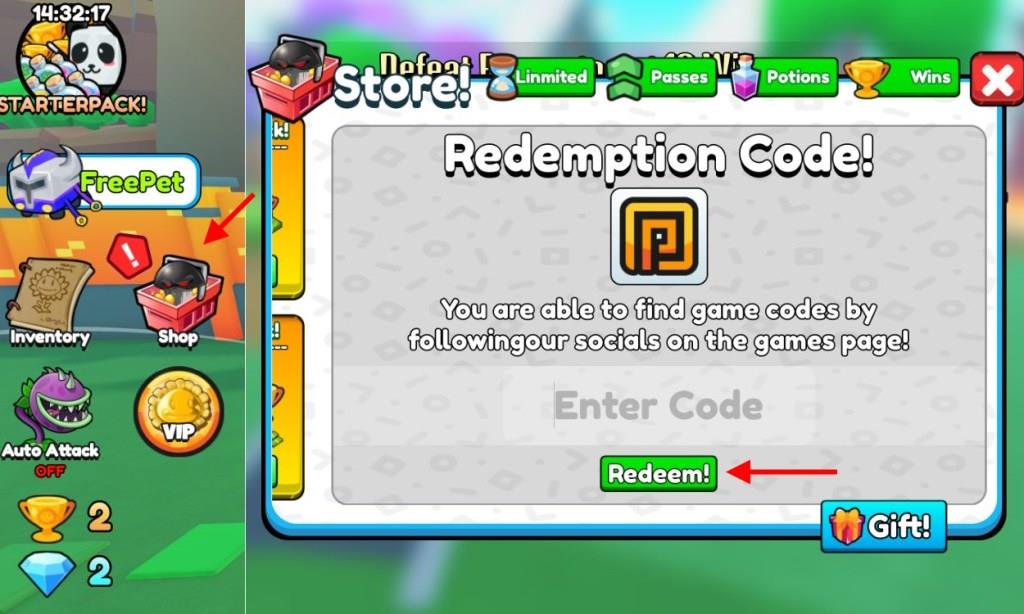
Redeeming the codes for Plants Evolution is as easy as defeating the small brown beans at the very beginning. All you need to do is follow the steps below:
- Launch Plants Evolution on Roblox.
- Click on the Shop icon on the left side of the screen.
- Scroll down till you see a Redemption Code window.
- Input a working code in the pop-up box.
- Click the Redeem button and get your potions.
How to Get More Plants Evolution Codes
You can find new Plants Evolution codes by checking the game’s official Roblox page, joining the developers’ Discord server, or following their social media accounts where they post updates and limited-time rewards. Players often share working codes on community forums and fan groups as well. Make sure to redeem them quickly, since many expire after special events or content updates.
If you are searching for the best way to easily get more codes for Plants Evolution, look no further. We update this page as soon as new updates are released. So, make sure you bookmark this page and check our list after every new update.
Moving on, you can consider joining the TuMiStudio Discord server and keep checking the ‘code‘ channel for any new codes. Moreover, you can also join the Dave’s Vegetable Garden Roblox community to stay updated on all kinds of game updates.
How to redeem codes in Plants Evolution step by step
To redeem codes in Plants Evolution on Roblox, follow these straightforward steps based on the game’s standard interface.
Step-by-Step Guide
-
Launch Plants Evolution through the Roblox platform and join a server.
-
Locate the Shop icon (often a shopping cart or Store button) on the left side of the screen and click it.
-
Scroll down or swipe right within the Shop menu until you reach the “Redemption Code” or “Enter Code” section.
-
Copy and paste an active code exactly as listed (codes are case-sensitive) into the text field.
-
Click the green “Redeem” or “Redeem!” button to claim your rewards instantly.
Troubleshooting Tips
Rewards like gems or potions appear in a confirmation notification if successful. Restart the game or switch servers if a valid code shows as invalid, and double-check spelling to avoid errors. Codes from April 2025, such as 10000LIKES or PVZ, work this way but may expire over time.
Open the Shop and locate the Redemption Code field
In Plants Evolution on Roblox, opening the Shop reveals the Redemption Code field at the bottom or by scrolling right in the menu.
Detailed Navigation
Click the Shop icon (shopping cart or Store button) on the left sidebar after loading into a server. Swipe or scroll horizontally through shop tabs until “Redemption Code” or “Enter Code” appears as a dedicated text input box. This field stays visible for easy access during gameplay.
Common Issues
If the field is missing, ensure you’re past the tutorial phase or rejoin the server, as new accounts sometimes delay UI elements. Mobile players may need to zoom out or rotate the device for full visibility. Enter codes here directly without leaving the shop.
