Minecraft players are buzzing about the new “Vibrant Visuals” feature-but can you actually turn it on right now? Here’s what Mojang has confirmed, what’s still experimental, and how Bedrock Edition users can test the latest graphical upgrade.
At this point, the announcement of Vibrant Visuals sounded like a boon to all the Bedrock players, but can you actually try out this feature in the latest stable 1.21.5 release yet? Well, let’s find out if and how you can turn on Vibrant Visuals in Minecraft right here.
Is Vibrant Visuals Available in Minecraft?
Vibrant Visuals is not yet available as an official feature in Minecraft Bedrock Edition. Mojang has teased its development, but players cannot enable it through standard settings at this time. Some preview or beta versions may hint at its effects, showing enhanced lighting, richer colors, and smoother shading. However, until it is fully released by Mojang, players wanting graphical upgrades must rely on texture packs or shaders supported by their device.
Sadly, you cannot try out the Vibrant Visuals feature yet in Minecraft 1.21.5. In the Minecraft Live, Mojang announced that Vibrant Visuals will be coming to the Bedrock Edition ‘later this year, and you can try it out in the Bedrock Previews. Till then, keep a note of what new changes you will get to experience with this upgrade.
The Vibrant Visuals is a graphical enhancement that will improve the shadows, reflections, lighting system, advanced fog mechanism, better water reflections, and more. All of these changes will surely make your blocky Bedrock world feel more immersive and alive than ever.
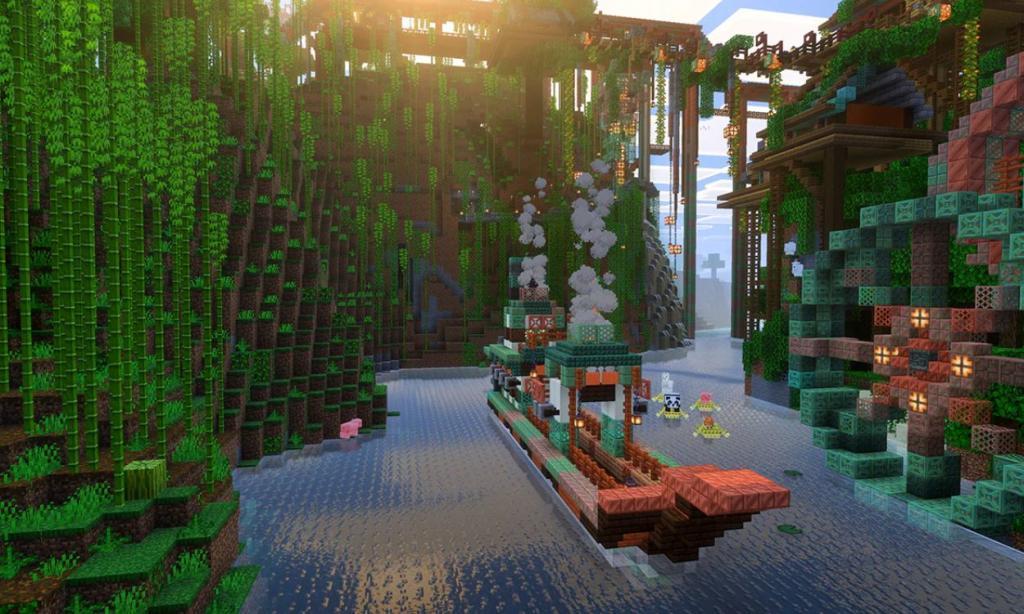
One of the major highlights of this feature is the light-shadow interplay. Once Mojang releases this feature for testing out among the community, you will realize how the shadows will be cast depending on the sun’s position. Furthermore, Minecraft mobs will receive huge detailing, making them look more menacing than before. The reddish glow in the spider eyes is one of such instances.
Mojang confirms that Vibrant Visuals will be “backwards compatible“, meaning it will run locally on your system. You can even play with those players on the same server who haven’t turned this on yet. This feature will not alter the vanilla gameplay at all, and all sorts of mob spawning and redstone mechanics will work as intended. With that said, let’s all hope that Mojang releases this feature soon and we can test a completely new experience in Minecraft.
Also Read: Minecraft Is Adding a Cute Flying Mob That You Can Ride Very Soon
What Else is New in Minecraft 1.21.5 Spring to Life
Minecraft 1.21.5 Spring to Life adds firefly bushes that spawn glowing insects in swamps, bushes and dry grass across biomes, cactus flowers in deserts, wildflowers in meadows, leaf litter under trees with falling particles, fallen trees in forests, and farm animal variants like warm pigs, cold chickens, and cows with updated models. Wolves gain unique sounds per type, spawn eggs show distinct mob icons, Pale Garden biomes see tweaks including woodland mansions, simulation distance expands random ticks for crop growth beyond player radius, and creakings persist named through day with dormant hearts. These changes hit both Java and Bedrock, pairing well with graphics options like Vibrant Visuals.

Now that you know that Vibrant Visuals is not included in the Minecraft Spring to Life update, let’s talk about all that’s new in this stable release. Firstly, we have the different variants of cows, chickens, and pigs. These were some of the oldest mobs in the game and had not received any visual upgrade till now. With the 1.21.5 drop, we’ve got the Warm and Cold variants, while the regular ones are getting renamed as Temperate animals.
Next we have two new kinds of flowers, the Wildflowers and Cactus flowers. Both are unique in their nature as the first one is a sun-kissed version of cherry petals and can be placed on the ground at varying orientations. The Cactus flowers add a vibrant color pop to the barren desert and badlands. Other new blocks include short and tall dry grasses, test blocks, firefly bushes, and leaf litter.
The Spring to Life update introduces several ambient features to the game as well. This includes desert noises, leaf falling animation, and wolf variant sounds. Apart from all this, other new features include new textures for spawn eggs, sheep wool spawning rules, fallen trees (in Java), cartographer, and wandering trader trade rebalances. Want to know more? Head over to all confirmed Minecraft 1.21.5 features here.
How to enable Vibrant Visuals on Xbox and PlayStation
Vibrant Visuals is enabled through Minecraft Bedrock Edition’s settings menu on both Xbox and PlayStation consoles with compatible hardware, such as Xbox Series X|S and PS5.
Xbox Steps
Launch Minecraft from the main menu, select Settings, then Video on the left side. Scroll to Graphics Mode and switch from Fancy or Simple to Vibrant Visuals; optional tweaks appear below for further customization. Exit to apply changes globally across worlds.
PlayStation Steps
Open Settings from the main menu, navigate to the Video tab, and locate Graphics Mode near the bottom. Select Vibrant Visuals from the dropdown-it may default on PS5 but could be locked on PS4 depending on updates and hardware. Changes take effect after returning to the menu or loading a world.
Troubleshooting Tips
Ensure your game is updated to 1.21.9 or later, disable any texture/behavior packs, and restart if the option is missing. On older consoles like Xbox One or PS4, performance may vary, and the feature might not appear without experiments enabled in previews.
Steps to enable Vibrant Visuals on PS5 specifically
Vibrant Visuals can be enabled directly in Minecraft Bedrock Edition settings on PS5 without needing experiments, as it’s now a standard feature in recent updates like 1.21.9 or later.
Step-by-Step Guide
Launch Minecraft on your PS5 and ensure it’s the PS5 version (free upgrade if needed). From the main menu, select Settings, then choose the Video tab on the left side. Scroll down to Graphics Mode and select “Vibrant Visuals” from the dropdown menu.
Customization Options
Once selected, expand the Vibrant Visuals options to tweak settings like Favor Performance, Favor Visuals, or Custom for features such as volumetric fog and enhanced lighting. Exit settings or load a world to apply changes instantly across all compatible worlds.
Common Fixes
If the option is grayed out, update the game, disable any resource or behavior packs, and restart from the main menu. PS5 hardware fully supports it by default for optimal performance.
