Sharpen your skills and claim exclusive rewards with the latest Basketball Rivals codes for March 2025 – fresh boosts to help you upgrade your players, dominate the court, and rise through the Roblox leaderboards.
That is why we have compiled the latest Basketball Rivals codes that will give you free style and zone spins along with other rewards. Utilize them now and try your luck at getting your favorite Kuroko’s Basketball character in the game.
All New Basketball Rivals Codes
Unlock codes, tips, and the latest updates for Basketball Rivals, helping you level up fast in Roblox.
- RELEASE: Get 5 Style Spins (NEW)
Expired Basketball Rivals Codes
The game just released and there are no expired codes yet. So, make sure you redeem the codes before the developers remove them.
Fans of basketball-inspired anime might enjoy Basketball Showdown, while soccer fans can dive into Blue Lock Rivals. For some fresh experiences, check out our Roblox game codes master list.
How to Redeem Basketball Rivals Codes
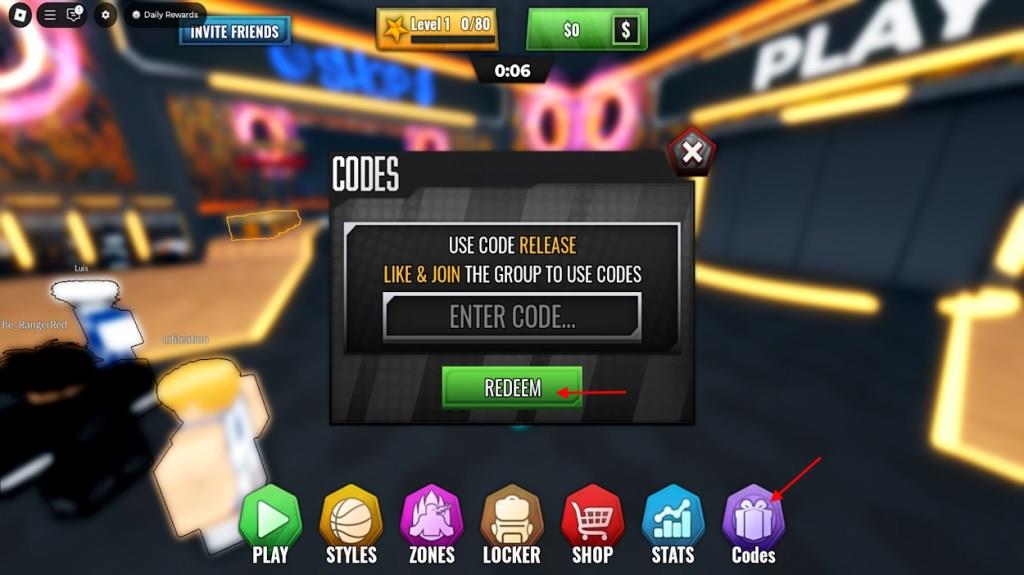
To redeem Basketball Rivals codes, open the game on Roblox and go to the main menu. Tap the Codes button, usually found on the side of the screen. A text box will appear-enter a valid code exactly as shown, then press Redeem to claim your reward. If the code is active, your items or boosts will be added to your account right away. Make sure to check for new codes regularly, as some may expire quickly.
To redeem the codes for Basketball Rivals, you must join the Current Roblox community and like the game from the game’s page. Once you do so, follow the steps below and claim your rewards:
- Launch Basketball Rivals on Roblox.
- Click the Codes button from the bottom menu.
- Type a working code in the Enter Code area.
- Click the Redeem button to claim rewards.
How to Get More Basketball Rivals Codes
Check the Basketball Rivals Discord server and official Roblox group for new code announcements from developers. Follow the game’s Twitter or X account and Roblox page, where they share updates during events or milestones. Join community forums like Reddit’s r/BasketballRivals to spot player-shared codes. Bookmark reliable code sites that track and verify active ones, then test them quickly in-game before they expire. Redeem right away through the menu’s code box to claim rewards.
As the game has limited options to find codes, it can get difficult to search for them. Do not worry; we frequently scour through the internet for the active codes for Basketball Rivals. So, bookmark this page and never miss out on the latest freebies. This will be helpful if you do not want to waste time during your basketball grind on the court. But if you are willing to scavenger hunt the codes, there are certain ways to do so.
The best place to find the Basketball Rivals codes is the Basketball: Rivals Discord server. Keep an eye on the announcements channel. We suggest you look around the server for more codes and news as well. Given there is no dedicated codes channel yet, it can get a little difficult.
How do I redeem codes in Basketball Rivals step by step
To redeem codes in Basketball Rivals (now often referred to as Basketball Zero), follow these straightforward steps in the game lobby.
Prerequisites
Join the official “Current” Roblox group from the game’s page and like the game, as many codes require this for eligibility. This unlocks the codes feature and prevents redemption errors.
Step-by-Step Guide
-
Launch Basketball Rivals or Basketball Zero on Roblox and enter the lobby.
-
Tap or click the Codes button (often a gift icon or labeled tab) at the bottom of the screen.
-
Enter the code exactly as shown (case-sensitive) into the Enter Code text box.
-
Press Redeem to claim your rewards, such as spins or cosmetics, which appear instantly.
Troubleshooting Tips
Codes may fail if expired, mistyped, or if group requirements aren’t met-double-check capitalization and verify group membership. Redeem quickly, as codes like those from March 2025 (e.g., RELEASE) often expire soon after release.
Show steps with screenshots for redeeming codes in Basketball Zero
To redeem codes in Basketball Zero on Roblox, complete prerequisites first, then follow the in-game steps shown in guides. These match descriptions from reliable sources with visual walkthroughs.
Prerequisites
Join the official “Current” group via the game’s Roblox page and like the game-many codes require this to avoid errors. Verify membership loads before entering the lobby.
Step-by-Step Redemption
-
Launch Basketball Zero and reach the main lobby screen.
-
Locate the purple Codes button (gift/present icon) on the bottom-right menu bar and tap it-a text input box pops up.
-
Enter or paste a valid code (case-sensitive, e.g., from prior lists like RELEASE) into the field.
-
Hit the green Redeem button-rewards like spins appear instantly if successful.
Visual References
Guides feature screenshots of the lobby menu highlighting the Codes icon, input dialog, and confirmation popup for clarity. YouTube tutorials (e.g., group join and redemption demos) visually confirm the exact button locations and flow. If issues persist, recheck group status or code validity.