Anime Geek players are racing to grab the latest March 2025 codes, trading expired ones for fresh rewards that power up their Roblox adventures faster than ever.
To begin your journey and become stronger, I believe you will need all the Anime Geek codes you can get your hands on. These will grant you free lucky potions, race shards, and keys to ease your battles and progression.
All New Anime Geek Codes
All new Anime Geek codes bring players extra boosts, spins, and exclusive rewards to enhance their experience in Roblox. These codes are updated regularly, giving fans new chances to strengthen their characters and progress faster in battles inspired by popular anime series. Use the active codes as soon as possible, since they often expire quickly after new events or updates.
- 3KLIKES: 2x Raid Keys and 1x Luck Potion (NEW)
- GEEKRELEAS3: 2x Race Shards (NEW)
- 2KLIKES: 2x Damage Potion (NEW)
- 1KLIKES: 10x Cursed Fingers and 1x Raid Key
Expired Anime Geek Codes
- SHUTDOWN1
- NEWBALANCE
Roblox has lots of other anime games that you will surely enjoy if you like Anime Geek. You can also check out Anime Vanguards codes or Blox Fruits codes and enter a completely different genre with your favorite anime characters. While you are here, check out other Roblox game codes from our master list.
How to Redeem Anime Geek Codes
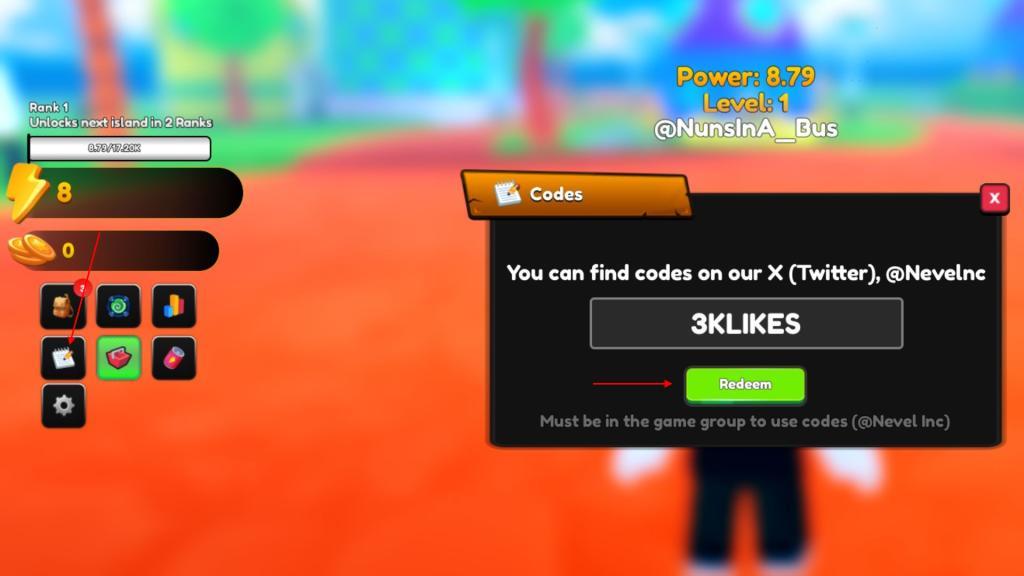
To redeem Anime Geek codes, open Roblox and launch the game. Once you’re in the main lobby, tap the Codes button, usually found on the side of the screen. Copy a working code from the list and paste it into the text box that appears. Confirm by pressing the Redeem or Enter button, and your rewards should appear in your account instantly. Be sure to use the codes exactly as shown, since they can be case-sensitive.
To get some free rewards, follow this simple step-by-step process to redeem codes for Anime Geek:
- Launch Anime Geek in the Roblox app.
- Click on the Codes icon on the leftmost side.
- Enter a working code in the text box.
- Press the Redeem button to claim rewards.
How to Get More Anime Geek Codes
Players can find new Anime Geek codes by checking the game’s official social media pages, such as Twitter, Discord, or the Roblox group, where developers often post fresh updates and bonuses. Joining those channels helps you stay updated whenever new reward codes drop. You can also revisit fan communities or code-sharing sites, as they frequently post lists of active and expired codes, saving time and keeping your collection current.
We regularly update our code lists to help you out. We know, it can be time consuming to go out and search for more such codes yourself. So, go ahead and bookmark this page by pressing the Ctrl D or Cmd D shortcut key.
Moreover, you can join the official Anime Geek discord channel and check the codes channel to find a list of all working codes right now. You can also follow the developer @Nevelnc on X and join the Nevel Inc Roblox community to stay updated on all sorts of game news.
How to redeem codes in Anime Geek step by step
Redeeming codes in Anime Geek is straightforward on Roblox. Follow these steps for quick rewards like shards and potions.
Step-by-Step Guide
Access the codes menu from the game’s left-side interface.
-
Launch Anime Geek on Roblox and join a server.
-
Locate the Codes, Notepad, or notepad icon on the left side of the screen (often below currency counters or in the third column).
-
Click the icon to open the redemption box with a “Type Here” text field and “Redeem” button.
-
Enter or copy-paste an active code exactly (case-sensitive, no spaces).
-
Press Redeem to claim rewards instantly-a confirmation shows your freebies.
Tips for Success
Copy-paste codes to avoid typos, as they expire or work once per account. If a code fails, it may be expired, already used, or mistyped-check the game’s Discord for updates. No login or premium features required.
Show where the codes button is located in the game menu
In Anime Geek on Roblox, the codes button appears as a Notepad or Codes icon on the left side of the screen.
Button Location
The interface features a vertical menu bar along the left edge, typically with currency displays, pet slots, and buttons in columns. Look in the third column or below the stats counters for the notepad icon (a small paper/notebook symbol)-it’s not in the top bar or main menu.
Visual Guide
-
Left side overall: Menu spans full height; codes button sits midway or lower.
-
Icon details: Plain notepad shape, often purple/blue tinted to match the anime theme.
-
Clicking it expands a text box labeled “Type Here” with a green Redeem button below.
If missing, ensure you’re in a loaded lobby (not loading screen) and try refreshing the game.
