Defend your toys and outsmart waves of enemies with the latest Poppy Tower Defense codes for March 2025-grab your boosts, gems, and surprises before they vanish!
Use the coins to summon the strongest playtime doll and defeat the enemies.
All New Poppy Tower Defense Codes
All new Poppy Tower Defense codes for March 2025 bring fresh rewards to help players strengthen their defenses and progress faster. These codes often include coins, boosts, and exclusive in-game items that make each round more exciting. Players should redeem them as soon as possible since codes usually expire quickly after release, ensuring they don’t miss out on valuable bonuses.
- RELEASE: Get 200 Coins (NEW)
Expired Poppy Tower Defense Codes
As of now, there are no expired codes in this experience. Once the codes from the active list stop working, we will move them here.
While the developers share more codes for the players, you can try out some cool tower defense games on Roblox, such as Spongebob Tower Defense, Five Nights TD, or Anime Reborn. Want to taste something different? We have many options for you listed in our Roblox game codes master list.
How to Redeem Poppy Tower Defense Codes
To redeem Poppy Tower Defense codes, open the game on Roblox and find the Twitter or Codes button on the main screen. Click it to open the code redemption window, then type or paste an active code into the text box. Press the Redeem button to confirm and receive your rewards, which will be added directly to your in-game account. Make sure to enter each code exactly as shown, since they are case-sensitive and may expire after a short time.
Going through the horrors in Playtime Factory can be hard but redeeming the codes for Poppy Tower Defense is simple. Here is how to do so:
- Launch Poppy Tower Defense on Roblox.
- Click the Settings button from the left menu.
- Press the ‘Go’ button beside the Codes option.
- Type a working code and click the Redeem button.
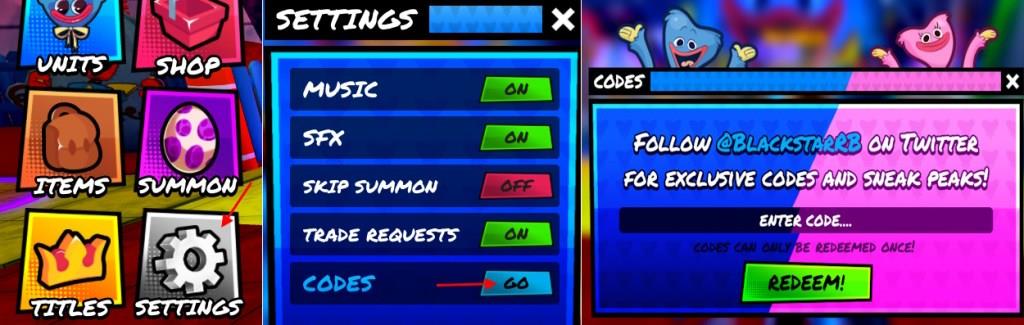
How to Get More Poppy Tower Defense Codes
Keep an eye on official Poppy Tower Defense social channels, join the game’s Discord server for announcements, and participate in events or promotions that occasionally reward codes. You can also check trusted Roblox code websites and the game’s own homepage for fresh codes, and be sure to redeem them promptly before they expire.
We go through the official socials and other sources frequently. That is why, we suggest you bookmark this page to never miss out on the latest Poppy Tower Defense freebies. While finding the new codes, we also ensure the expired codes are not in the active list. Want to scavenger hunt the codes by yourself?
Well, finding the codes for Poppy Tower Defense can get a little tricky. The best place to find the codes is the socials. You can join the Poppy Tower Defense Discord server and follow developer @BlackstarRB on X. There is no dedicated channel for codes on the server. So, make sure you go through the announcements or update channels to find them.
Other Free Rewards In Poppy Tower Defense
Players receive hourly rewards by claiming them before leaving matches in Poppy Tower Defense. Joining the Poppy TD x Blackstar Roblox group and liking the game grants additional group rewards at the main hub. These options provide coins and items without codes.
Apart from the codes, you can get more free rewards in the game easily. If you play the game consistently, there will be hourly rewards. Make sure you claim them before quitting the game. You can also join the Poppy TD x Blackstar Roblox community and like the game. Once you do so, go to the main hub of the game and claim the group rewards.
How to redeem codes step by step in Poppy Tower Defense
To redeem codes in Poppy Tower Defense on Roblox, follow these exact steps for quick rewards like coins and potions.
Step-by-Step Redemption
-
Launch Poppy Tower Defense via the Roblox app or website.
-
Locate the Settings icon (gear symbol) on the left side of the screen and click it.
-
In the Settings menu, find Codes and click the Go button next to it to open the code entry box.
-
Copy-paste an active code (e.g., LUCKY or UPDATE3) exactly into the Enter Code text field-codes are case-sensitive.
-
Click Redeem to claim your rewards instantly; repeat for each code.
Troubleshooting Tips
Enter codes precisely to avoid “Invalid Code” errors, and redeem them promptly as they can expire. If issues persist, rejoin the game or check the official Discord/Roblox group for updates.
Open the Codes menu in Poppy Tower Defense for me
To open the Codes menu in Poppy Tower Defense on Roblox, follow these precise steps directly in-game.
Opening the Menu
-
Launch the game and ensure you’re in the main lobby or gameplay screen.
-
Look for the Settings icon (gear symbol) on the left side of the screen and click it.
-
Inside Settings, locate the Codes section and click the Go button next to it-this opens the code entry box immediately.
Quick Tips
The menu appears as a text input field labeled “Enter Code” with a Redeem button below. Copy-paste codes to avoid errors, and close/reopen if it glitches.
