Hidden within Roblox Divaz codes lies a hidden doorway-friended by clues, unlocked by timing, and powered by luck.
If you use these spins, you can roll for the best fighting styles and be the baddest diva on the server.
All New Divaz Codes
New Divaz codes bring players fresh rewards to boost their Roblox experience. These codes can grant accessories, in-game currency, or exclusive items that add flair to your avatar. Redeem them on the Divaz page before they expire, as new ones appear regularly during updates or special events. Stay alert for future drops to keep your collection growing and your style ahead of the crowd.
- RELEASE: Redeem for 1 Style spin (NEW)
Expired Divaz Codes
As the game just released, there are no expired codes yet. So, grab all the working codes ASAP and gain an advantage over other players. We will update this section when a code is no longer working.
Thinking of playing a game about divas but more on the dress-up side? You can collect the Dress to Impress codes and It Girl codes to try them out. For more variety of experiences, you can always visit our Roblox game codes master list.
How to Redeem Divaz Codes
To redeem Divaz codes, open Roblox and launch the Divaz game. Click on the Twitter or Codes icon, usually found on the game’s main screen. Type or paste an active code into the input box and press Redeem to claim your reward. If the code works, your bonus will appear instantly; if not, double-check for typos or expiration.
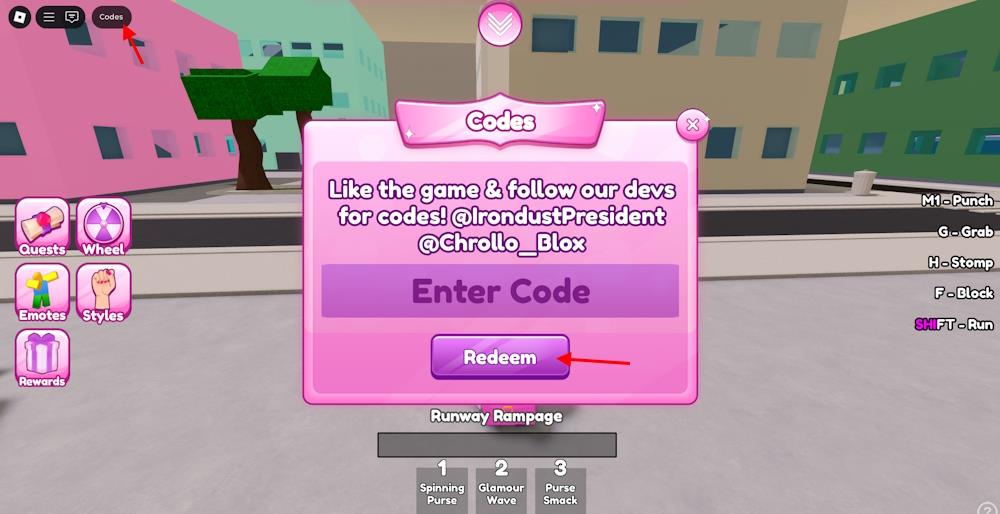
Redeeming the codes for Divaz is easier than surviving in the battlegrounds. Here is how to do so:
- Launch Divaz on the Roblox app.
- Click the Codes button from the top left.
- Type a working code in the Enter Code box.
- Press the Redeem button to claim rewards.
How to Find More Divaz Codes
You can usually find new Divaz codes through the game’s official social media pages, such as Twitter, Discord, or the Roblox group run by the developers. They often post fresh codes during updates, special events, or milestones. Checking community forums and fan pages can also help you spot codes shared by other players. To avoid missing any, consider turning on notifications for official posts or joining the game’s community server.
If you want to stay on top of the codes by yourself, there are several sources you can check out. However, the Divaz Discord server is the best place to find them. In the server, you will find the codes in the ‘announcements’ channel. You can also join the LipSmack Games Roblox community and keep an eye out for more updates.
But are you willing to sacrifice the slaying time to search for these codes? If your answer is no, we are here as your assistant. We regularly check for the new codes and remove the old ones. So, bookmark this page and visit frequently to never miss out on the free rewards.
Where to redeem Divaz codes in Roblox Divaz
To redeem Divaz codes in Roblox Divaz, launch the game first. The codes interface is located in the top-left corner of the screen.
Redemption Steps
Click the Codes button in the top-left corner to open the input field. Enter the code exactly as shown (case-sensitive) in the “Enter Code” text box, then hit Redeem to claim rewards like spins.
Common Locations
Multiple guides confirm the Codes button appears prominently on the main screen or lobby, typically as an icon or label in the top-left area. No separate Roblox website redemption is needed-these are in-game codes.
Troubleshooting Tips
If the button is missing, ensure the game is fully loaded or check for updates, as UI can vary slightly by device. Codes expire quickly, so verify active ones from prior lists like “RELEASE”.
How to find the Codes button in Divaz menu
The Codes button in Roblox Divaz appears on the main menu or lobby screen. Look for it in the top-left corner as a labeled icon or button.
Locating the Button
Launch Divaz and wait for the game to fully load into the lobby. The Codes button sits prominently in the upper-left area, often next to settings or profile icons-tap it to reveal the code entry field.
Visual Guide
Guides describe it as a simple text or icon button (possibly with a gift or ticket symbol). If hidden by UI scaling, adjust your display settings or zoom out slightly on mobile/PC.
Quick Fixes
Restart the game or rejoin a server if it’s not visible, as updates can shift minor layouts. It’s always in-game, not in Roblox’s main menu.
