Track down the newest Monster Evolution codes for January 2025 to claim free boosts, coins, and exclusive rewards that speed up your creature upgrades and battles in Roblox’s mutant arena.
Use our list of new Monster Evolution codes that will give you free gems. Go ahead and use these gems to unlock damage, health and EXP boosts.
All New Monster Evolution Codes
Uncover the latest Monster Evolution codes for January 2025, including fresh boosts, exclusive skins, and limited-time rewards across Roblox adventures.
- 1KMEMBERS: 50 Gems (NEW)
- MONSTER: 50 Gems
- RELEASE: 50 Gems
Expired Monster Evolution Codes
As of now, there are currently no expired Monster Evolution codes.
If you’re into Roblox clicker games but are tired of this one then worry not. Games like Monster Race and Eating Simulator will keep you coming back for more. You can even check out our Roblox game codes master list for more experiences.
How to Redeem Monster Evolution Codes
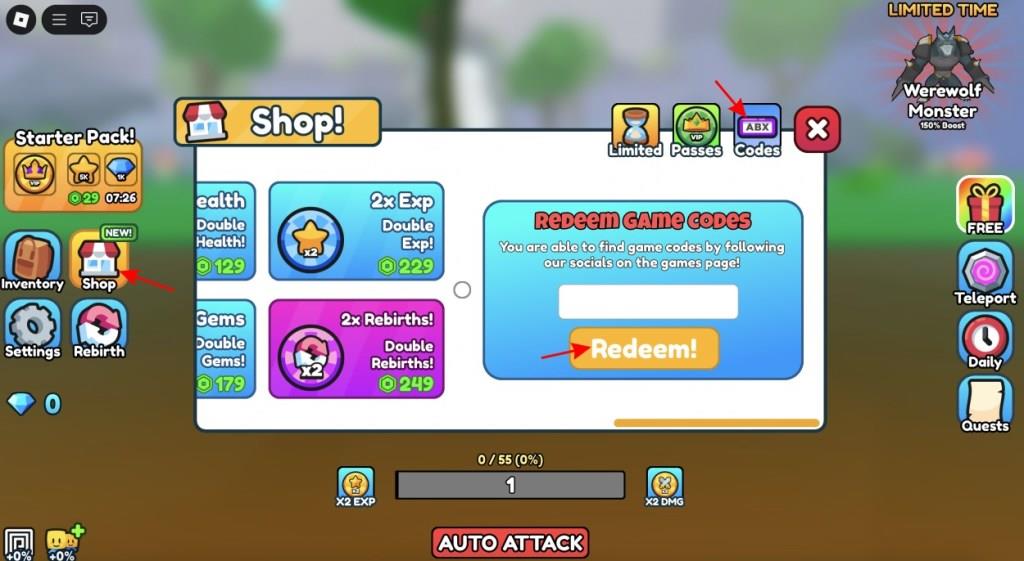
To redeem Monster Evolution codes, open Roblox and launch the game. Tap the Codes button on the screen, then enter a valid code in the text box that appears. Press Redeem to claim your reward instantly. Make sure to type codes exactly as shown, since they are case-sensitive and may expire after a short time.
Redeeming codes for Monster Evolution is as easy as eating those apples. Follow the steps below to do so:
- Launch the Monster Evolution experience on Roblox.
- Open the Shop menu from the left of the screen.
- Select the Codes option from the right side.
- Input a working code in the text box.
- Click the Redeem! button and claim your rewards.
How to Get More Monster Evolution Codes
New Monster Evolution codes are often released through the game’s official social media accounts, such as Twitter, Discord, and YouTube. Developers usually share them during special events, updates, or milestones. Players should check these platforms regularly and enable notifications to avoid missing new codes. Joining the game’s community groups and following Roblox-related fan pages can also help catch codes shared by other players.
When talking about the latest Monster Evolution codes we suggest bookmarking this article as we are the first ones on the scene. If you want to fly solo and look yourself then we highly suggest joining the official Kryptonite Productions Discord server. Once there, look for the codes channel.
Those looking for even more can follow Monster Evolution’s developer Twitter. Last but not least, make sure you join the Monster Evolution Roblox community for the latest news and rewards.
How do I redeem codes step by step in Monster Evolution
Redeeming Codes Step by Step
Launch Monster Evolution on Roblox. Click the yellow Shop button on the left side of the screen.
Access the Codes Menu
Select the Codes tab (upper right or purple tab) from the Shop menu. A text input field and yellow Redeem button will appear.
Enter and Submit Code
Copy-paste an active code exactly (case-sensitive) into the field. Press Redeem to claim rewards like Gems; a confirmation notification shows success.
Troubleshooting Tips
-
Ensure correct capitalization and no spaces.
-
Codes expire, so use active ones like UPDATE1 or 75KMEMBERS promptly.
-
If invalid, double-check or try another code.
Open the Shop tab in Monster Evolution where is it located
Shop Tab Location
The Shop tab in Monster Evolution is a yellow button located on the left side of the screen.
Precise Position
It appears in the first row among four buttons arranged in two rows on the left panel, making it easy to spot when the game loads.
Access Process
Click the yellow Shop button to open the menu, then select the Codes tab (upper right corner) for redemption.
Visual Confirmation
Players often describe it as the prominent yellow icon in the vertical left sidebar, visible immediately upon spawning in the game world.