Hidden codes glow in the bootleg shadows of Roblox, guiding players toward cash rewards that appear and vanish like digital mirages.
To get started, you will need a bit of a push, and this is where Deep Descent codes that provide you with free cash will come in handy.
All New Deep Descent Codes
The latest Deep Descent codes for January 2025 bring fresh rewards for players eager to boost their progress. Use these active codes to claim free cash and other bonuses that can speed up your upgrades and customization in the game. Make sure to redeem them before they expire, as new codes often replace older ones after updates or special events.
- 2025: Redeem for 500 cash (NEW)
- CASH!: Redeem for 500 cash (NEW)
Expired Deep Descent Codes
- 10M | UPCOMING! | JULY4TH
If you enjoy playing Roblox adventure games, you can check out other titles like Survive the Killer, Murder Mystery 2, and Five Nights TD (FNTD). If you feel like exploring other popular games and their codes, we have a Roblox game codes master list.
How to Redeem Deep Descent Codes
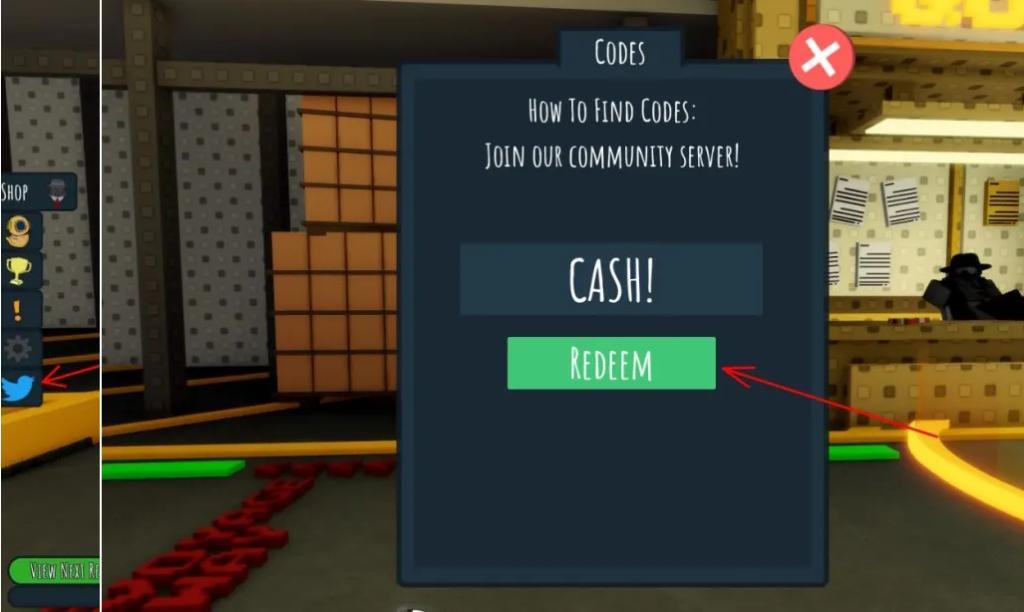
To redeem Deep Descent codes, open Roblox and launch the Deep Descent game. Click the “Codes” or “Twitter” button, usually found on the main menu or screen. A new window will appear where you can type or paste your active code. Press “Redeem” to claim your reward instantly. If the code is valid, your free cash or other bonus will appear in your account right away.
Although surviving in the cold and harsh climate can be quite difficult, redeeming codes for Deep Descent is as easy as it gets. Follow the steps below to claim the rewards:
- Launch Deep Descent on your Roblox app.
- Click the Twitter Bird icon on the left side.
- Enter a working code in the pop-up that opens.
- Click on Redeem to claim your free rewards.
How to Get More Deep Descent Codes
New Deep Descent codes are often released through the game’s official social media pages, such as X (Twitter), Discord, and Roblox group posts. Developers sometimes share bonus codes during updates, events, or milestones, so checking these channels regularly helps you stay current. You can also follow community forums or fan pages, where players often share fresh codes as soon as they appear.
If you want the latest updates for this game, ensure that you bookmark this page by pressing the Ctrl D or Cmd D shortcut. As soon as the developers add new codes for Deep Descent, we will update this article accordingly.
Moreover, head over to Discord and follow their official channel Polar Marine Exploration. Keep an eye on the announcements channel to find the latest codes they release. You can even join the Polar Marine Exploration community on Roblox where they regularly post news on upcoming updates.
How to redeem Deep Descent codes step-by-step
Deep Descent is a Roblox game where redeeming codes grants free cash for in-game purchases like gear. Follow these steps carefully, as the process requires reaching free roam first.
Step-by-Step Guide
-
Launch Deep Descent on Roblox and join a server.
-
Complete the introductory cinematic until you enter free roam mode.
-
Locate the Codes or Twitter bird icon on the left side of the screen and click it.
-
Enter the code exactly as shown (case-sensitive) in the “Code Here” text box.
-
Press the Redeem or Claim button to receive your rewards instantly.
Troubleshooting Tips
-
Codes fail if expired, already used, or mistyped-double-check spelling and capitalization.
-
Restart Roblox or rejoin the server if the interface glitches.
-
Each code works once per account; track active ones like “2025” or “CASH!” from prior lists.
Open Deep Descent and show where the codes button is located
In Deep Descent on Roblox, the codes button appears after completing the introductory cinematic and entering free roam mode. It is located on the left side of the screen, typically as a Twitter bird icon (blue bird) or a dedicated Codes button nearby.
Visual Location Guide
-
Position: Far left edge of the HUD, among other quick-access icons like inventory or settings.
-
Icon Details: Resembles the classic Twitter bird logo; clicking it opens a text input box labeled “Code Here” with a Redeem button below.
-
Screen Context: Active during gameplay exploration, not in menus or cutscenes-scroll or pan left if obscured on smaller devices.
Activation Tips
Look for it immediately upon free roam; if missing, rejoin the server or verify game updates. Videos confirm its static left-side placement across sessions.