Hidden codes lie inside the bloom of Blox Fruit, and only the crafty unlock their sweet, sweet fortune.
You need cash to roll for devil fruits, though. Thus, use our list of active Blox Fruit But Very Good codes to get free cash that you can use to spin for new devil fruits.
All New Blox Fruit But Very Good Codes
Grab the latest codes for Blox Fruits in January 2025. These fresh releases boost your gameplay with free spins, fruits, and EXP. Redeem them fast before they expire, and claim rewards to power up your character right away. Check back often for updates on new codes.
- SORRYFORSHUTDOWN: Redeem for $50,000 (NEW)
- 10klikes: Redeem for $50,000
Expired Blox Fruit But Very Good Codes
Since the game was only released recently, it does not have any expired codes right now. We will move active codes to this section once they stop working.
Moreover, if you’ve landed here by mistake and are in search of the official Blox Fruits codes then we have an updated list linked here. In addition, don’t forget to check out our Roblox game codes master list, along with new and popular games like Anime Adventures and Jujutsu Infinite.
How to Redeem Blox Fruit But Very Good Codes
To redeem Blox Fruit But Very Good codes, open the game on Roblox and click the small Twitter bird icon on the left side of your screen. A text box will appear where you can enter a working code. Type or paste it carefully, then press the “Redeem” button to claim your free rewards. If a code doesn’t work, it might have expired or been typed incorrectly, so double-check for extra spaces or capitalization errors before trying again.
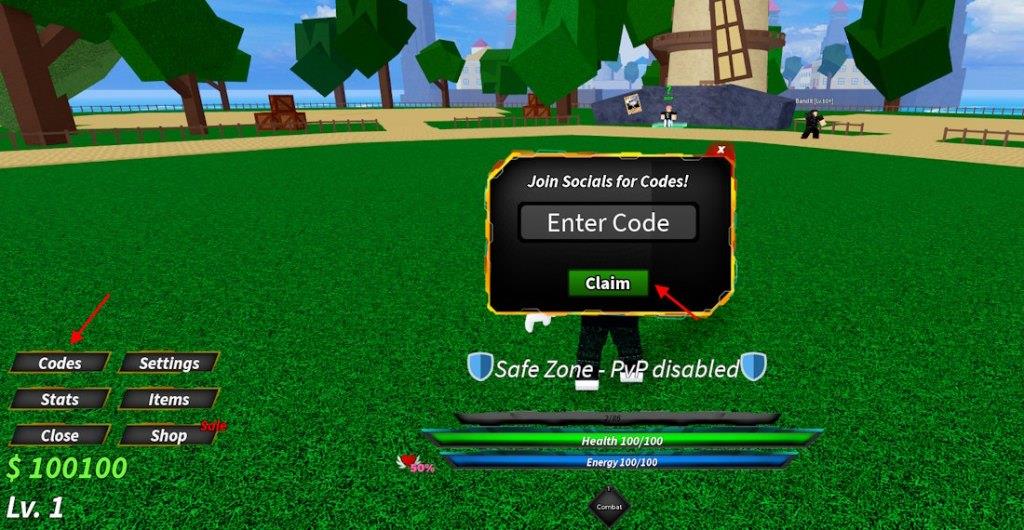
The menu here is simpler and cleaner than the OG Blox Fruits, allowing you to redeem codes for Blox Fruit But Very Good quite easily. Follow the steps below:
- Launch Blox Fruit But Very Good on Roblox.
- Click the Menu button at the bottom left.
- Click the Codes button to open a pop-up menu.
- Input an active code here and click the Claim button.
Where to Get More Blox Fruit But Very Good Codes
You can find new and active Blox Fruit But Very Good codes by checking the official Blox Fruits social media pages on platforms like Twitter, Discord, and YouTube, where developers often post fresh updates and events. Many Roblox fan sites and gaming forums also collect the newest codes shared by players. To avoid expired ones, always compare the date of each code and check official announcements for upcoming releases.
As we always point out, we are quite active in checking for new code releases and adding them to our posts as quickly as possible. Thus, the easiest way to access new codes for Blox Fruit But Very Good is to bookmark this post.
If you want to join the budding community, find out what new fruits are being added, and access newly released codes, then join the official Discord server for Blox Fruit But Very Good. The devs usually share new codes in the ‘updates’ channel.
How to redeem codes in Blox Fruit But Very Good step by step
Step-by-Step Redemption Guide
Launch Blox Fruit But Very Good through Roblox on your device.
Click the Codes button (marked with a “1” icon) on the left side of the screen, or open the Menu in the bottom-left corner and select the Codes tab.
Enter the code exactly as listed (case-insensitive, but copy-paste to avoid typos) into the text box, then press Claim to receive rewards instantly.
Common Issues and Fixes
Codes can only be redeemed once per account; if already used, try another server or check for new ones.
No expiration has occurred for current codes like 3klikes or 10klikes, but verify via official sources for updates.[conversation_history]
Open the in-game menu and locate the code redeem icon
Accessing the In-Game Menu
In Blox Fruit But Very Good, press the Menu button located in the bottom-left corner of the screen to open the main interface.[conversation_history]
Locating the Code Redeem Icon
Within the opened menu, navigate to the Codes tab, which appears as a dedicated button or icon often marked with a “1” symbol on the left sidebar or directly in the menu options.[conversation_history]
Click this icon to reveal the code input field for entering and claiming rewards.[conversation_history]
