Pair up, plan your style, and prove your fashion chemistry-Duos mode in Dress to Impress turns teamwork into a runway showdown where coordination and creativity decide who steals the spotlight.
So, if that sounds interesting, let’s look at the step-by-step process to invite friends and play as a duo in Dress to Impress.
How to Invite Friends for Duos in Dress to Impress
Invite friends by sharing a quick invite link, then coordinate a time that suits everyone; once you’re together, choose the same outfit theme, communicate a simple plan, and jump into Duos with a smooth, coordinated start.
By using the Duos feature, you can invite a friend to take part in the ramp walk with you. So, once the dress up timer ends and the fashion show starts, both your characters will walk side by side allowing you to perform some Dress to Impress poses accessible only when using this feature. Now, follow the steps below to pick your partner in the game:
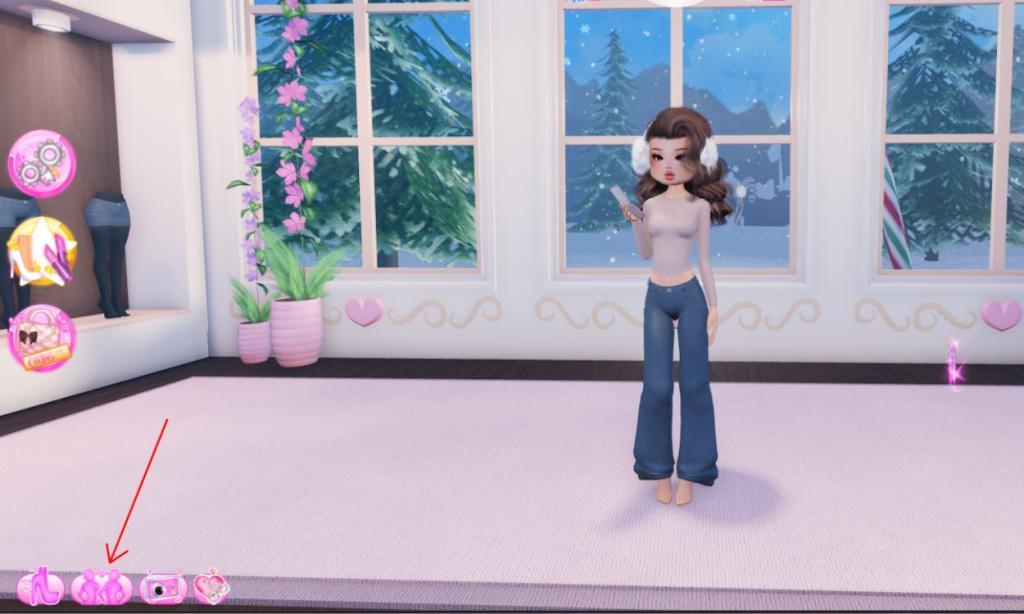
- Once a round starts, click the icon that shows two mannequins posing together at the bottom of the screen.
- If you have a friend on your server, then scroll down, search for their name, and click the Invite button next to their name.
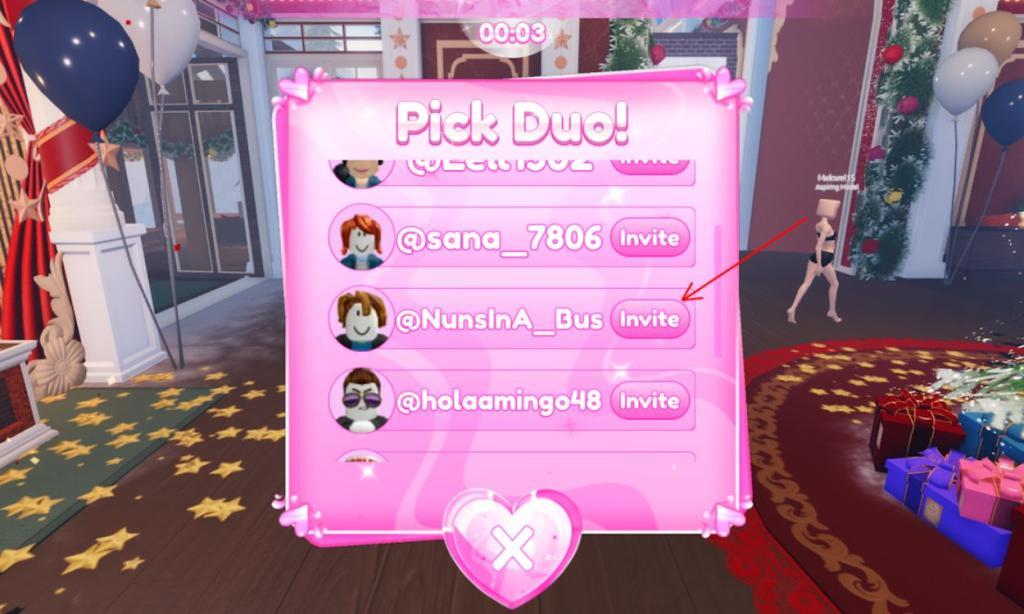
- You can do the same with any random person and have a quick chat with them to see if they are interested in participating with you.
Now that both of you are playing as a duo and taking part in the ramp walk together, you can wear matching clothes and accessories to get the maximum points. For free outfits, we suggest you redeem Dress to Impress codes right away.
If you are considering the idea of taking part in the ramp walk together, consider inviting them at the beginning of the round. This way, you will get ample time to discuss and plan out your outfits, and there won’t be any confusion later on.
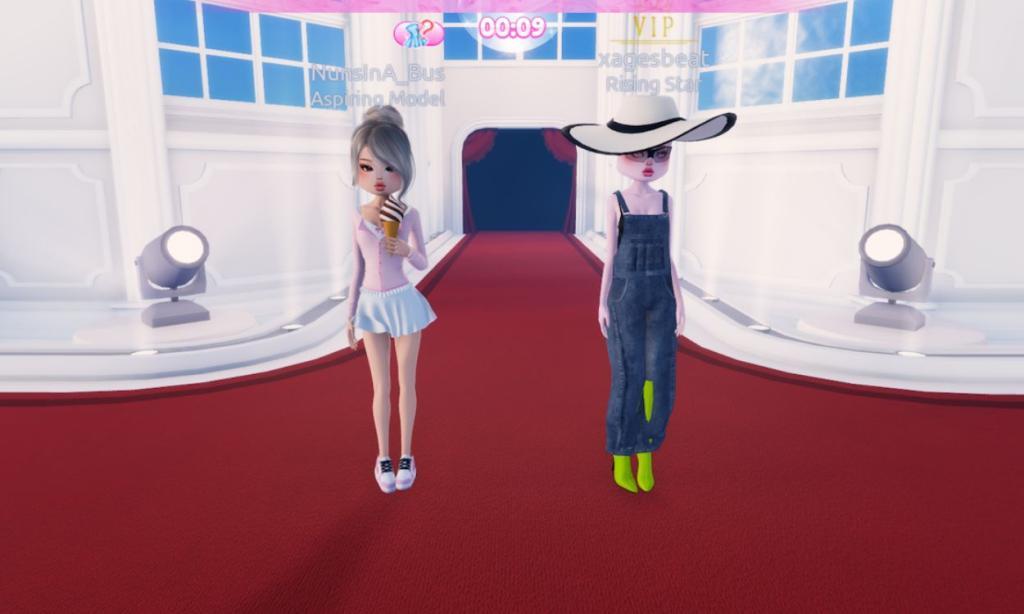
Consider wearing matching outfits with shades of the same color that will convey your effort as a team. Lastly, we suggest you also discuss the poses you’re going to use on the runway so that you don’t mess up in your final moments.
Furthermore, you may also discuss the total time for a single pose to sync perfectly on the ramp and stop using a pose in Dress to Impress. This will grab the attention of the viewers and you can get the highest points in that round.
Dress to Impress duo invites workflow tips
You can make duo invites in Dress to Impress much smoother by following a consistent workflow every round and using a few social tricks to get faster accepts.
Ideal timing and setup
-
Send invites as soon as the round theme appears, before you start dressing, so you are not rushing later.
-
Stand near the spawn area or mirrors where people gather; it makes it easier to click the right name in the duo menu.
Using the duo invite menu
-
Open the duo window (bottom-left icon with two people), find your friend (or target player) in the list, and send the invite once, then wait a few seconds before resending.
-
If the list is crowded, type the player’s name into chat first so you can recognize it faster in the menu.
Getting more people to accept
-
Ask in chat first (“LF duo for [theme]” or “Anyone want to duo?”); then immediately send the invite to whoever replies to reduce declines.
-
Target players who are already styling near you or replying in chat; random spam invites are declined more often and waste time.
Avoiding common invite issues
-
If someone ignores or “leaves you on read,” cancel and invite another player instead of waiting the whole build timer.
-
Re-check that you are still in a duo before the runway starts by reopening the duo window; if their avatar disappeared from the panel, they left and you should plan to walk solo.
Syncing during the runway
-
Once you are confirmed as a duo, decide quickly who leads poses and emotes, then use the “Sync with duo” button at the start of the show if it is available in your version.
-
Agree on a simple plan like “walk center, emote once, final pose at the end” so even if sync bugs out, both of you still look coordinated.
Best times to send duo invites for faster accepts
In Dress to Impress duos, the best times to send invites are tied to the round flow and player attention, not a real-world clock.
Before you start styling
-
Send your invite right after the theme appears and the timer starts, before you open any wardrobes; people are still idle and checking their screens, so they notice requests faster.
-
Stand near spawn or the main mirror area when you send; players clustered there are more likely to be actively playing that round, which raises accept rates.
When chat is active
-
Watch for moments when multiple players are chatting (“what’s the theme?”, “good luck everyone”); send duo requests immediately after you ask “Anyone want to duo?” so your name is fresh in their mind.
-
Target people who respond or who type about the theme; those players are already engaged and far more likely to accept than silent/random names.
Avoiding bad moments
-
Avoid spamming invites in the last 30-40 seconds of build time; many players are rushing outfits and will ignore or misclick.
-
Do not send repeat invites every second to the same person; if they have not accepted after two tries spaced out, move on to someone else instead of wasting the round.