Unlock Roblox’s hidden pose language and learn how to stop posing to impress-let your character tell the story, not the script.
Well, don’t worry, as you can quickly cancel and stop doing a certain pose in DTI during the fashion show.
How to Stop Posing in Dress to Impress
Shift your approach from aiming to impress to focusing on comfort and authenticity, and your dress poses will feel more natural. Start by choosing outfits that fit well and suit your personal style, and practice in front of a mirror to find angles that reveal confidence without forcing a look. Pay attention to posture, breathing, and small, relaxed movements rather than exaggerated poses, so your movements appear effortless.
Once a round starts, you are given around 5 minutes to find the perfect outfit based on one of the Dress to Impress themes. The fashion show starts once this timer ends, and all the participating players will walk on the ramp one by one.
The moment your turn arrives, you can start doing poses by clicking the “Dancing Mannequin” icon on the right. However, if you want to stop doing the current pose, there are two ways to do so. The first way to stop posing in DTI is:
- Search for the name of the pose you are currently doing on the ramp.
- Click on the pose name and your character will stop doing that pose.
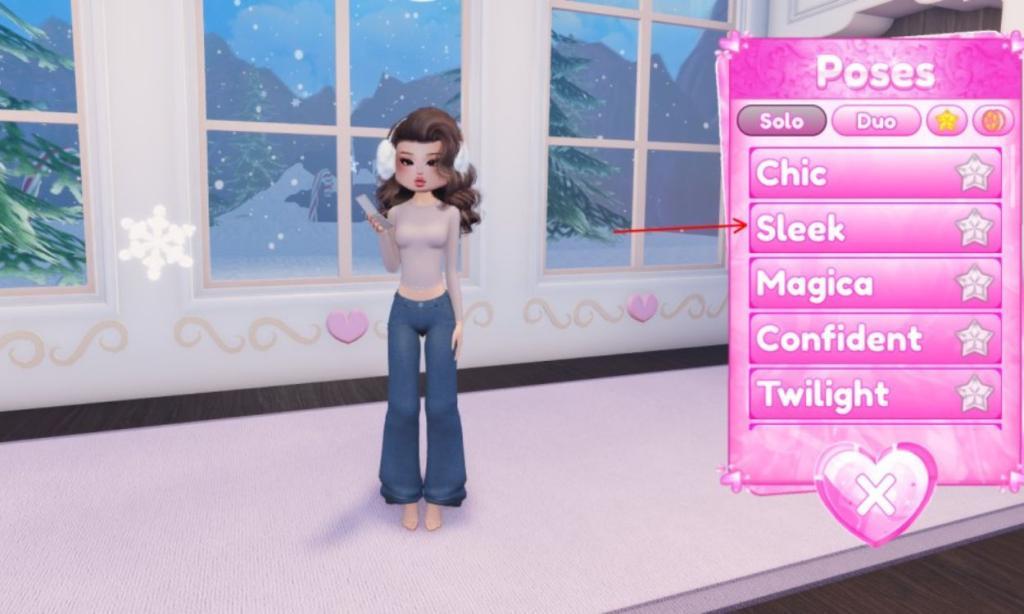
The second way is to quickly click on a different pose to start doing it and then re-click it to pause. This simple step will help you at times when you accidentally click on a pose.
Alternatively, you can click on a different pose name to start doing a new pose and stop the previous one. This way you can combine different poses to entertain the audience and elevate the look of your outfit. Pair this with free outfits that you can grab using Dress to Impress codes.
List of All Pose Packs in Dress to Impress
Here is the full list of pose packs available in Dress to Impress. Players access them through the posing menu during competitions or photoshoots. Basic poses come standard, while themed packs like Runway, Editorial, and Street Style unlock via in-game currency or events. Check the menu for the latest additions, as new packs appear with updates. Use them to match your outfit’s vibe and boost scores.
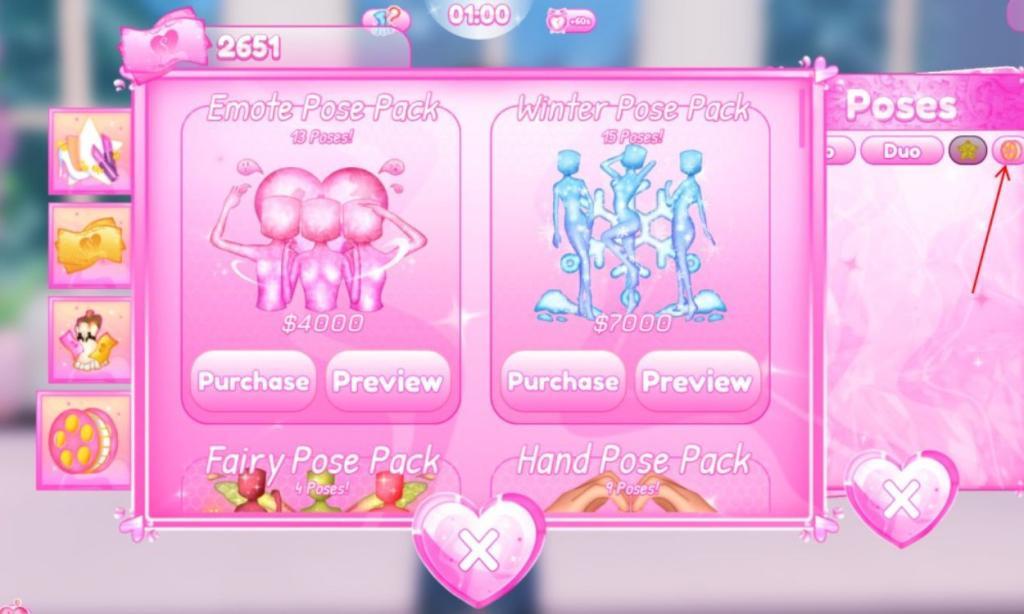
At the time of writing, there are 26 pose packs available in the game, and we have curated the best Dress to Impress poses for you. To unlock some poses, you canbuy these packs by clicking the “Dancing Mannequin” icon on the right. Then, tap on the rightmost icon with a camera roll.
To make your gaming experience easier, we have listed down all the pose packs available in DTI, along with how many poses they offer and their price here.
| Pose Packs | Price | Number of Poses |
|---|---|---|
| Starter Pose Pack | Free | 35 |
| Starter Duo Pack | Free | 16 |
| Winter Pose Pack | 7000 Cash | 15 |
| Gala Pose Pack | 5000 Cash | 10 |
| Hand Pose Pack | 4500 Cash | 9 |
| K-Pop Pose Pack | 4500 Cash | 15 |
| Baddies Pose Pack | 4000 Cash | 4 |
| Kawaii Pose Pack | 4000 Cash | 18 |
| Emote Pose Pack | 4000 Cash | 13 |
| Mermaid Pose Pack | 3500 Cash | 10 |
| Fairy Pose Pack | 3200 Cash | 4 |
| Supernatural Pose Pack | 3200 Cash | 11 |
| Goddess Pose Pack | 3000 Cash | 8 |
| Troll Pose Pack | 2000 Cash | 3 |
| Dance Pose Pack | 2000 Cash | 3 |
| Masculine Pose Pack | 2000 Cash | 7 |
| Crazy Pose Pack | 2000 Cash | 8 |
| Pop Culture Pose Pack | 1800 Cash | 7 |
| Roblox Classic Pose Pack | Unlocked by redeeming Codes during the Classic Event | 1 |
| One Billion Pose Pack | Unlocked during the Summer event by spamming on the 1 Billion Balloon | 2 |
| Brat Pose Pose Pack | Unlocked by playing the Brat Event | 6 |
| Halloween Pose Pack | 4600 Cash (was available during Halloween Event, 2024) | 8 |
| Summer Pose Pack | 4300 Cash (was available during Summer Updates, 2024) | 10 |
| Editorial Pose Pack | 2500 Cash | 7 |
| Sci-Fi Pose Pack | 2000 Cash | 10 |
| Fantasy Pose Pack | 1000 Cash | 4 |
How to unequip poses quickly during a fashion show
In Dress to Impress on Roblox, you can unequip poses quickly during a fashion show by reopening the pose menu and reselecting the active one.
Quick Unequip Steps
Access the Dancing Mannequin icon on the right screen side, even mid-show. Tap your current pose (e.g., Chic or 360 Swing) again to instantly cancel it and return to normal movement.
During Runway Timing
Right before or at the runway end, double-tap the same pose in the menu for a fast reset without interrupting your walk. Practice in prep phase to memorize the icon’s position for speed.
Glitch Prevention
Avoid equipping new poses seconds before the show ends; if stuck, spam-click any pose twice or reset via the menu wheel. This works reliably in 2026 updates.[conversation_history]
Practice quick pose transitions for runway shows
Practice quick pose transitions in Dress to Impress by rehearsing in the prep phase before runway shows. Focus on menu navigation speed and muscle memory for seamless switches during live performances.[conversation_history]
Prep Phase Drills
Open the Dancing Mannequin icon repeatedly and cycle between 3-5 poses like Chic to 360 Swing, re-clicking each instantly to unequip. Time yourself to under 2 seconds per transition, mimicking runway pressure without lag.
Runway Simulation
Walk your avatar in private servers while swapping poses mid-stride-equip one at halfway, unequip before end. Use short bursts: select, pose, reselect to reset, building timing for fashion show phases.
Advanced Tips
Chain transitions by pre-memorizing pose icons; hover over menu for previews during practice. Record sessions to review glitches, aiming for fluid unequips that boost scores without halting your walk.[conversation_history]
