Mystic powers clash in Aura Battles, the hit Roblox arena where strategy decides victory. Here are the latest January 2025 codes to boost your energy, summon rare auras, and claim rewards before they vanish.
By utilizing these resources, any player can now become powerful with a legendary aura and rare abilities.
All New Aura Battles Codes
Stay ahead in Aura Battles with the latest redeem codes for January 2025. These fresh updates give you free rewards such as coins, boosts, and other useful items to strengthen your auras and progress faster. Make sure to claim the codes quickly before they expire so you don’t miss out on limited-time bonuses that can give you an edge in every match.
- LIKES10000: 150 Gems and 25 Points (NEW)
The game currently has one working code. Make sure you redeem it before it expires. The code has validity until January 17th, 2025. A new code will be released when the game reaches 15000 Likes.
Expired Aura Battles Codes
- UPDATE1
- LIKES5000
- 2000LIKES
- RELEASE
- FREEPOINTS
- DISCORD500
Waiting for new codes to continue your dominance in the arena? While you wait, you can summon JJK-inspired aura in Jujutsu Infinite or devil fruits aura in Blox Fruits. You can also check out all the best games in our Roblox codes master list for the top experiences.
How to Redeem Aura Battles Codes
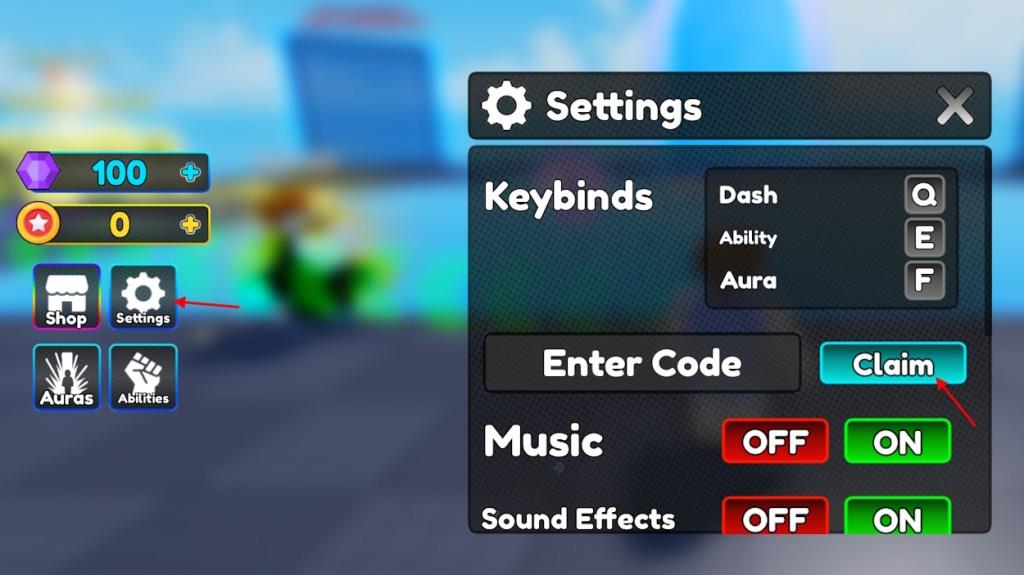
Launch Aura Battles on Roblox and log into your account. Tap the gear icon in the top-right corner to open settings. Scroll to the codes section at the bottom, enter a valid code exactly as shown, then hit redeem. Rewards appear right away if the code works. Codes expire quickly, so claim them soon after release.
To get rewards from the codes for Aura Battles, follow the step-by-step process below:
- Launch the Aura Battles game on Roblox.
- Select the Settings button from the left menu.
- Type a working code in the Enter Code box.
- Click the Claim button to redeem rewards.
How to Get More Aura Battles Codes
Players can find new Aura Battles codes by checking the game’s official social media pages, such as Twitter, Discord, or Roblox group posts, where developers share the latest rewards. Joining the community and turning on notifications helps you spot updates quickly. It’s also useful to follow trusted Roblox content creators or code websites that post verified codes regularly, ensuring you never miss the newest bonuses.
We frequently check for the new codes for this fun Roblox experience. While we scour through the internet for the latest freebies, we make sure to move the expired ones as well. So, bookmark our page to never miss out on the new Aura Battles codes. However, there are some official sources that you can check for the latest codes.
Aura Battles game page on Roblox shares new announcements and updates. This is an ideal place to find the working codes. Unfortunately, some of the codes are often expired which may consume a little time for you. That is why, we suggest you join the Aura Battles Discord server. In the server, look for the codes channel and follow it regularly.
Which Aura Battles codes are still active right now
Currently active Aura Battles codes include several that reward gems, points, and crates for Roblox players. These are verified from the most recent reliable sources as working right now.
Active Codes
-
NEW140KLIKES: 400 Gems, 50 Points
-
SUPREMEUPDATE: 500 Gems, 3 Supreme Crates
-
SORRYFORDELAY1: 50 Gems, 1 Supreme Crate
-
SORRYFORDELAY2: 250 Gems, 5 Supreme Crates
-
LIKES160K: Free rewards (likely gems/points)
-
LIKES150K: Free rewards (likely gems/points)
Notes
LIKES140K shows as “Check” status, so test it in-game as it may still work. Older codes like BUGFIXES or LIKES130K have expired. Redeem via the Settings menu for instant rewards.
Redeem codes for Aura Battles how to guide
To redeem codes in Roblox’s Aura Battles, launch the game and access the settings menu on the left side of the screen. Enter codes exactly as listed (case-sensitive) into the provided text box and hit Claim for instant rewards like gems, points, or crates.
Step-by-Step Guide
-
Open Aura Battles via the Roblox platform and join a server.
-
Locate the Settings icon (often a cogwheel or gear) on the left sidebar.
-
Click it to reveal the Enter Code or Redeem field.
-
Copy-paste an active code (e.g., NEW140KLIKES or SUPREMEUPDATE from prior lists) and press Claim.
-
Rewards appear in your inventory if valid; repeat for each code.
Troubleshooting Tips
-
Codes fail if expired, mistyped, or already claimed-double-check capitalization and no extra spaces.
-
Test one at a time during active play sessions, as servers may lag.
-
For updates, bookmark reliable code trackers, since new ones drop with game milestones.
