A brisk sprint through Roblox’s hidden codes, where blades gleam and buffoonery cuts to the chase.
The easiest way to do that is our list of active Blades and Buffoonery codes that you can find below.
All New Blades And Buffoonery Codes
Grab the freshest Blades And Buffoonery codes for January 2025. Redeem them now to claim free rewards like cash, spins, and boosts in this Roblox hit. Codes expire fast, so check back monthly for updates and snag them before they vanish.
- FREESTUFF: 3.5k Gems and 1K Heads (NEW)
Expired Blades And Buffoonery Codes
- 5KLIKES
- Release
Looking for more Roblox game codes? Try out Rogue Demon codes, Weak Legacy 2 codes, and Demon Blade codes for a similar experience.
How To Redeem Blades And Buffoonery Codes
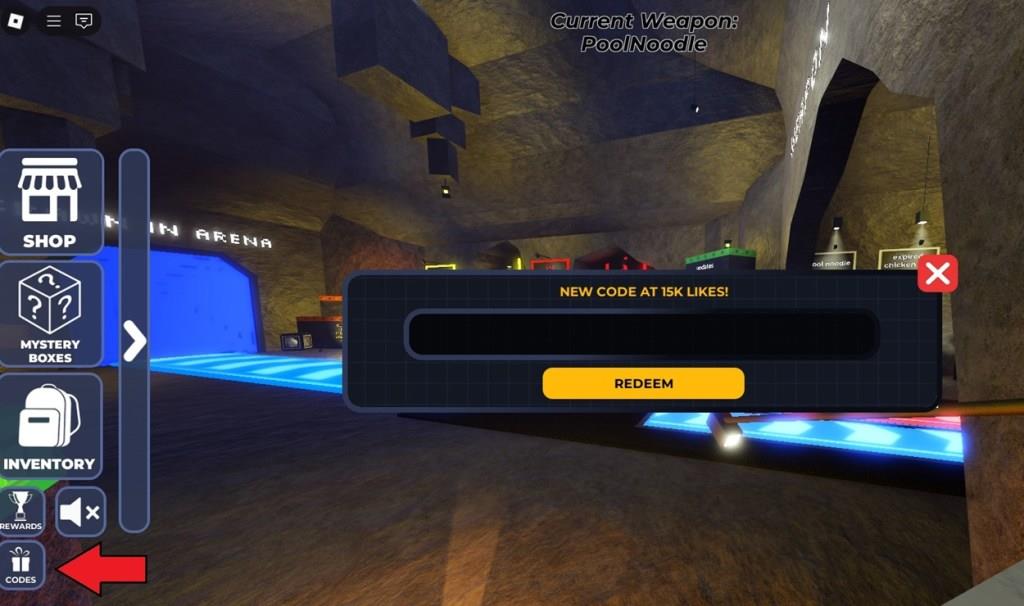
To redeem Blades and Buffoonery codes, open Roblox and launch the game. Click the Twitter or Codes button on the main screen to open the redemption menu. Copy a valid code from the latest list and paste it into the text box exactly as shown. Press the Redeem button to confirm and receive your free rewards instantly. If a code does not work, it may have expired or been entered incorrectly, so double-check for typos before trying again.
You can claim the codes for this experience pretty easily. Follow these steps to redeem codes for Blades And Buffoonery:
- Launch Blades And Buffoonery in the Roblox player.
- Click the Codes option at the bottom left.
- Now, input a code and click on Redeem.
Where to Get More Blades And Buffoonery Codes
You can find new Blades And Buffoonery codes on the game’s official social channels, such as Twitter, Discord, and Roblox group pages, where developers share the latest rewards and event updates. It’s also a good idea to check community forums and fan pages, as players often post newly released or unlisted codes. Bookmarking reputable code list websites can help you stay updated without missing future giveaways.
New codes are released on the official Blades and BuffooneryDiscord server. So, you can join this server to stay updated on their latest updates, including newly released codes. However, there are no dedicated ‘codes’ channels and the codes for this experience expire quickly.
How do I redeem codes in Blades and Buffoonery step by step
To redeem codes in Blades and Buffoonery on Roblox, follow these straightforward steps based on consistent guides from multiple sources.
Step-by-Step Guide
-
Launch Blades and Buffoonery through the Roblox player or website.
-
Look at the bottom left of the screen for the Codes button, often shown as a blue tick/check icon, arrow icon, or “Codes” widget.
-
Click it to open the redemption menu, which includes a text input field and a yellow or “Redeem” button.
-
Enter a valid code exactly as listed (case-sensitive, no extra spaces).
-
Press Redeem to claim rewards like Gems or Heads, which appear instantly if the code works.
Troubleshooting Tips
Codes may fail if expired, already used on your account, or mistyped-copy-paste them directly. No prerequisites like joining a group are typically required, and it works on PC, mobile, or console. For latest codes, check back with the previous list shared earlier in our chat.[conversation_history]
Open the Codes menu in Blades and Buffoonery where is it located
The Codes menu in Blades and Buffoonery is located at the bottom left of the screen.
Launch the game on Roblox and look for the Codes button there, described across sources as a blue tick/check icon, white checkmark with blue background, arrow icon, or simply labeled “Codes” widget.
Exact Location Details
Clicking this bottom-left button directly opens the code redemption box with an input field and Redeem option-no side menu required in most descriptions. Some guides note it as the last option in a left-side column after tapping an arrow icon first. It remains consistent on PC, mobile, and console.
Quick Access Tips
Stay in-game after spawning; the icon appears immediately on screen load. If hidden by UI, tap the left edge or check for the blue/white highlight. Refer to prior redemption steps from our chat for full process.[conversation_history]
