Roblox’s Ultimate Showdown explodes with fresh January 2025 codes-claim them now for free cash, pets, and power-ups before they vanish.
To unlock and upgrade these powerful characters, you’ll need coins. Fortunately, you can easily earn free coins by using our list of active Ultimate Showdown codes. Utilize the coins to your advantage and be the strongest in the arena.
All New Ultimate Showdown Codes
Grab the latest Ultimate Showdown codes active in January 2025. Redeem them now for free cash, spins, and boosts to power up your battles. Codes expire fast, so check back often for fresh ones. Paste each code exactly as listed into the game’s redeem menu and hit enter to claim rewards instantly.
- 1500LIKES: Get 50 Coins (NEW)
- 1000LIKES: Get 50 Coins
- RELEASE: Get 100 Coins
- 500LIKES: Get 50 Coins
Expired Ultimate Showdown Codes
There are no expired codes yet in this fun Roblox superheroes showdown game. However, things can change quickly. That is why we recommend you redeem the working codes before they expire.
If you love fighting anime-style wars, then Jujutsu Infinite and Blox Fruits are two of the top-rated games on Roblox that you must try. In case you are looking for something fresh, go through our Roblox game codes master list and find your next adventure.
How to Redeem Ultimate Showdown Codes
Open Ultimate Showdown on Roblox and find the Settings menu in the top-right corner. Tap the Codes button to reveal the text box. Copy a code from our list, paste it in, and hit Redeem. Claim your rewards right away before they expire.
To redeem the latest codes for Ultimate Showdown, follow the step-by-step process below:
- Launch Ultimate Showdown on Roblox.
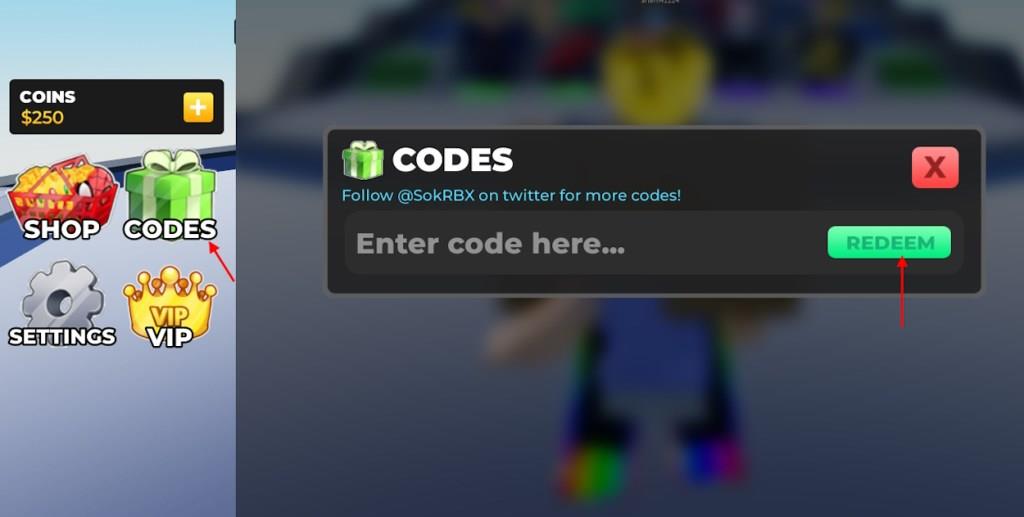
- Select the Codes option from the left menu.
- Type a working code in the Enter code here… area.
- Click the Redeem button to claim rewards.
How to Get More Ultimate Showdown Codes
New codes for Ultimate Showdown are often shared through the game’s official social media pages, Discord server, and developer posts on Roblox. Players should check these sources regularly, especially during updates, events, or collaborations. Subscribing to notifications or following community groups can also help you spot new codes before they expire.
Finding the codes for this experience can be a little tricky. You can join the Ultimate Showdown Discord server for the latest announcements and news. In the server, there are no dedicated code sections or update logs. This means, the developers have not added the codes on the server yet. However, you can find a few working codes on the Triologyx3 Roblox group.
Well, if you want to stay away from all that hassle, bookmark our page. We frequently go through the game and all the reliable sources for the new Ultimate Showdown codes. After testing the codes regularly, we update our list so that you never miss out on the free rewards.
Redeem codes step-by-step in Ultimate Showdown
Redeeming codes in Ultimate Showdown follows a simple process within the Roblox game interface. Codes grant free Coins for unlocking characters like Marvel and DC heroes. Follow these steps precisely, as they are case-sensitive and expire over time.
Step-by-Step Guide
-
Launch Ultimate Showdown on Roblox and join a server.
-
Locate the green or labeled Codes button on the left side of the screen.
-
Click it to open the code redemption menu with the “Enter code here…” text box.
-
Copy and paste a valid code (e.g., 7000LIKES or 6000LIKES) into the box.
-
Press the Redeem button to claim rewards like 50 Coins.
Troubleshooting Tips
Invalid codes show a “Not a valid code!” message-double-check spelling or try another. Previously redeemed codes won’t work again, and expired ones like GROOT provide no rewards. Verify updates on sites like Beebom or RobloxDen for the latest.
Show where the Codes button is located in the UI
The Codes button in Ultimate Showdown is located on the left side of the game’s main UI screen, typically as a prominent green icon or labeled button. It appears shortly after joining a server, near other menu options like shop or settings.
Visual Location
Positioned vertically along the left edge of the screen, below the top toolbar and above the central gameplay area. On mobile devices, it remains accessible without obstructing the arena view. Look for “Codes” text or a gift/box icon to identify it quickly.
Tips for Finding It
-
Ensure you’re in the lobby or main menu, not mid-battle, as UI elements can shift.
-
If not visible, try respawning or rejoining the server to refresh the interface.
-
Screenshots from guides often highlight it circled in green for clarity.
