Roblox DOORS players, grab free rewards now-January 2025 codes expire fast.
So, we have made your job easy and compiled a list of DOORS codes that will be helpful in your adventures.
All New DOORS Codes
Check out the newest DOORS codes available this month to claim free Knobs, Revives, and other in-game items. These codes help you recover faster after tough runs and collect more rewards without spending Robux. Make sure to redeem them soon, as some might expire quickly or be replaced by new ones in upcoming updates.
- SIX2025: 100 Knobs and 1 Revive (NEW)
- SCREECHSUCKS: 25 Knobs
Expired DOORS Codes
- 5B
- THEHUNT
- 4B
- THREE
- 2BILLIONVISITS
- ONEBLLIONVISITS
- LOOKBEHINDYOU
- SORRYBOUTTHAT
- 500MVISITS
- 100MVISIT
- TEST
- SORRYFORDELAY
- psst
While you are here, check out the list of Roblox codes for top experiences. You can find more scary experiences on Roblox and use the Survive the Killer codes and Murder Mystery 2 codes to become fearless.
How to Redeem DOORS Codes in Roblox
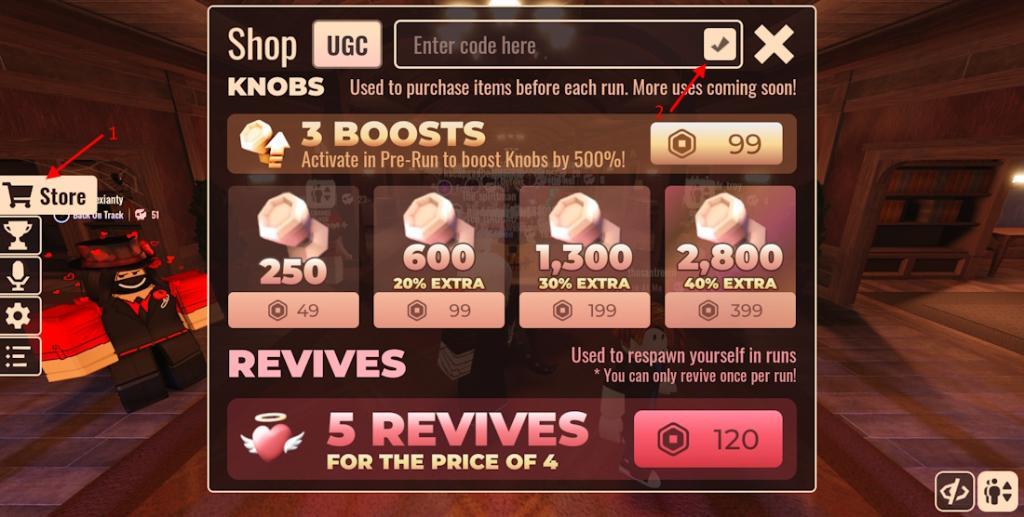
To redeem DOORS codes in Roblox, open the game and go to the “Shop” section from the main menu. Scroll down until you find the “Enter Code” box. Type an active code exactly as shown, then press the “Confirm” button to claim your rewards. If the code is valid, your items or boosts will appear in your account immediately.
To get free rewards, you must follow the step-by-step process below to redeem the codes for DOORS:
- Open the DOORS game on your Roblox app.
- Click the Store button at the bottom of the screen.
- Enter a working at the top of the Shop window.
- Click the verify (tick) button to get the reward.
How to Get More Doors Codes
New DOORS codes typically appear during special Roblox events, game updates, or developer milestones. Players can follow the official DOORS social media channels, join the LSPLASH Discord server, or check the game’s Roblox page regularly to stay updated. Community forums and fan pages also share new codes quickly, so it’s worth keeping an eye on those to grab fresh rewards as soon as they drop.
To increase your chances of obtaining DOORS codes, actively follow the game’s official social media accounts, particularly X and YouTube. Twitter is the official and best place for all the new ones. You can also subscribe to @LSPLASH YouTube for more information. Joining the official Discord server for DOORS can also provide valuable announcements.
What are the latest active DOORS codes for January 2026
These are the main active DOORS codes that multiple January 2026 code trackers list; some sources disagree on a few, so if one shows as invalid in-game, move on to the next.
Main active codes (January 2026)
-
– 7 Stardust, 777 Knobs, 1 Revival
-
LAZYDEVS – 50 Knobs
-
3RD (or 3rd in some lists) – 33 Knobs
-
SCREECHSUCKS – 25-50 Knobs depending on source (most list 25)
-
RAGDOLL COMBAT – 1 Stardust
-
CRUSADERS – 5 Stardust
-
PATHSWAP – 1 Stardust
-
JUMP OVER THE BRICK – 1 Stardust
Extra working codes for Knobs
Many January 2026 lists also still mark these as active (5 Knobs each unless noted).
-
, ,
-
W, L, GRACE, Pressure
-
8BITRYAN, KUBZ SCOUTS, BIJUU MIKE, THINKNOODLES, KREEKCRAFT, XQC, DANTDM, PENGUINZ0, ISHOWSPEED
-
FIND THE TROLLFACES, RAGDOLL UNIVERSE, RAGDOLL MAYHEM, VOCAB HAVOC, LORE
-
CHEDDAR BALLS – 1 Knob
-
ABCDEFGHIJKLMNOPQRSTUVWXYZ – 5 Knobs
Recently expired (no longer working)
Most January 2026 guides now list these as expired, even if they were popular before.
-
SIX2025, 5B, 4B, THREE
-
, 100MVISITS, 500MVISITS, ONEBILLIONVISITS, 2BILLIONVISITS
-
SORRYFORDELAY, SORRYBOUTTHAT, PSST, LOOKBEHINDYOU, TEST
-
NO_DATA, Gullible, THEHUNT
How to redeem DOORS codes
-
Open DOORS and stay in the main lobby.
-
Click the Shop button on the left, type the code in the “Enter code here” box, then press the tick/check icon to claim the reward.
Because codes change often, checking a fresh January 2026 list if some of these suddenly stop working is recommended.
How do I redeem DOORS codes in Roblox
To redeem DOORS codes in Roblox, use the in-lobby Shop and the code box, then confirm to claim your rewards.
Step-by-step redemption
-
Launch DOORS from Roblox and wait until you are in the main lobby.
-
Click the Shop button/menu on the left or bottom of the screen (it may also be labeled Store on some versions).
-
In the Shop screen, find the text box that says “Enter code here”.
-
Carefully type or paste your code exactly as shown (codes are case-sensitive) into that box.
-
Press the checkmark/tick, Confirm, or hit Enter on your keyboard to redeem.
-
If the code is valid and unused, your Knobs, Revives, Stardust, or other rewards are added instantly to your account.
If your code isn’t working
-
The code may be expired; most DOORS codes only work for a limited time.
-
Double-check for typos (extra spaces, wrong capitalization, missing characters) or try copy-pasting from a trusted list.
-
If the game says the code was already redeemed, it means you have used that code on your account before and cannot claim it again.