New year, new freebies! Fresh My Hello Kitty Cafe codes for January 2025 have arrived, bringing free diamonds, coins, and cute decor for your café. Redeem them fast before they expire and give your shop the sweetest upgrade yet.
For that, use our list of My Hello Kitty Cafe codes to obtain Gacha Tix, decorations, and diamonds and create the cafe of your dreams.
All Active My Hello Kitty Cafe Codes
All Active My Hello Kitty Cafe Codes
- WEEKLYREWARD2: 1 Gacha Tix (NEW)
- SWEETGIFT: 300 Million Visits Photo
- LIKEKITTYHL2: 3 Gacha Tix
- LIKEKITTYXK2: Pompompurin Mascot!
- thankyou: 300 Diamonds
- LIKEKITTYFD2: 3 Gacha Tix
- LIKEKITTYKD2: 3 Gacha Tix
Expired My Hello Kitty Cafe Codes
- LIKEKITTYGD2
- HAPPYGIFT
- 600KHAPPYDAY
- 700KHAPPYDAY
- ES2CLP3KE1S
- D6NU4DGP1
- WEEKLYREWARDE
- AM5RAN3EAMC
- NEWRECORD
- WEEKLYREWARDG
- A7BEL1ABLS
- WEEKLYREWARDJ
- WEEKLYREWARDP
- WEEKLYREWARDR
- WEEKLYREWARDS
- A2HRS9YETH1
- WEEKLYREWARDT
- 700KHAPPYDAY
- 800KHAPPYDAY
- HAPPY25NEWYEAR
While you are here, take a look at other Roblox game codes from our master list. Experiences like Doodle World, Pet Simulator 99, and Dress to Impress can be right up your alley.
How to Redeem My Hello Kitty Cafe Codes
Open the game and tap the gift box icon on the left side of the screen. Enter a working code exactly as shown, keeping it case-sensitive. Hit the Redeem button to claim your rewards right away. If the code fails, double-check for typos or confirm it has not expired yet.
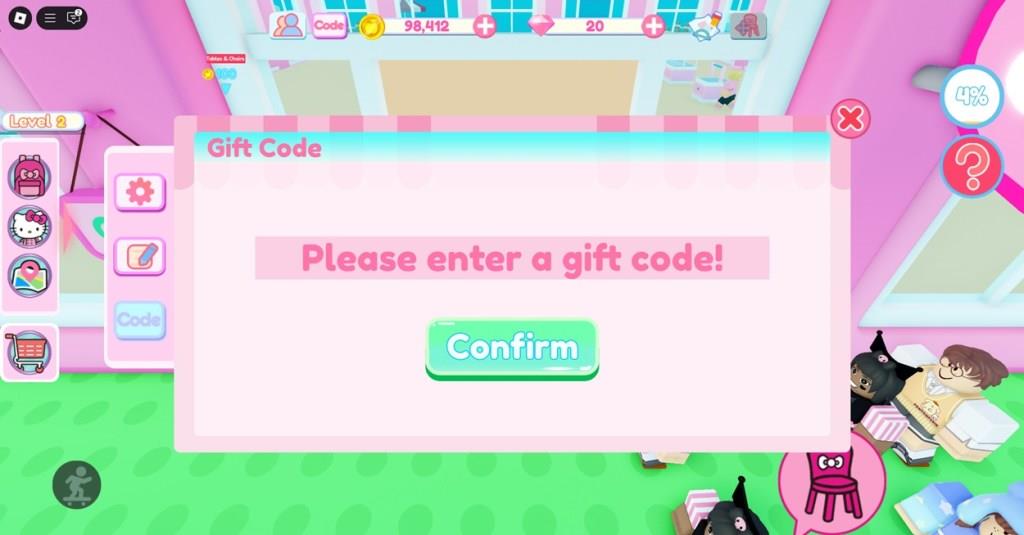
Now that you have codes for My Hello Kitty Cafe, here are the steps to redeem them:
- Launch My Hello Kitty Cafe in Roblox.
- Then, select the Code option at the top.
- Enter a code in the ‘Gift Code’ pop-up window.
- Click on Confirm to claim your rewards.
How to Find More My Hello Kitty Cafe Codes
Check the game’s official Discord server and Roblox group page for new code announcements from developers. Follow My Hello Kitty Cafe on Twitter or X and turn on notifications to catch posts right away. Join Roblox code-sharing communities on Reddit or Discord that focus on the game. Bookmark reliable code lists online and refresh them weekly, since updates often bring fresh rewards. Test codes quickly in-game to confirm they still work before they expire.
If you are looking for more codes for My Hello Kitty Cafe, simply bookmark this post as we add the latest released codes here. The codes for this game are not released traditionally through their social media, but rather players have to actively search for them.
Other than that, popular creators for this experience also share codes, which makes it hard to keep track of. So, the best way to find codes is simply bookmarking this list and visiting regularly.
Latest active codes for My Hello Kitty Cafe January 2025
No active redeem codes for My Hello Kitty Cafe on Roblox are confirmed working as of January 2025 based on the latest available lists from late 2025 sources.
Potentially Usable Codes
Try these recent codes from December 2025 updates, which may still function briefly into early 2026; rewards include Gacha Tickets, Diamonds, and items:
-
WEEKLYREWARD2
-
HAPPY25NEWYEAR
-
C1TE4N2SWS2T
-
P1BTY2AR5PA1YH
-
WEEKLYREWARD1
-
800KHAPPYDAY
Older codes like LIKEKITTYFD2 (3 Gacha Tix), LIKEKITTYKD2 (3 Gacha Tix), and thankyou (300 Gems) were active mid-2025 but likely expired.
How to Redeem
Launch the game, click the gear icon for Settings, enter the code in the Code tab, and confirm. Codes are case-sensitive and time-limited, so test promptly. Follow the official RockPandaGames X account for new releases.
How to redeem codes in My Hello Kitty Cafe
To redeem codes in My Hello Kitty Cafe on Roblox:
Step-by-step redemption
-
Open the game
-
Launch Roblox and start My Hello Kitty Cafe.
-
Wait until your cafe loads fully on the screen.
-
-
Open the Settings menu
-
Click the gear icon (Settings) at the top-right or upper side of the screen, depending on your device.
-
A settings window or menu will pop up.
-
-
Go to the Code section
-
In the settings window, look on the left side and click the Code button/tab.
-
This opens a text box for entering gift or promo codes.
-
-
Enter and confirm the code
-
Type or paste your code exactly as given (codes are case-sensitive).
-
Press Confirm to redeem; if the code is valid and not expired, your rewards (like Gacha Tix, Diamonds, or photos) will be added automatically to your account.
-
-
If it doesn’t work
-
An error such as “expired” or “already redeemed” means the code is no longer usable on your account.
-
Each code is time-limited and can usually only be redeemed once per account.
-
