Dodgeball Legends codes are back in January 2025, unleashing power-ups, rare skins, and blistering speed-but every strike counts, and only the quickest claim their prize.
To help you with the journey, we have stated all the latest working codes in this game that will grant you free coins and some special rewards.
All New Dodgeball Legends Codes
Stay up to date with the latest Dodgeball Legends codes to grab free rewards like coins, skins, and special power-ups. These codes give players helpful boosts to progress faster and customize their characters. Make sure to redeem them quickly, as many expire after a short time or during limited events.
- 1MVISITS: Redeem to get Free Rewards (NEW)
- 2000LIKES: Redeem to get 1000 Coins (NEW)
- 1000LIKES: Redeem to get 1000 Coins (NEW)
- RELEASE: Redeem to get 1000 Coins
- UPDATE: Redeem to get 1000 Coins
Expired Dodgeball Legends Codes
- 100LIKES
Currently, there is only one code that has expired in Dodgeball Legends. If you are a sports enthusiast looking for some cool sporty Roblox games, do check out Football Legends Codes, MMA Legends Codes, and Bike League Codes. We have a dedicated master list for all Roblox Game Codes to make your life easier too.
How to Redeem Dodgeball Legends Codes
To redeem Dodgeball Legends codes, launch the game on Roblox and tap the Codes button on the main screen. Enter the active code exactly as shown, making sure to match capitalization and spacing. Once you’ve typed it in, press Redeem to claim your reward. If the code is valid, your items or boosts will appear instantly in your inventory.
It may take a few matches to get the hang of the game. However, redeeming the codes is a lot easier. Follow the steps given below to redeem Dodgeball Legends codes:
- Launch Dodgeball Legends on Roblox.
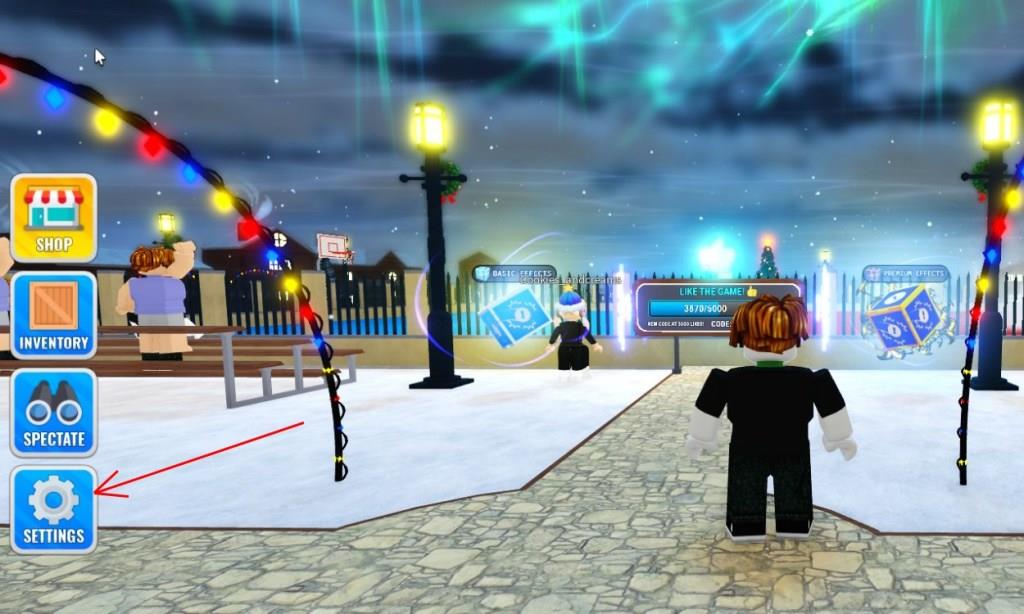
- Click on the Settings icon on the bottom left of your screen.
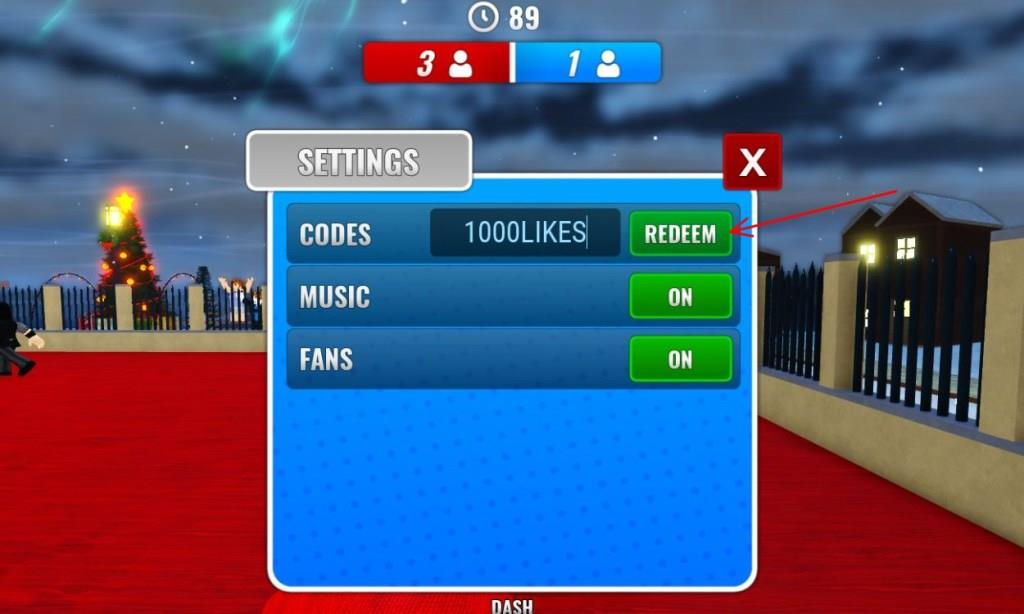
- Input a working code in the textbox and click on Redeem.
How to Get More Dodgeball Legends Codes
New codes for Dodgeball Legends are usually posted by the developers on their official Roblox group, Discord server, or social media pages such as X (Twitter). Players can check these platforms regularly or join the community to stay updated on fresh rewards. Keeping an eye on special events, collaborations, and major updates can also increase the chances of finding new, time-limited codes before they expire.
To get the latest updates on Dodgeball Legends Codes, make sure you bookmark this article as we will add the new ones immediately. Alternatively, you can join the official Infinity Sports discord server and keep an eye on the codes-and-info channel in the Information section.
Lastly, hop on to your Roblox app and be a member of the InfinityDodgeball community on Roblox. This will be more than enough to keep you updated with any new changes happening in the game.
How to redeem codes step by step in Dodgeball Legends
To redeem codes in Dodgeball Legends on Roblox, follow these steps exactly in order to avoid errors:
-
Launch the game
-
Open Roblox and start Dodgeball Legends from your games or the game page.
-
-
Wait to load into the lobby
-
Let the game fully load until you can see your character and the main UI.
-
-
Open the Settings menu
-
Look at the left or bottom-left side of the screen for a gear/Settings button.
-
Click/tap the Settings button to open the code window.
-
-
Find the code text box
-
In the Settings window, locate the box that says something like “Enter code here” or an empty field for codes.
-
-
Enter your code carefully
-
Type the code exactly as given; codes are case-sensitive, so every letter and number must match.
-
To avoid mistakes, it is recommended to copy and paste the code from a trusted list.
-
-
Redeem the code
-
After typing the code, click/tap the Redeem button next to or below the text box.
-
If the code is valid and active, your rewards (usually Coins or cases) are added to your account immediately.
-
-
If you get an error message
-
“Code is invalid” usually means:
-
The code is expired, or
-
There is a spelling or capitalization mistake.
-
-
Try re-entering or re-pasting the code; if it still fails, that code is probably no longer active.
-
Show the exact location of the Settings button in-game
In Dodgeball Legends, the Settings button is a small gear icon on the left side of the main in-game screen, not in the top bar or pause menu.
Location on your screen
-
When you load into the lobby, look at the left side of the screen; the gear icon sits among the main UI buttons (like shop and inventory) rather than in a hidden submenu.
-
It appears as a gray gear symbol; clicking this opens the panel where you can enter and redeem codes.
How to spot it quickly
-
If you are on mobile, the gear icon is still on the left side, roughly at mid-height of the screen; it is not behind another button.
-
On PC, make the game window full screen and look from top-left downwards along the left edge until you see the gear; hover your mouse and it should show a Settings tooltip or open on click.