Master the hidden powers of Jujutsu Infinite with this guide to every console command in Roblox’s hit anime game – from XP boosts to secret abilities that change the fight in an instant.
So, without wasting any time, check the list of commands in Jujutsu Infinite here and learn how to use them.
Jujutsu Infinite Console Commands List
Access the full roster of Jujutsu Infinite console commands right here. Players use these inputs to tweak gameplay, spawn items, adjust stats, or test features during Roblox sessions. Commands range from basic god mode toggles like “god” to advanced scripts for cursed energy manipulation and domain expansions. Input them directly into the developer console with F9 or the tilde key (~) for instant results. Regular updates add new ones, so check back often.
Ready to take advantage in the realm of the cursed? Unlike the Jujutsu Infinite codes, these commands do not give anything away for free. However, you can perform certain actions without going to specific places through the commands. Here is the full Jujutsu Infinite command list that you must use to get ahead of enemies:
- /duel [Username]: Challenge another player to a 1v1 duel. The other player must accept it first.
- /trade [Username]: Quickly send a trade request to another player. Go to the trade hub and check which players want to trade items in Jujutsu Infinite, then use this command.
- /tutorial: Review the beginning of the tutorial.
- /tutorialp2: Review the second part of the tutorial.
- /buff: Easily activate buffs from consumables. You cannot stack the effects but they will work even if you have a consumable Jujutsu Infinite item in your inventory.
- /sandbox: Instantly teleport to the Sandbox mode. Best to try out the best Jujutsu Infinite weapons, Innate Techniques, and unreleased objects.
- /invite [Username]: Invite a friend to a 2v2 duel. The other player must accept it first.
We will add more Jujutsu Infinite console commands to our list once the developers share more admin codes. Until that happens, learn how to level up fast in Jujutsu Infinite here.
How to Use Console Commands in Jujutsu Infinite
Open the chat box located at the top left of the screen in Jujutsu Infinite on Roblox. Type a command starting with “/” such as “/duel [username]” or “/buff”, replacing placeholders where needed. Press Enter or the send button to activate it on PC, mobile, or console.
Using the commands in Jujutsu Infinite is simple. Once you know which command to use, follow these steps:
- Start up Jujutsu Infinite on Roblox.
- Click the chat box icon from the top left of the screen.
- Input a working Jujutsu Infinite command.
- Click the send button or hit Enter/Return on your keyboard.
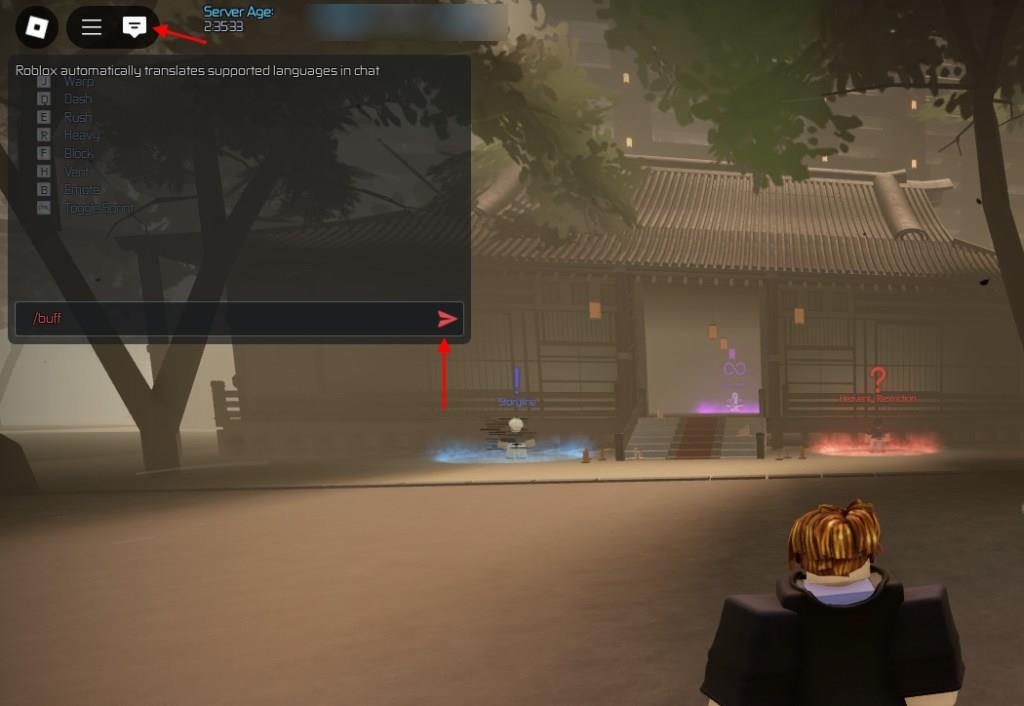
Remember, when you use commands involving other players, it will require their approval. So, you cannot initiate a duel without their acceptance after you invite them. Just make sure you are using the ‘/‘ before using any of the commands.
Using the commands in JJINF will help you trade items or enter the sandbox. This is really helpful for players who do not want to move around the lobby too much. However, the best Jujutsu Infinite console command is /buff. Whether you are in a PVP or PVE boss fight a quick console command before starting it will help you increase your stats.
Which commands give buffs and how to use them
In Jujutsu Infinite, the only real “buff” command is /buff, and it works by instantly using your consumable items that give stat boosts and passive progress (like vials and gourds).
Which command gives buffs
-
/buff – This is the command that gives you buffs.
-
It auto-uses all your buff-type items in your inventory (e.g., cursed energy vials, stamina vials, gourds) instead of you drinking/using them one by one.
-
You still need to own those items; the command does not create free buffs, it just consumes what you already have more quickly.
-
How to use /buff
-
Open the in-game chat (click the chat icon or press / on keyboard).
-
Type /buff exactly like that and send the message.
-
If you have any usable buff consumables, they will all be applied instantly and removed from your inventory as if you had used them manually.
-
If nothing happens, it usually means you either have no buff items, or you are in a place/state where item usage is restricted (for example, some arenas or cutscenes).
If you tell what items you currently have (names of vials/gourds), a more specific explanation of what exact buffs you’ll get from /buff can be given.
List Minecraft effect command examples for common buffs
Here are some practical Minecraft /effect command examples for common “buff” effects, in both Java and Bedrock style where useful.
Basic syntax
-
Java: effect give
[seconds] [amplifier] [hideParticles]. -
Bedrock: /effect
[seconds] [amplifier] [hideParticles].
amplifier starts at 0 for level I, 1 for level II, etc.
Speed (movement buff)
-
Java (Speed II for 60s to nearest player):
effect give @p minecraft:speed 60 1. -
Bedrock (Speed II for 60s to you):
/effect @s speed 60 1.
Strength (melee damage buff)
-
Java (Strength II for 300s to yourself):
effect give @s minecraft:strength 300 1. -
Bedrock (Strength II, 5 minutes, no particles):
/effect @s strength 300 1 true.
Resistance / Protection
-
Java (Resistance V for a long time):
effect give @s minecraft:resistance 1000000 4 true. -
Bedrock (Resistance II, 60s):
/effect @s resistance 60 1.
Regeneration (heal over time)
-
Java (Regeneration II, 30s):
effect give @p minecraft:regeneration 30 1. -
Bedrock (Regeneration I, 120s):
/effect @s regeneration 120 0.
Haste (faster mining)
-
Java (Haste II, 120s):
effect give @p minecraft:haste 120 1. -
Bedrock (Haste III, 60s, hide particles):
/effect @s haste 60 2 true.
Jump Boost
-
Java (Jump Boost II, 60s):
effect give @p minecraft:jump_boost 60 1. -
Bedrock:
/effect @s jump_boost 60 1.
Night Vision
-
Java (Night Vision, 600s):
effect give @p minecraft:night_vision 600 0. -
Bedrock:
/effect @s night_vision 600 0.
Saturation / Food buff (Java)
-
Java (Saturation, 20s):
effect give @p minecraft:saturation 20 0.
Clearing effects
-
Java (clear Speed only from all players):
effect clear @a minecraft:speed. -
Bedrock (clear all effects from yourself):
/effect @s clear.
If you say which edition you play (Java or Bedrock) and what kind of buff (combat, mining, exploring) you want, a focused set of ready-to-paste commands can be given.