Roblox has found a new way to boost its virtual economy – by bypassing traditional app stores and offering players extra Robux for buying directly through its own channels.
That is why the creators of Roblox are now trying to outsmart these app stores with their new scheme.
Roblox creators have recently shared a new change in a post on their official forum. It basically states that you can get up to 25% more Robux with every purchase if you buy them from the Roblox website or using a gift card. This is what they had to say:
“Users who purchase US $9.99 worth of Robux with a gift card, computer, or web would have originally received 800 Robux but will now receive 200 extra Robux or a total of 1000 Robux to spend on passes, in-experience items, and avatar items.”
Looking at their FAQ section, it is pretty clear that it isn’t just a limited-time holiday promotion. They plan on continuing this scheme for global players post the holiday season as a permanent change. They have also mentioned that this change also applies to gift cards purchased before today. So if you received a Roblox gift card during Thanksgiving, you can redeem it today and still enjoy the benefits.
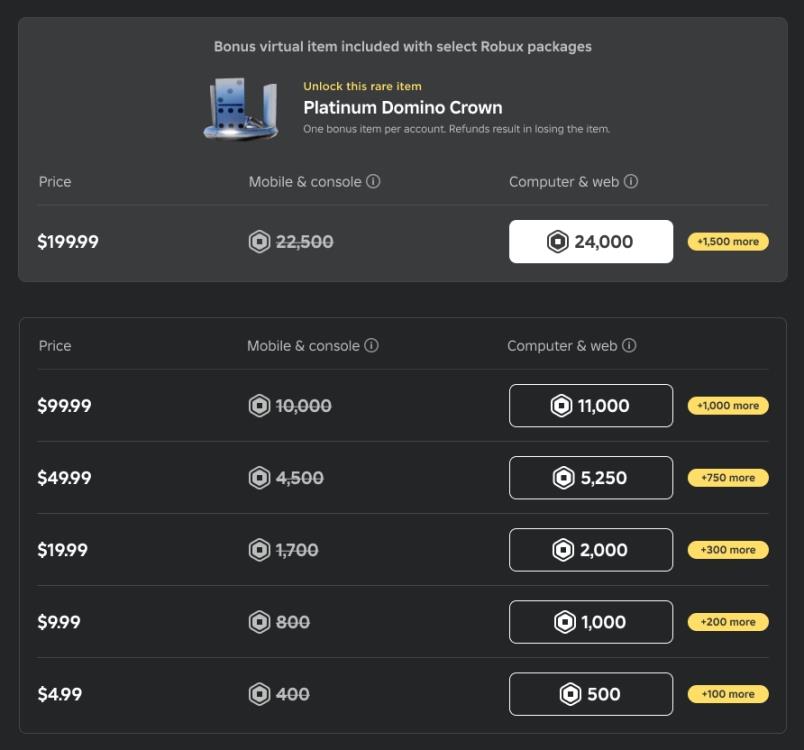
The biggest question on everyone’s mind is why is this offer limited to web and gift cards. And I feel the answer is pretty obvious. They are trying to skirt the audience away from buying Robux from these markets and incentivize them to spend money on direct purchases.
How to buy Robux from the Roblox website step by step
Buying Robux directly from the Roblox website is straightforward and offers up to 25% more currency than app store purchases.
Step-by-Step Guide
-
Visit roblox.com and log in to your account using your username and password.
-
Click the golden Robux icon (hexagon with “R$”) in the top-right corner of the page to access the purchase section.
-
Select a package based on your budget, ranging from 400 Robux (~$5) to 22,500 Robux (~$200); web purchases include the bonus amount.
Payment and Completion
-
Choose a payment method like credit/debit card, PayPal, or Roblox gift card, then enter the required details securely.
-
Review the order summary showing the bonus Robux and confirm the purchase; funds appear instantly in your balance.
Tips for Safety
Always use the official site to avoid scams, enable two-step verification on your account, and check for the 25% web bonus in the package details. Prices may vary by region due to taxes.
Sign in troubleshooting for Roblox website purchases
Signing into the Roblox website for purchases can fail due to browser issues, account restrictions, or verification problems. Common fixes resolve most cases quickly.
Browser Fixes
Clear your browser’s cache and cookies, then restart it before attempting to log in. Disable pop-up blockers and extensions specifically for roblox.com, or switch to an incognito window or different browser like Chrome or Edge.
Account Verification
Ensure your email or phone number is verified in Roblox account settings (under Account Info), as unverified accounts often block purchases. Check for parental controls, age restrictions, or account bans that prevent logins or transactions.
Login Steps and Recovery
Visit roblox.com/login directly, enter credentials slowly, and use “Forgot Password” if locked out. Enable two-step verification afterward for security, and confirm you’re on the official site to avoid phishing. [conversation_history]
