Tracking rare catches in Roblox Fisch just got easier – the GPS tool lets players pinpoint exact coordinates for hidden hotspots and treasure-filled waters. Here’s how to get one, calibrate it, and use it to chart locations like a pro.
Want to know where to get this limited stuff? Keep reading as we show you how to find and get the GPS in Roblox Fisch.
Roblox Fisch: How to Find and Get GPS
In Roblox Fisch, players acquire the GPS for 100 credits at two spots: Moosewood Island near the spawn pond on a chair by the leaderboard ramp, or Mushgrove Island beside a sleeping guard up a ladder. To purchase, approach and hold E to confirm the transaction. Once obtained, drag it to the hotbar, equip with the slot key, and XYZ coordinates appear onscreen, shifting with movement to track positions for treasure maps or friends.
The first thing you should know is that the GPS can only be found in two locations in Fisch which are the Moosewood and Mushgrove islands. Keep reading to learn how to get it in both locations:
1. In Moosewood Island
Moosewood is the starter island where you initially spawn as you start playing the game. So, if you are new to the game, this is where you get the GPS. Follow the steps below:
- Climb up the ramp beside the leaderboard where you will notice a merchant on the left.
- Keep walking straight toward the pond where you’ll see the GPS on a chair.
- Finally, spend 100 credits by holding E and the Yes option Fisch GPS is all yours!
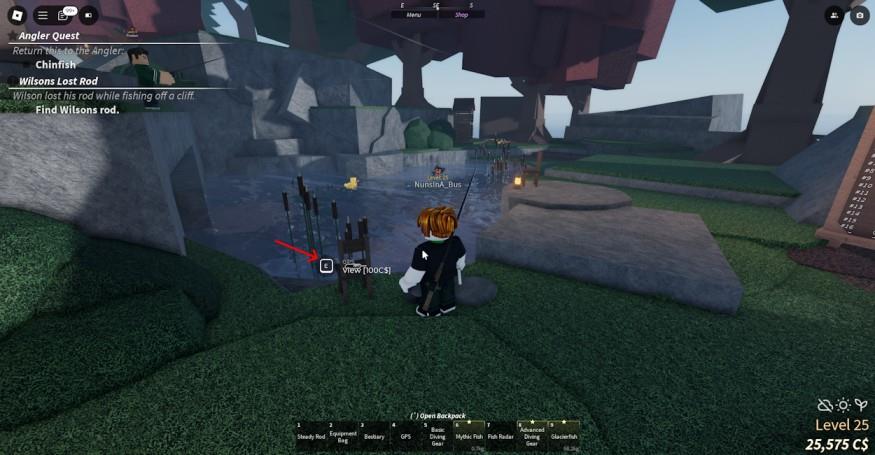
If you don’t have the money, simply catch some fishes from the pond and sell them to the merchant to get the amount.
2. In Mushgrove Island
If you have played Fisch for long enough to explore other nearby islands, the Mushgrove island might seem familiar to you. This island is present in the north-eastern side of Moosewood and is filled with huge mushrooms as well as swamps. You will encounter the Shipwright if you travel to this island from Moosewood. To get the GPS from here, follow the steps below:
- Take a left from the Shipwright and head straight. You will find a guard tower and some crab cages on the ground.
- Climb up the ladder to find the GPS placed beside the sleeping guard.
- Hold E to buy it for 100 credits and you’re done.
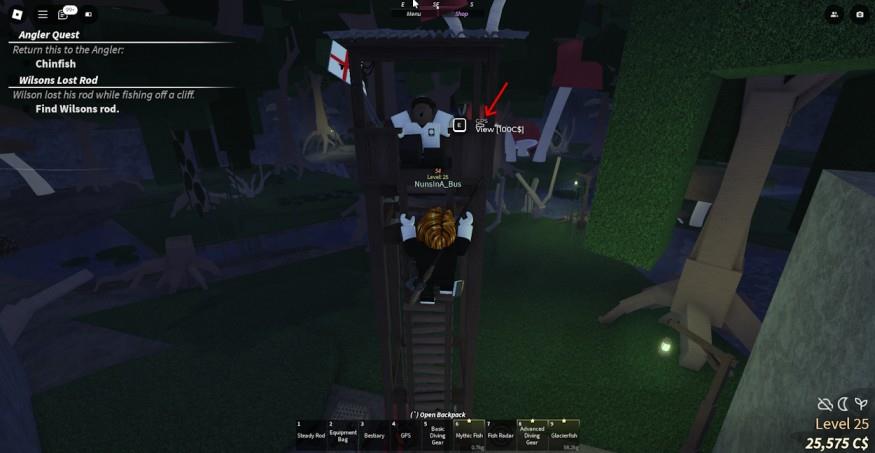
If you are short on money not in the mood to fish, you may redeem the latest Fisch codes to get some free cash.
How to Use the GPS in Fisch
Drag the GPS from your inventory to a hotbar slot, then press its assigned key to equip it. XYZ coordinates appear above the hotbar, updating as you move: X rises eastward and falls westward, Z grows southward and shrinks northward, Y climbs with height or dips underwater. Match these numbers to treasure map clues or share them in chat to meet friends at exact spots.
Using the GPS in Roblox Fisch is fairly simple and is the same as using other items. Follow the steps below:
- Simply, drag and drop the GPS from your backpack to your hotbar.
- Press the key matching the item slot and your character will take out the GPS.
- You will now see a bunch of numbers after the words “XYZ.” These are your coordinates.
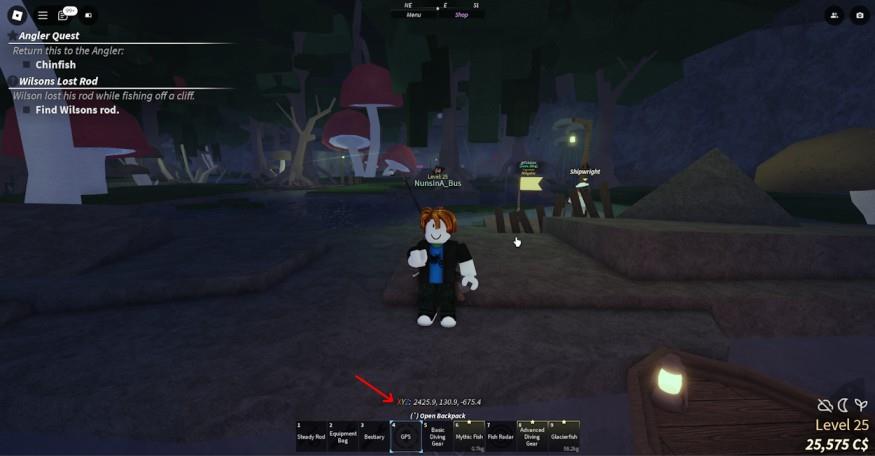
These are your in-game coordinates and will change as you move. So be sure to walk around and get used to them. The Fisch GPS is mainly used to find the Treasure Chests introduced in the last update.
Furthermore, if you are playing Fisch with your friends, and all of them have a GPS in their hand, you will be able to see cursors on the screen locating their position. You may also consider using the GPS to give away your coordinates in the chat if you find a secret location or any kind of fish abundance or simply if you want your friends to gather around you.
Where are the Treasure Chest coordinates to use with GPS
Treasure chests in Roblox Fisch are located using random coordinates revealed by fixing Treasure Maps with Jack Marrow; they respawn and vary per player, so no universal fixed list exists. Use your GPS to navigate to the map’s X/Z values (Y is height and less critical-often underwater near 40-150) by boating in the matching direction.
Sample Coordinates
These examples from guides show typical spots (check your own map for accuracy):
-
X: 200.715, Y: 138.048, Z: 15.334
-
X: 383.653, Y: 111.771, Z: 348.746
-
X: 898.77, Y: 97.933, Z: -1195.711
-
X: 1011.134, Y: 130.222, Z: -1236.562
-
X: 96.88, Y: 46.941, Z: 1618.29
Finding Tips
Equip GPS, match X (forward/back), Z (left/right), and scan nearby water/land when close-chests glow and are interactable. Write down your map’s coords or share in chat; friends with GPS show as cursors. Practice on starter islands first.
Show the nearest treasure chest coordinates to my current area
Treasure chests in Roblox Fisch generate at random coordinates unique to each Treasure Map and player, so no fixed “nearest” coordinates exist without your current GPS position or specific map details. Guides confirm locations vary and respawn, preventing a universal nearest chest lookup.
Use Your GPS
Check your GPS for current X/Y/Z, then compare to your map’s numbers-head east to increase X, south to increase Z until they match. Chests are often underwater (Y ~40-150) near starter islands like Moosewood (X/Z around 0-500) or Mushgrove.
Starter Area Examples
Common early-game spots from player reports (verify with your map):
-
X: 200.7, Y: 138.0, Z: 15.3 (near Moosewood)
-
X: 383.7, Y: 111.8, Z: 348.7 (Mushgrove vicinity)
-
Boat around X: 0-1000, Z: -500 to 1500 from spawn for frequent finds.