Fortnite hosts Kizuna AI’s live concert in a custom UEFN world-mark your calendar for the date and grab your ticket to this virtual spectacle.
The KizunaAI concert will be a specially designed UEFN experience that will allow players to experience the VTuber’s beloved songs in a live virtual setting. Here’s everything you need to know about the Kizuna AI live event in Chapter 7.
Fortnite Kizuna AI Concert Date
The Fortnite Kizuna AI concert is scheduled to take place on February 29, 2026, giving players a unique chance to experience a virtual performance inside the game. Hosted through the UEFN platform, the event will blend Kizuna AI’s signature style with Fortnite’s interactive features. Fans can join the concert by entering the special event island code during the scheduled time, where participants will enjoy exclusive visuals, music, and limited-time rewards inspired by the virtual idol herself.
The Kizuna AI concert in Fortnite will take place sometime during March 2026. As of now, we do not have an exact date or time for the concert. However, we do know that the concert will feature multiple sessions. This means it will not be a one-time live event, and players can experience it even if they miss the initial launch.
How to Join the Fortnite Kizuna AI Live Event
To join the Fortnite Kizuna AI Live Event, launch Fortnite and select the event island through the Discover tab or by entering the official island code in the search bar. Once loaded, join the queue a few minutes before the scheduled concert time to secure your spot. Make sure your game is updated to the latest version and that you have a stable internet connection. You can attend solo or with friends, and it’s recommended to join early to enjoy the pre-show experience before Kizuna AI takes the stage.
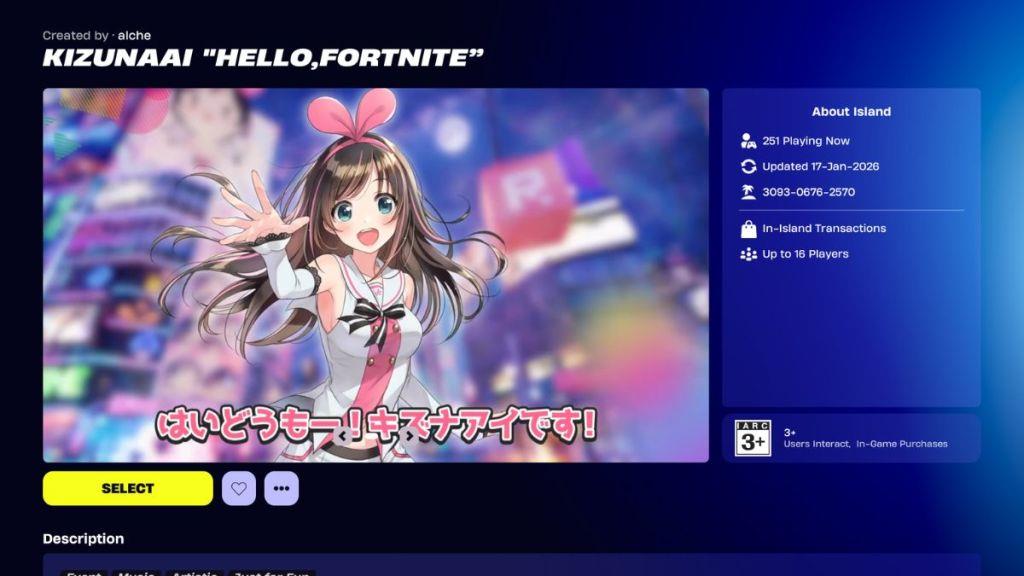
You can join the Fortnite Kizuna AI live event by joining the UEFN map titled “Hello, Fortnite”, a reference to the artist’s first-ever physical live event. While the concert is still two months away, you can still explore this custom map. If you want to explore the Hello, Fortnite map before the concert, you can join the Kizuna AI UEFN map by following these steps:
- Launch Fortnite and scroll down to the Discover section of the lobby.
- Here, enter the code for the Fortnite Kizuna AI UEFN map: 3093-0676-2570 in the search bar.
- Select the map titled Kizuna AI ‘Hello, Fortnite,” and press Play.
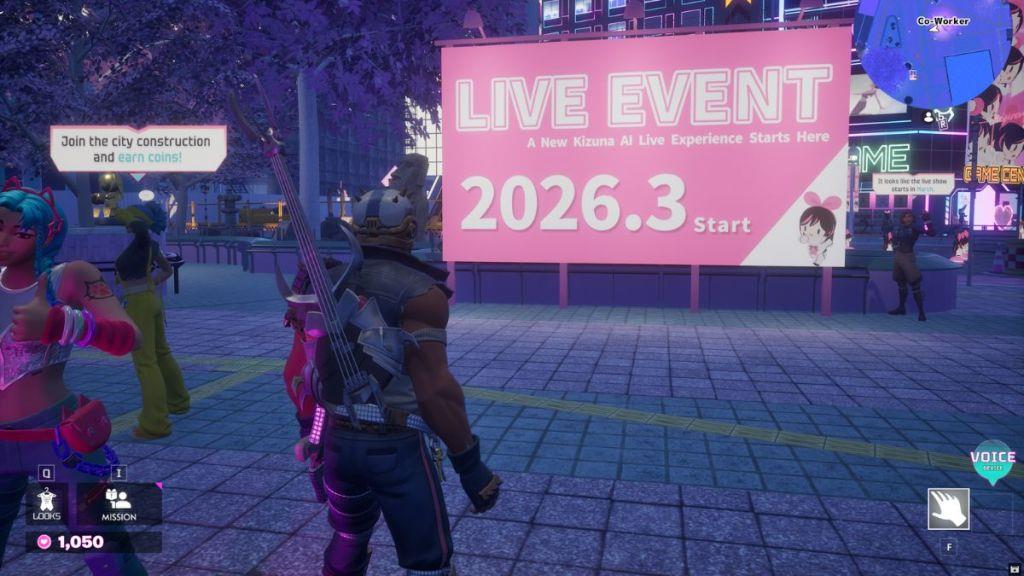
Once you are on the map, you will be greeted with a cutscene, taking you through the entire map and what activities it has to offer. You can also find a billboard for the upcoming live event on this map, which will be the stage for the Fortnite Kizuna AI concert.
Enter Fortnite Kizuna AI map code 3093-0676-2570
To enter the Fortnite Kizuna AI map using code 3093-0676-2570, launch Fortnite and go to the Discover section in the main lobby. Search for the code in the search bar, select the map titled KizunaAI “Hello, FORTNITE” by creator alche, and hit Play to load in.
Step-by-Step Entry
-
Open Fortnite on your platform (PC, console, or mobile).
-
From the lobby, scroll to Discover (or Creative mode hub).
-
Enter 3093-0676-2570 and confirm; a cutscene plays on first load, showing map features like missions and the concert stage preview.
-
Queue solo or with friends-no Battle Pass or specific level required.
What to Expect Inside
The UEFN map offers Kizuna AI-themed exploration now, with minigames, item collection, Mini AI-chan hunts, an arcade, photo ops, and voice lines. The full live concert arrives in March 2026 with multiple sessions on this same map. It’s not XP-focused but artistic and replayable.
How do I enter a Creative map code in Fortnite step by step
Entering a Creative map code in Fortnite, like 3093-0676-2570 for the Kizuna AI map, requires accessing the Discover hub from the main lobby. The process works across PC, consoles (PS5, PS4, Xbox), Nintendo Switch, and mobile, though input methods vary slightly by controller or keyboard.
Step-by-Step Guide
-
Launch Fortnite and ensure you’re in the main Battle Royale or main lobby (not already in a match).
-
Scroll left or select the Discover tab/icon at the top (magnifying glass or search area on some UIs).
-
Click or press the Search icon (top-left magnifying glass) to open the search bar for island codes or names.
-
Type or paste the 12-digit code exactly (e.g., 3093-0676-2570); press Enter or Start/Confirm.
-
Select the matching map (e.g., KizunaAI “Hello, FORTNITE” by alche) from results, choose Public mode, and hit Play to load.
Platform Tips
-
Console/Mobile: Use on-screen keyboard; enable “Join Public Island (from Lobby)” in settings if needed.
-
PC: Copy-paste works directly; check Recently Played under Discover for quick re-entry.
-
No Battle Pass required; sessions support solo or friends, with a short cutscene on first load for themed maps.
