A fresh wave of Superforest Codes has arrived this February 2026, offering players new ways to boost their progress and claim exclusive Roblox rewards before they expire.
This calm and cozy game feels warmer when servers work together, turning shared boosts and the Mother Tree into moments of rapid growth. Here are the Superforest codes that give free Coins and boosts upfront, helping you expand faster and unlock better seeds without waiting through long harvest cycles.
All New Superforest Codes
Discover all the latest Superforest codes for February 2026, including how to redeem them, where to find new codes, and tips to maximize your rewards in Roblox.
- 10K_LIKES: Spade (NEW)
- 6000_Likes: 60k coins
Expired Superforest Codes
- ILLUSTRIOUS
- 3000Likes
Are you tired of chill games? You can also give a shot at Hypershot codes and Rivals codes. If you are done with shooting heads, try checking out Blox Fruits codes and The Forge codes. Apart from these games, you can try out other cool games on this platform by looking at our Roblox game codes master list.
How to Redeem Superforest Codes
To redeem Superforest codes, open Roblox and launch the Superforest game. Once loaded, click on the gift or code icon typically found on the main menu or settings screen. Enter a valid code exactly as shown, including any capital letters or numbers, then press the confirm or redeem button. If the code is active, you’ll receive your in-game rewards instantly, such as coins, boosts, or items. Make sure to check for spelling errors or expired codes if the redemption doesn’t work.
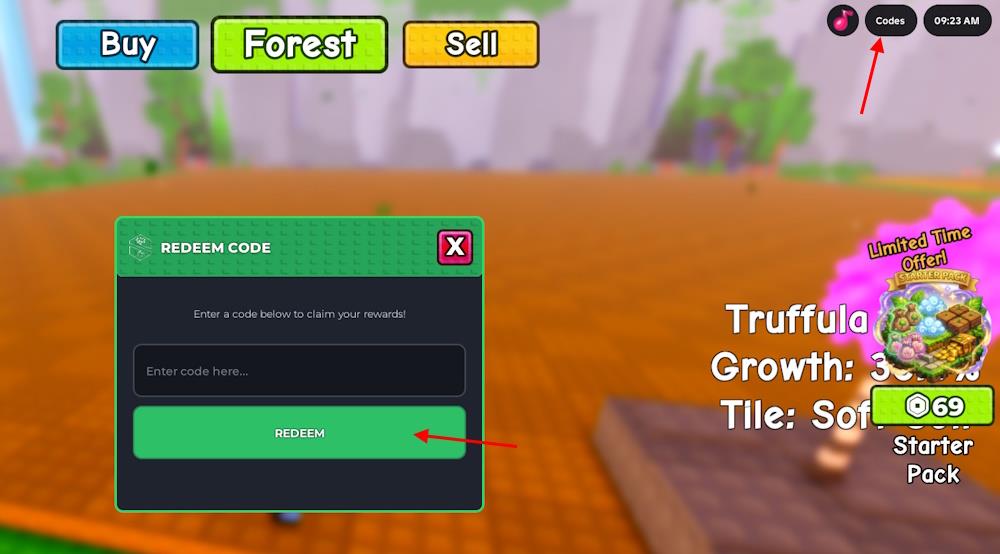
Before redeeming the codes for Superforest, you must complete the tutorial. Once done, follow the simple step-by-step process below to obtain the free rewards:
- Launch Superforest on Roblox.
- Click the Codes button from the top-right menu.
- Type a working code in the ‘Enter code here’ section.
- Click the REDEEM button to claim the rewards.
How to Get More Superforest Codes
Check the official Superforest Discord server and Roblox group for new code drops from developers. Follow Superforest’s Twitter and YouTube channels, where they post updates during events or milestones. Join Roblox code-sharing communities on Reddit and Discord that track Superforest releases. Enable notifications on these platforms to catch announcements right away. Test codes quickly in-game, as they expire fast.
If chasing new codes every day sounds tiring than chasing the rare plants, then leave it to us. This page is updated as soon as new codes drop, and expired ones are clearly separated, so there is no confusion. Bookmark our page for the latest codes for Superforest once, and keep your runs clean and hassle-free.
Even veteran farmers need a backup plan. For codes straight from the developers, you can join the official Superforest Discord server. Yes, this is the official Discord server for Superforest on Roblox. It is the only trusted place where new codes are shared, usually posted in the ‘announcements’ channel. Announcements can get messy fast, which is why sticking to our curated list saves time and patience.
Why Are My Superforest Codes Not Working?
If your Superforest codes aren’t working, they may have expired or been entered incorrectly. Check that you typed each code exactly as shown, paying attention to capital letters and symbols. Some codes are also region- or time-limited, which means they stop being valid after a certain date. If you’re sure the code should still work, restart the game and try again, as server delays or connection errors can sometimes cause redemption issues.
When new codes drop, the game often rolls out a client update, so wait a moment for the servers to settle before redeeming anything. If an error appears, double-check the spelling, as even a small typo can break the code. Copying the code straight from our list avoids that problem.
How do I redeem Superforest codes step by step
Here’s a simple step-by-step guide to redeem codes in Roblox Superforest:
-
Open Roblox and launch Superforest from your games list or the game page.
-
Wait until your character fully loads into the map (after the tutorial if you are a brand-new player).
-
Look at the top-right corner of your screen and click the button labeled “Codes”.
-
A window will pop up with a text field that says “Enter code here…”.
-
Carefully type or paste a working code into that box, exactly matching capital letters, numbers, and underscores.
-
Click the green “Redeem” button under the box.
-
If the code is valid and unused, you’ll see a success message and get your coins or items instantly.
If a code doesn’t work, double-check spelling and extra spaces; if it still fails, the code is probably expired or already redeemed on your account.
What are the active Superforest codes for February 2026
The currently reported active Superforest codes for early February 2026 are:
-
10K_LIKES – rewards a Spade tool (added with the February 1, 2026 update).
-
6000_Likes / 6000_likes – rewards 60,000 Coins.
Some older codes like ILLUSTRIOUS and 3000Likes are now listed as expired on several updated guides, so expect them not to work anymore.
