Loot Up Codes deliver January’s hidden boosts-grab the best while they last, then chase the next surprise.
While it takes time to level up and add points to your stats, you can achieve this fast by redeeming the current Loot Up codes which give free coins, crystals, and more. So, dive right in to know more about them.
All New Loot Up Codes
The latest Loot Up codes for January 2026 give players a quick boost with fresh rewards, from coins and crates to premium items that enhance gameplay. These codes help you progress faster and grab exclusive gear without extra grind. Make sure to redeem them soon, as many are time-limited and might expire before the next update.
- HAPPYNEWYEARS: 1200x Coins, 1200x Crystals, 1500x EXP, 3x Foreguard, 3x Enchant Stones, 20x Frozen Keys, 3x Skill Scrolls (NEW)
- CHRISTMAS: 1200x Coins, 1200x Crystals, 1500x EXP, 3x Foreguard, 3x Enchant Stones, 20x Frozen Keys, 3x Skill Scrolls (NEW)
Expired Loot Up Codes
- RELEASE
If you find this game interesting, try checking out 1 Slayer Blade, Arise Shadow Hunt, and Pixel Slayer, too. You can also have a look at our Roblox game codes master list since it has some of the coolest games you can play on this platform.
How to Redeem Loot Up Codes
Launch Loot Up on Roblox and check the main menu or settings for a code input field. Copy a valid code from our January 2026 list exactly as shown, then paste it into the box. Hit the redeem button and confirm the rewards appear in your inventory right away. Repeat for each code, noting some may expire quickly.
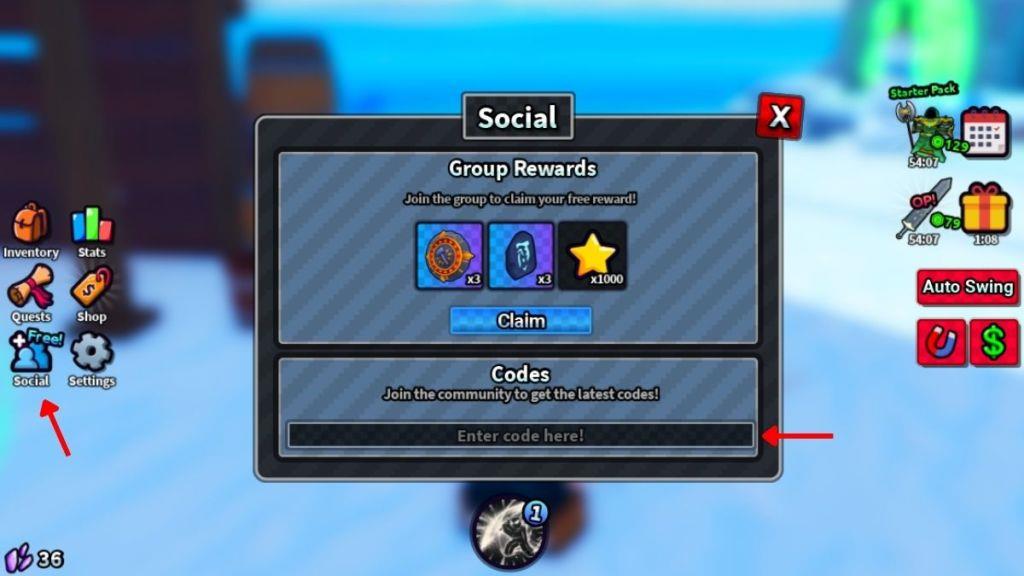
Now that it’s time to redeem the codes for Loot Up, you can follow the given steps to do so:
- Launch Loot Up on your Roblox app.
- Click on the Social icon on the left side of the screen
- Enter a working code in the text box of the pop-up window.
- Press the Enter button to get all your rewards.
How to Get More Loot Up Codes
Check the Loot Up Discord server and official Roblox group page daily for new code announcements from developers. Follow the game’s Twitter or X account and turn on notifications to catch posts right away. Join community forums like Reddit’s r/LootUp or Roblox code-sharing groups where players share active codes quickly. Bookmark code-tracking sites such as Rolimons or Beebom that update lists frequently. Test codes in-game as soon as you spot them since they expire without warning.
If you’re looking for more codes in this game, consider saving this page in your bookmarks. Since we keep this list updated at all times, you will never miss out on any new codes or rewards in the game.
Adding to that, make sure to join the Loot Up Discord server and check the ‘codes‘ channel to find the list of active codes in the game. Finally, you can join their official Roblox community called Humbling Games to receive a few additional rewards in the game.
Why Are My Loot Up Codes Not Working?
Your Loot Up codes might not work for a few reasons. The most common cause is that the code has expired or was typed incorrectly, including extra spaces or missing characters. Some codes are case-sensitive or limited to specific servers, so double-check the format and timing. It’s also possible that you’ve already redeemed the code on your account, as each one typically works only once per user.
Sometimes, entering a code may not give you the correct rewards. This can happen due to multiple reasons, like network issues or simply that you’re entering the wrong code. Make sure that you check the spelling, or just copy and paste the one from our list.
If the issue is still occurring, do leave the server and join the experience again after checking your internet connection. It may happen that you’re still playing on an older server that hasn’t been updated yet.
How to redeem Loot Up codes in Roblox
Redeeming Loot Up codes in Roblox is straightforward using the in-game interface. Follow the steps below to claim your free rewards like coins and enchant stones.
Redemption Steps
Launch Loot Up on Roblox and complete the initial tutorial if you haven’t already. Click the Social icon (or button) located on the left side of your screen. Enter the code exactly as shown in the text box that appears, then press Enter on your keyboard to instantly receive the rewards.
Troubleshooting Tips
Codes are case-sensitive, so copy and paste them directly to avoid typos. If a code fails, ensure you haven’t already redeemed it, restart the game to join a fresh server, or check for expiration since they can be time-limited. This process works on desktop, mobile, and console versions of Roblox.
Troubleshoot why a Loot Up code won’t redeem
Loot Up codes may fail to redeem due to common Roblox game issues like typos or server glitches. Follow these troubleshooting steps to resolve problems.
Common Causes
Codes are case-sensitive, so mistyping even one character (e.g., confusing “0” with “O” or “1” with “I”) triggers an “invalid code” error. They might also be expired, already claimed on your account, or temporarily unavailable due to high traffic. Joining a new server often fixes sync issues, as some games require fresh instances for redemption.
Fixes to Try
-
Copy-paste codes: Avoid manual entry; copy directly from reliable lists like those shared earlier.
-
Rejoin the game: Exit Loot Up, re-enter via the Roblox homepage, complete the tutorial if needed, and retry via the Social button.
-
Check server status: Visit sites like DownDetector for Roblox outages, or switch servers if overloaded.
Additional Checks
Verify you’re in the correct game mode (e.g., post-tutorial) and not using a VPN, which can block redemptions. If issues persist across devices, wait 5-10 minutes for server propagation or test on mobile/desktop. Active January 2026 codes like MORERINGS remain valid as of recent checks.
