Unlock free gems and summons in Anime Card Adventures-grab January 2026’s active codes before they vanish.
And a little bit of extra help can boost your journey. In this Anime Card Adventures codes guide, you’ll get all the free codes and use them to get rewards like Gems, Rerolls, Trait Shards, and more.
All New Anime Card Adventures Codes
Discover the latest codes and resources for Anime Card Adventures, packed with fresh boosts and rewards to enhance your Roblox gameplay in January 2026.
- 1kLikes: 2 Damage Potion, 1 Power Luck, 1500 Gems, 55 Trait Shards (NEW)
Expired Anime Card Adventures Codes
- updatesoon
- fireforce
- NEWYEAR
- XMAS
- 150LIKES
- Release
- 1000Visits
- 100Likes
- 2.5KVisits
- 2.5KVisitsShards
While you wait for more codes, try out similar anime games like Anime Story, Blox Fruits, and Type Soul. For a relaxing experience, try Grow a Garden, Fisch, and Prospecting. Apart from them, you can try out other cool games on this platform by looking at our Roblox game codes master list.
How to Redeem Anime Card Adventures Codes
Launch Anime Card Adventures on Roblox. Click the gift box icon on the left side of the screen to open the code redemption menu. Enter a valid code into the text field, making sure letters and numbers match exactly. Hit the Redeem button to claim your rewards, which arrive instantly if the code works. Repeat for each active code from the January 2026 list.
Redeeming codes for Anime Card Adventures is simple. Follow the steps below to redeem them:
- Open the Anime Card Adventures experience on Roblox.
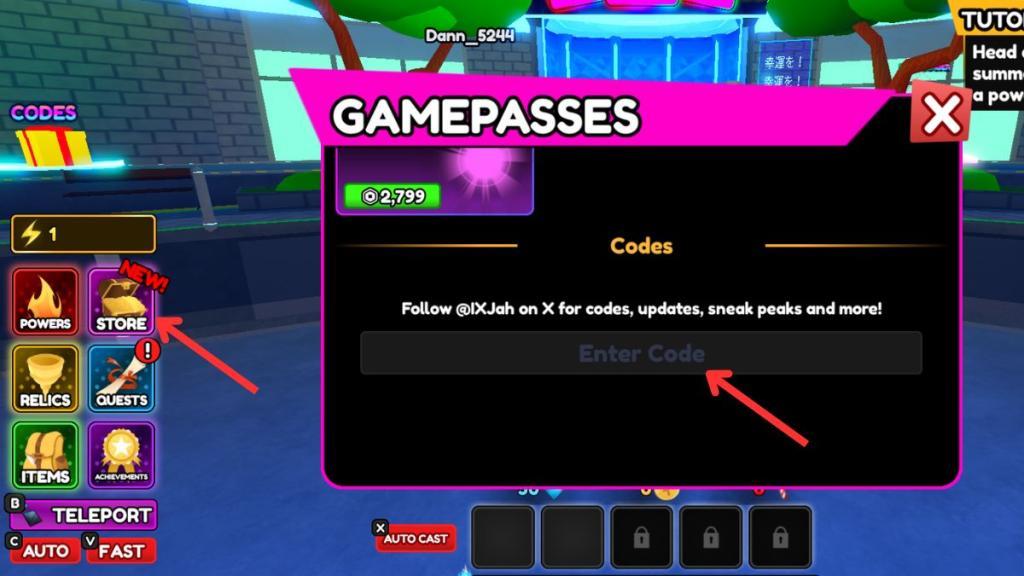
- Click on the Store option on the left side of your screen.
- Scroll down the shop to find the codes section.
- Copy and paste a working code from our list into the empty space.
- Click the Enterbutton on your keyboard to get your free rewards.
How to Get More Anime Card Adventures Codes
Check the game’s official Discord server and Roblox group page regularly, as developers post new codes there during updates or events. Follow Anime Card Adventures on social media platforms like Twitter or YouTube for announcements. Join Roblox code-sharing communities or forums where players share active codes quickly. Redeem them fast since most expire soon after release. Test old codes periodically, as some return unexpectedly.
The best way to get more codes for Anime Card Adventures is by bookmarking this page. We are always hunting for new codes and updates. So, whenever in doubt for new Roblox game codes, check back, and you’ll find them here.
If you want to find the latest codes, then you should join the official Anime Card Adventures Discord Server. Once you’re in the server, head to the #codes channel to find all the working codes. You can even join the official Anime Team A Roblox Group and follow @IXJah on X for the latest news.
Why Are My Anime Card Adventures Codes Not Working?
Codes in Anime Card Adventures may fail for several reasons. They might have expired, been typed with incorrect capitalization, or include extra spaces. Sometimes, a new update disables older codes until developers release replacements. If the issue continues, restart the game or check the official Roblox group and social media pages for active code announcements and maintenance updates.
When new Anime Card Adventures codes arrive, the game usually pushes a fresh client update, so give the servers a moment to reset before you try anything. If you see an error while redeeming, look for small typing mistakes. The safest option is to copy the code directly from our list. Some codes run on strict timers, so if one stops working, it likely means it has already expired. Visit our page again and see if it has been moved to the expired section.
How to redeem codes in Anime Card Adventures step by step
To redeem codes in Anime Card Adventures on Roblox, launch the game and access the Store menu on the left side of the screen. Scroll to the bottom of the Gamepasses or shop section to find the code input box, enter a valid code exactly as listed (case-sensitive), and press Enter to claim rewards instantly.
Step-by-Step Guide
Follow these precise steps for successful redemption.
-
Open Anime Card Adventures in Roblox and join a server.
-
Locate and click the Store button on the left side of your screen.
-
Scroll down to the bottom of the Store window, past gamepasses, to reveal the code entry field.
-
Copy-paste an active code (e.g., 4KLIKES) into the text box-avoid typing to prevent errors.
-
Hit Enter on your keyboard or tap the green Redeem/Claim button next to the box.
Rewards like Gems or Rerolls appear immediately if the code is valid and unused on your account. Each code works only once per profile, so check for new ones via official Discord updates.
Open the in-game store and find the Codes box step by step
To open the in-game store and find the Codes box in Anime Card Adventures on Roblox, start by launching the game and joining a server. Locate the Store button on the left side of the screen, click it to open the menu, then scroll down past gamepasses to reveal the code input box at the bottom.
Step-by-Step Directions
These steps match the game’s standard UI layout for quick access.
-
Launch Roblox and enter Anime Card Adventures, ensuring you’re in an active server.
-
Look at the left sidebar-click the Store icon (often a shopping bag or shop symbol).
-
The Store window opens; scroll to the bottom using your mouse wheel, touchpad, or drag gesture, passing any gamepasses or item lists.
-
The Codes box appears at the very bottom: a text input field labeled for codes, with an Enter or Redeem button nearby.
Troubleshooting Tips
-
If the Store button is missing, rejoin the game or check for UI updates-it’s always on the left panel.
-
Mobile users: Tap the Store icon; pinch-zoom or scroll if the box hides initially.
-
Codes won’t appear until the Store fully loads, so wait a moment after opening.
