Fortnite’s fox mascot is loose, and you can snag it for free-if you crack the code before it vanishes.
As players wait for the end of Winterfest 2025, Epic Games has added the Kitsune Sidekick to Chapter 7 Season 1 completely for free if players meet the requirements. Let us walk you through how you can find out if you qualify for the free Sidekick or not.
How to Unlock Kitsune Sidekick for Free in Fortnite
Grab the Kitsune Sidekick at no cost through Fortnite’s current free reward track. Log into the game and check the quests tab for simple tasks like playing matches or hitting targets in Creative mode. Finish enough daily or weekly challenges to reach the required level, usually around tier 20 or 30 depending on the season. Claim the pet from your locker once you hit the milestone-it attaches to your back slot right away. Play a few games to test it out with its fox animations and emote reactions.
There is a very specific group of players who can receive the Kitsune Sidekick for free, especially players who own the original Kitsune back bling, a cosmetic introduced in the Chapter 1 Season X Battle Pass. The back bling was acquired at Tier 28 of the Season X Battle Pass and is now being turned into a full-fledged Sidekick. This follows a similar pattern to the Bonesy Sidekick in The Simpsons Mini-Season.
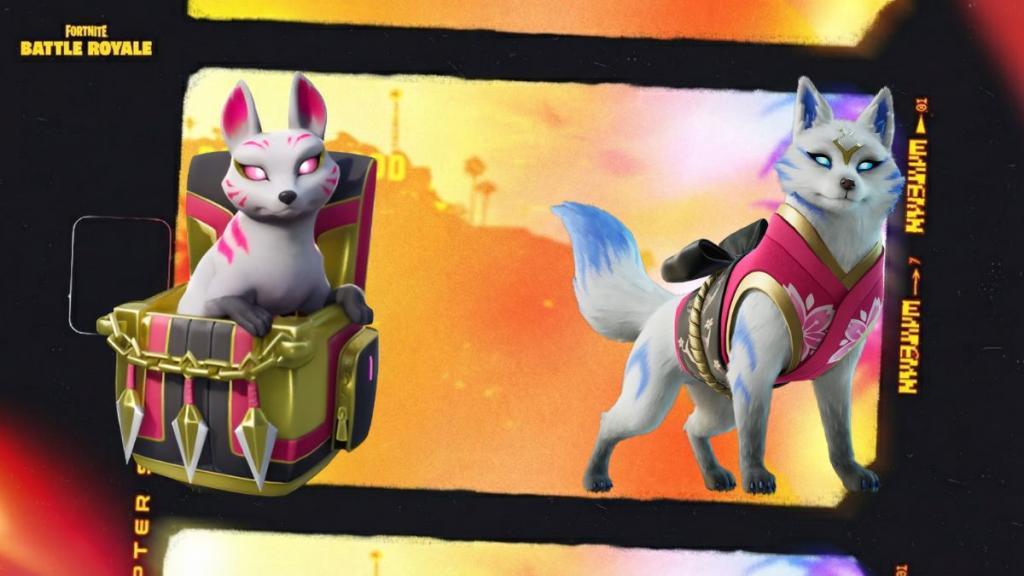
To redeem the Kitsune Sidekick, you can follow these steps:
- Log in after the Item Shop reset on January 3, 2026, with the account that owns the original Kitsune back bling.
- You should receive the Sidekick automatically. However, if you cannot find it, head to your locker and filter by Sidekicks. You should see the Kitsune Sidekick in your inventory.
You can then select your new sidekick, customize it with your choices, and then equip it before heading into a match of Battle Royale or LEGO Fortnite. It is important to remember that there are no quests required for the Kitsune Sidekick. Epic Games will automatically add it to your cosmetic library if you qualify.
If you didn’t own the Kitsune back bling, however, you do not qualify for this free unlock. Additionally, you cannot acquire the Kitsune Sidekick through any codes or Fortnite gift cards. You will have to wait for the Sidekick to hit the Fortnite Item Shop for a chance to obtain it.
How to check if I own Chapter 1 Season X Kitsune back bling
To check if your Fortnite account owns the Chapter 1 Season X Kitsune back bling (the original pet unlocked at Tier 28 of that Battle Pass), open your Locker and search or filter for it directly.
Steps in-game
Launch Fortnite, log into the relevant account, and navigate to the Locker from the main menu. Use the search bar to type “Kitsune” or filter cosmetics by “Back Bling” (or “Pets” if still categorized that way), then scroll to see if the fox pet appears in your owned inventory- it has a distinct white/orange fox design from 2019.
Epic account verification
Visit the Epic Games website, sign into the same Epic account linked to Fortnite, and go to your inventory or purchase history under Fortnite; look for Season X Battle Pass rewards or specifically the Kitsune pet listed as unlocked. Cross-check across platforms if you play on multiple (e.g., console vs. PC), as ownership is account-bound.
What it looks like
The item is named “Kitsune” (not Sidekick), shows as a reactive pet back bling with fox ears and tails, and was exclusive to Season X owners who reached Tier 28-no free grants or transfers exist for it now. If absent, your account never unlocked it, so no free Kitsune Sidekick eligibility applies.
Search Kitsune back bling in Fortnite locker
To search for the Kitsune back bling in your Fortnite Locker, launch the game, log into the correct Epic account, and access the Locker from the main menu.
Search process
Open the Locker tab, then use the search bar at the top (magnifying glass icon) and type “Kitsune” exactly-results will show any matching back blings or pets if owned, including the original Epic rarity fox pet from Season X Tier 28 with its white/orange design and “Two tails, one good friend” description. If it appears unlocked (not locked or shop-purchasable), your account owns it and qualifies for the free Kitsune Sidekick grant.
Filter alternative
Switch to the filter menu (sliders icon next to search), select “Back Bling” or “Pets” category, and scroll or sort by name/acquisition date (2019 for Season X); the Kitsune should appear if eligible, distinct from the newer Sidekick version. No ownership means no free Sidekick-check Epic’s site inventory too for confirmation across platforms.