New Roblox Plague codes for January 2026 are here, offering fresh rewards that can boost your gameplay and help you stand out among other players. Check out the latest active codes and see what bonuses you can claim before they expire.
Using codes, you can get plenty of free in-game items and bonuses that can help you progress faster. In this Roblox Plague codes guide, you’ll get all the free rewards like coins, boosters, and new units, aiding your survivability.
All New Plague Codes
Redeem these fresh Plague codes for January 2026 to claim free cash, DNA points, and other in-game boosts. Active codes include PLAGUE2026, NEWYEARPLAGUE, and WINTEROUTBREAK, each granting solid rewards. Enter them quickly in the game’s code menu before they expire and miss out on powering up your plague spread. Check back monthly as developers release new ones with updates.
- HAPPYNEWYEARS: 20 Lucky Zombie Spins and 20 Lucky Survivor Spins (NEW)
- 1500LIKES: 10 Lucky Zombie Spins and 10 Lucky Survivor Spins
Expired Plague Codes
- SUNDAYPATCH
- FIRSTUPDATEYAY
- MERRYCHRISTMAS
- THANKYOUGUYS
While you wait for more codes, try out similar battle royale games like Anime Royale or Dig It. If you are tired of playing battle royale games, try checking out The Forge and Fish It. For a relaxing experience, try Grow a Garden, Fisch, and Prospecting. Apart from chill games, you can try out other cool games on this platform by looking at our Roblox game codes master list.
How to Redeem Plague Codes
To redeem Plague Codes, open Roblox and launch the game, then locate the Codes button or promo tab in the main menu or in-game settings. Enter your code exactly as shown, confirm, and you’ll receive your rewards instantly in your inventory or bundled with your current boosts. If a code is invalid or expired, try refreshing the page and double-checking for typos.
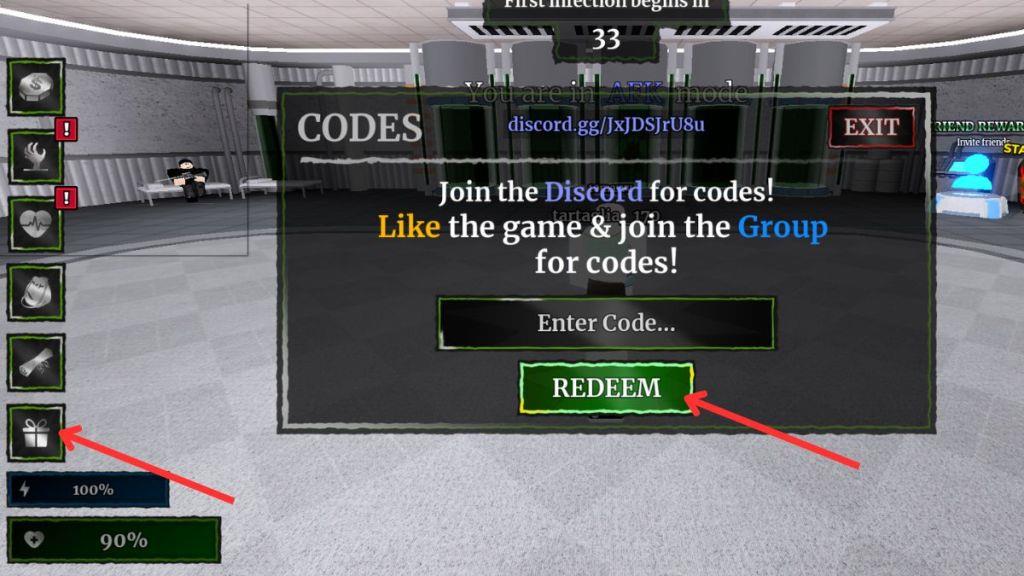
Redeeming codes for Plague is easier than killing zombies. Follow the steps below to redeem them:
- Open the Plague experience on Roblox.
- Click on the giftbox option on the left side of your screen.
- Copy and paste a working code from our list into the empty space.
- Click the Redeem button to get your free rewards.
How to Get More Plague Codes
Increase your chances by checking daily codes on official Roblox channels, participating in limited-time events, and visiting the in-game codes tab regularly to redeem rewards before they expire.
The best way to get more codes for Plague is by bookmarking this page. We are always hunting for new codes and updates. So, whenever in doubt for new Roblox game codes, check back, and you’ll find them here.
If you want to find the latest codes, then you should join the official Plague Discord Server.
How to redeem Plague codes step by step in Roblox
Here’s a clear, step-by-step guide to redeeming Plague codes in Roblox.
Quick answer
You redeem Plague codes from inside the Plague game using the giftbox / present button on the left side of the screen, then typing your code into the “Enter Code” field and pressing Redeem.
Step-by-step in-game
Follow these exact steps while you are in Roblox:
-
Launch Roblox and open the Plague experience, then join a server/lobby.
-
Once you are in the lobby, look on the left side of the screen for a giftbox/present icon or a button often labeled for codes.
-
Click or tap this giftbox / present button to open the code redemption window.
-
In the pop-up, find the field usually labeled “Enter Code” or similar.
-
Carefully type or paste a working Plague code into this field (capital letters must match exactly).
-
Press the Redeem (often a green button) to submit the code.
-
If the code works, you will immediately receive your free spins/rewards, and you may see a green success message at the top of the screen.
If your code is not working
If you see an “invalid” or “expired” message, try these checks:
-
Make sure there are no extra spaces before or after the code, and that capitalization is identical.
-
If it is a brand-new code that should work, rejoin or switch servers and try again, in case your server is not updated.
-
If you get a clear “expired” message, the code is no longer usable and you must try a different one.
If you tell what device you play on (PC, mobile, console), a tailored, device-specific version of these steps can be provided.
Open the Codes giftbox in Plague where is it located
The Codes giftbox button in Plague is located on the left side of your screen while you’re in the game lobby.
Where to find it
-
Join a match lobby in the Plague experience on Roblox (not just the main Roblox menu).
-
Look at the left edge of the game screen for a gift box icon (a present-shaped button).
-
That gift box icon is the Codes button; click or tap it to open the code redemption window.
If you do not see it, you may still be loading into the lobby, using an old UI version, or your screen UI scale may be cutting off the left edge on some mobile devices.
