Roblox’s Death In The Box hides fresh codes for January 2026 wheelspins-claim them before the box seals shut forever.
That’s why you must use the Death in the Box codes from our list here to grab free Wheelspins and get an edge over your opponents.
All New Death In The Box Codes
The newest Death In The Box codes for January 2026 bring fresh rewards to boost your gameplay, including Wheelspins, in-game cash, and fun cosmetics. Redeeming these codes lets players earn helpful bonuses that make building and surviving easier. Keep checking for updates, as developers often drop new codes during events or major patches.
Currently, there are no active Death in the Box codes. This is the last known active code:
- XMAS25: 2 Wheelspins
Expired Death In The Box Codes
There are no expired codes for this Roblox Experience. Once the above codes expire, they will be moved here.
Death in the Box is truly unique, but you may want to experience something that others are playing as well. So, check out Blue Lock Rivals, Hunty Zombie, and The Forge. If none of these excite you, try checking our Roblox game codes list to find the amazing games.
How to Redeem Death In The Box Codes
Open the Roblox game, locate the Death In The Box wheel or rewards area, and enter your codes exactly as shown in the official code list. If a code is valid, you’ll receive in-game rewards immediately and can repeat the process with additional codes before they expire. Keep an eye on the expiration dates and confirm the rewards appear in your inventory or redeemed page. If a code doesn’t work, recheck for typos or try later as codes can be limited or refreshed seasonally.
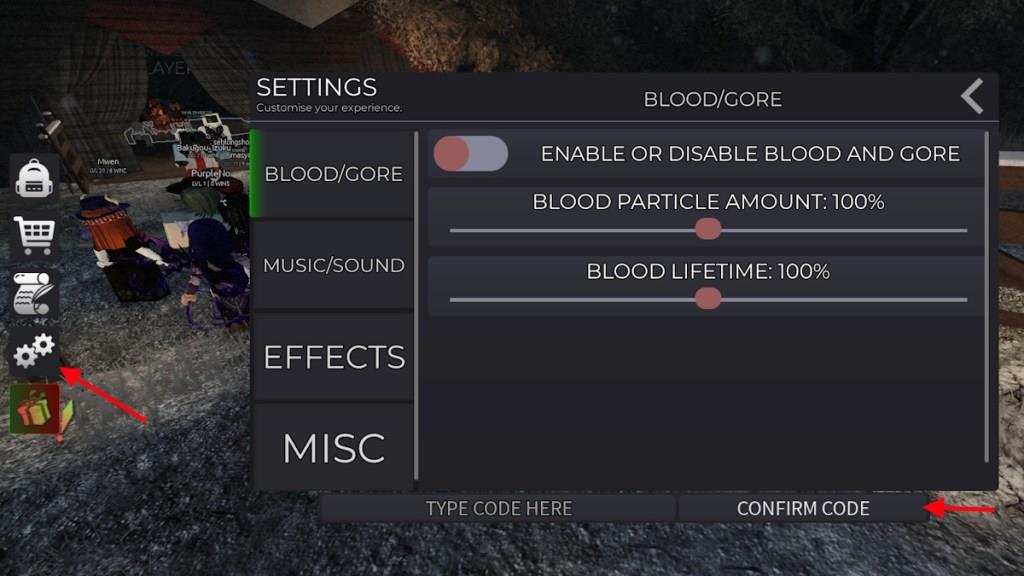
Redeeming codes for Death in the Box is very easy. All you have to do is follow the instructions given below:
- Launch Death in the Box on Roblox.
- Click on the Gear icon in the left part of the screen.
- Type the active code in the ‘Type Code Here’ box.
- Click Confirm Code to redeem the rewards.
How to Get More Death In The Box Codes
Joining the official Death In The Box Discord server and following the developer’s Roblox group are the best ways to find new codes as soon as they drop. Keep an eye on the game’s social media accounts, where special events or updates often include time-limited codes. Checking community forums or fan pages can also help since players frequently share the latest working codes there.
Codes for Death in the Box expire very quickly, so you need to redeem them right after they are released. That’s why you need a trustworthy source to find the codes once the developers release them. You can’t find a better place to find codes than right here. So, all you have to do is bookmark this post and visit regularly to find the latest codes.
But if you want to check for them yourself, your best bet will be to join the Death in the Box Discord server. Keep your eyes on the ‘Announcement’ channel, and you should be able to find the newly released codes. Joining the Discord is also a great way to stay connected with the community.
Why Are Death In The Box Codes Not Working?
Death In The Box codes may stop working for several reasons. Some codes expire after a short time or are limited to specific events or updates. Others might be mistyped, have extra spaces, or use the wrong capitalization. Occasionally, the developers disable codes during maintenance or release new ones to replace outdated rewards. Always check official game channels or trusted community pages for the latest active codes.
The Death in the Box codes expire extremely fast, which is why you may not find them working if you are late. If the codes have expired, it will show that the code has expired, and you won’t be able to redeem them. However, if you are seeing other errors, like Invalid, then you may have entered the code incorrectly.
How to redeem Death in the Box codes step by step
Redeeming Death in the Box codes involves a straightforward in-game process on Roblox. Follow these steps carefully, as codes are case-sensitive and expire quickly.
Step-by-Step Guide
-
Launch Death in the Box on Roblox and wait for the game to fully load.
-
Locate and click the gear icon (Settings) on the left side of the screen.
-
Scroll to the “Type Code Here” input box at the bottom of the Settings menu.
-
Enter the active code exactly as listed (e.g., XMAS25) and click “Confirm Code”.
-
Rewards like Wheelspins appear instantly if the code is valid.
Troubleshooting Tips
Codes may fail if expired, mistyped, or used previously-double-check spelling and try a new server. Roblox-wide promo codes use a different site redemption page, but Death in the Box codes redeem in-game only. Check back frequently for updates, as new ones drop via Discord or developer posts.
What are the current active Death in the Box codes
As of January 18, 2026, XMAS25 remains the sole active code for Death in the Box on Roblox. It provides 2 Wheelspins to enhance your card draws in matches.
Code Details
-
XMAS25: Grants 2 Wheelspins (verified working per recent checks up to January 16).
Status Notes
No additional codes have been released this month despite developer teases. Sources like Beebom, RobloxDen, and RoCodes confirm XMAS25 as the last known active one, with others expired or none reported. Redeem promptly in-game via the gear icon, as codes vanish quickly. Monitor the official Discord for fresh drops.
