Lost in Frostspire Expanse’s icy grip? Forge Island 3 beckons with hidden paths through blizzards and ruins-here’s your map to victory.
How to Reach The Forge Island 3 (Frostspire Expanse)
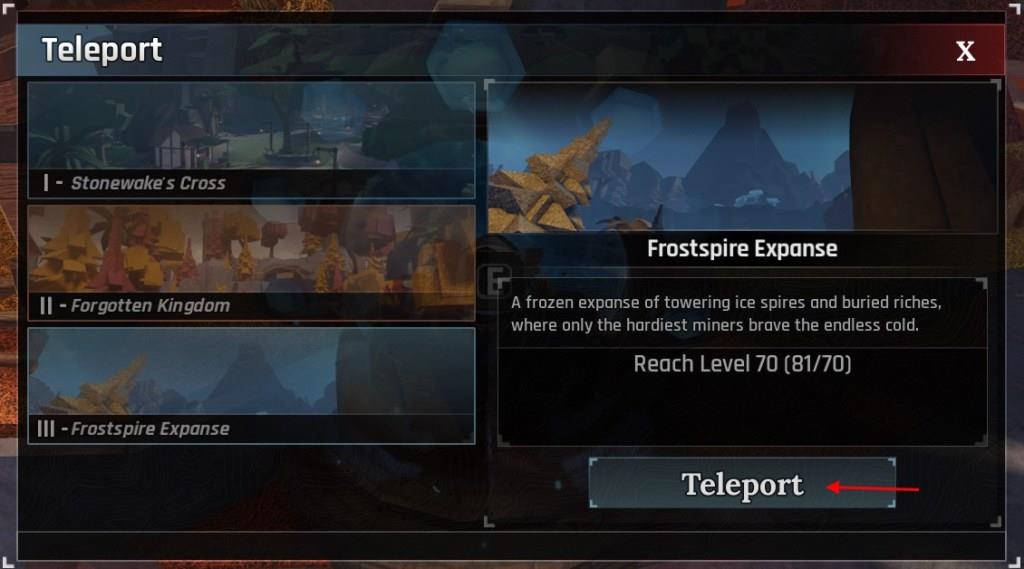
To reach The Forge Island 3, Frostspire Expanse, you first need to reach at least level 70 and have the Portal Tool unlocked on your account, which you get by completing the tutorial and early-game progression. Once you meet these requirements, equip the Portal Tool from your hotbar, interact with it, and choose “Frostspire Expanse (Island 3)” from the island selection menu, then confirm teleport to load directly into the snowy area. After arriving, follow the initial path from the spawn point to find key NPCs such as Bjorn and quest-givers who help you progress through the zone and prepare for its tougher enemies and late-game ores.
To reach the Winter Island in The Forge, you must reach level 70 first. Once done, you will need the Portal Tool. After you unlock the tool by completing the tutorial, talking to the Wizard, and reaching level 10, you will be able to use it. Equip the portal by pressing the button assigned to the hotbar. Select the Frostspire Expanse option, click the Teleport button, and reach Island 3 in The Forge.
In the Island 3 of The Forge, you will find new pickaxes, quests, and more. On top of that, there is a new Santa NPC near the spawn. You can interact with the Santa NPC to get tasks that earn you Xmas Tickets, which are used in the Christmas Store for blueprints, potions, totems, and more.
On top of this new content, the Winter Island in The Forge is full of new rocks. There are two new areas where you can farm to get some of the high-rarity ores in the game. Moreover, new enemies lurk in the caves.
How to unlock the Portal Tool in The Forge
To unlock the Portal Tool in The Forge on Roblox, complete the tutorial questline from Sensei Moro near spawn, then speak to the Wizard NPC at the end of Stonewake’s Cross. Reaching level 10 is required to use it for teleporting to the Forgotten Kingdom afterward.
Steps to Unlock
Start by interacting with Sensei Moro right at spawn and accept all his early quests, such as mining ores, forging items, defeating zombies, and using runes or essences. After finishing these, head to the Wizard’s house-take the left path before the cave entrance, past Tomo the Explorist. Speak to the Wizard (who also handles races), and he rewards you with the Portal Tool.
Using the Tool
Equip the Portal from your hotbar, place it on green-highlighted solid ground, walk into it, and press E to select destinations like Forgotten Kingdom (at level 10) or later islands like Frostspire Expanse (at level 70). Progression through quests and levels unlocks more islands in the menu.
How to use the Portal Tool in The Forge
To use the Portal Tool in The Forge on Roblox, select it from your hotbar (often bound to key 3), place it on solid ground where the indicator turns green, then walk into it and press E to open the island selection menu. Choose an unlocked destination like Forgotten Kingdom (at level 10) or Frostspire Expanse (at level 70), and click Teleport to instantly travel.
Placement Rules
Place the portal only on stable, flat surfaces highlighted green; red indicators mean invalid spots like water or uneven terrain. It persists until you leave the server or pick it up, allowing repeated use for fast travel between islands.
Available Destinations
Destinations unlock progressively with levels and quests: Stonewake’s Cross (starter), Forgotten Kingdom (level 10+), and Frostspire Expanse (level 70+). Higher islands appear in the menu only after meeting requirements, serving as a progression checklist.
