Uncover the covert codes shaping December 2025’s Dungeon Hunters-where every clue unlocks new quests, rewards, and rivalries in Roblox’s most thrilling dungeons.
All New Dungeon Hunters Codes
Check back here monthly for fresh Dungeon Hunters codes. Developers release them during updates, events, and milestones to reward players with gems, coins, and boosts. Redeem them quickly before they expire. Our list stays current with the latest active codes verified as of December 2025.
- k25lIkES: 100 Diamonds (NEW)
- DC_1000: 100 Diamonds (NEW)
- DC_500: 100 Diamonds (NEW)
- DC_100: 100 Diamonds
- 12K_LiKes: 100 Diamonds
- 5K_lIKes: 100 Diamonds
- 1K_LiKes: 100 Diamonds
- 100liKES: 100 Diamonds
- DC_join: 100 Diamonds
- NEW: 100 Diamonds
Expired Dungeon Hunters Codes
Currently, there are no expired codes for the Roblox experience. Once a code expires, it will be moved to this section.
Dungeon Hunters is an amazing game, but there are better dungeon games on Roblox. Check out Fabled Legacy, Legends ReWritten, and Dungeon Heroes. Not interested in any of these? Take a look at our massive Roblox game codes list.
How to Redeem Dungeon Hunters Codes
To redeem Dungeon Hunters codes, open the game on Roblox and tap the “Codes” button on the main screen. Enter a valid code into the text box exactly as it appears, then hit “Redeem” to claim your rewards. Make sure to double-check the spelling, as codes are case-sensitive and may expire after a limited time.
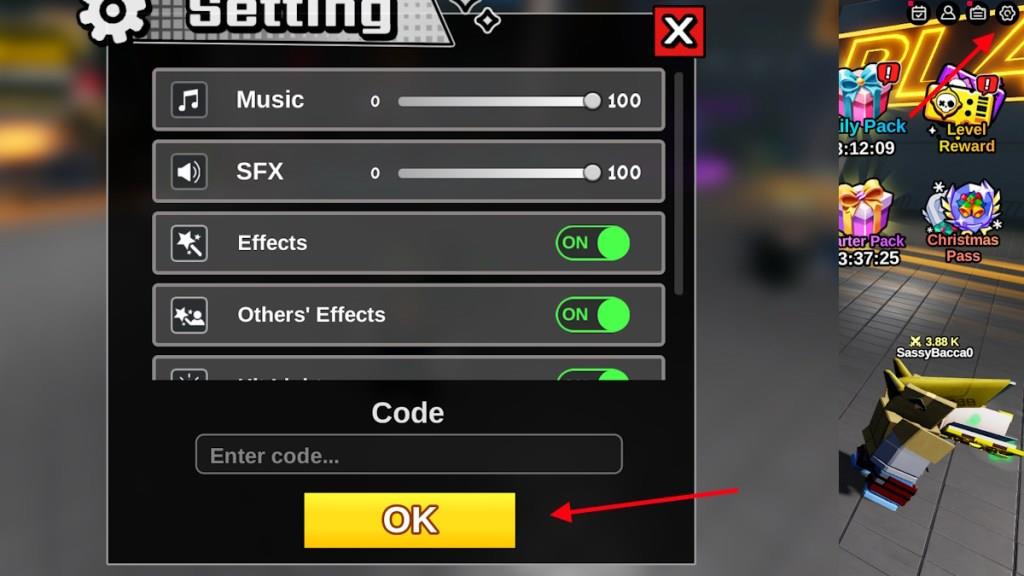
Redeeming the codes for Dungeon Hunters is extremely easy and requires no additional steps like joining a group or liking the game. Here are the steps to do it:
- Launch Dungeon Hunters on Roblox.
- Click on the Gear icon in the top right corner of the screen.
- Type the active code in the ‘Enter code…’ box.
- Click OK to redeem the rewards.
How to Get More Dungeon Hunters Codes
New codes appear on the Dungeon Hunters Discord server and official Roblox group page. Check the developer’s X account and Roblox game description for announcements. Join the community on Reddit or Discord to catch player-shared updates as soon as they drop. Bookmark these spots and visit them weekly to stay ahead. Redeem any fresh codes right away in the game menu before they expire.
The best place to find more codes for Dungeon Hunters is right here. We update our list regularly, so you will always find the latest codes here before anywhere else on the internet. But, if you don’t trust us with the latest codes, what you can do is join their Discord server.
Join the Dungeon Hunters Discord server and keep your eye on the ‘announcement’ channel. Here you will find the latest codes once they are revealed by the developers. However, the codes are often buried under other announcements, so our list here would still be the most convenient option for you.
Why Are My Dungeon Hunters Codes Not Working?
Codes might fail if they have expired since the list was last checked in December 2025-developers release new ones irregularly and deactivate old ones without notice. Typing errors, like wrong capitalization or extra spaces, often block redemption too. Make sure the game is up to date on Roblox, as outdated versions reject valid codes. Check your internet connection, since poor links halt the process. Finally, confirm you haven’t claimed that code already on your account.
If your Dungeon Hunters codes are not working correctly, then here is what you need to do. First, make sure you have copied the exact code from our list here. Next, make sure that there is no extra space before or after the code. Other than that, sometimes codes released during an update only work on new servers. Finally, if the codes are still not working, then they may have expired.
How to redeem codes in Dungeon Hunters step by step
Here is a simple step-by-step guide to redeem codes in the Roblox game Dungeon Hunters.
Step-by-step redeem guide
-
Launch Dungeon Hunters on Roblox and join a game lobby.
-
Look for the cog/gear icon (settings button) on the screen, usually in a corner (commonly top-right or top-left depending on your device/UI).
-
Click/tap the cog icon to open the settings menu where the code box appears.
-
Find the code text box at the bottom or center of that menu labeled something like “Enter code…”.
-
Carefully type your code exactly as shown (match capital letters, numbers, underscores, and ! symbols).
-
Press the OK or Redeem button next to the box to submit the code.
-
If the code is valid and active, a pop-up will confirm your rewards (usually Gems/diamonds) and they will be added to your account automatically.
If a code doesn’t work
-
Check for typos, especially capital letters and symbols like _ or !.
-
Try again with slow, careful typing or copy-paste if you are on PC.
-
If it still fails, the code is most likely expired or already used on your account.
List all active Dungeon Hunters codes
Here is the full list of codes that are currently marked as active for the Roblox game Dungeon Hunters as of mid-January 2026; every code below gives about 100 Gems/diamonds unless otherwise noted.
All active Dungeon Hunters codes
-
Dc_15000! – 100 Gems (new)
-
200K_liKEs – 100 Gems (new)
-
Dc_!10000! – 100 Gems
-
dC_!9000 – 100 Gems
-
DC_!8000 – 100 Gems
-
120kLIKes – 100 Gems
-
DC_7000! – 100 Gems
-
DC_6000! – 100 Gems
-
DC_5000! – 100 Gems
-
Dc_4000! – 100 Gems
-
Dc!_3000 (sometimes written as Dc_3000) – 100 Gems
-
DC_2000 – 100 Gems
-
50liKeS_k – 100 Gems or “loads of Gems” depending on source
-
k25lIkES – 100 Gems
-
DC_1000 – 100 Gems
-
DC_500 – 100 Gems
-
DC_100 – 100 Gems
-
12K_LiKes – 100 Gems/reward
-
5K_lIKes – 100 Gems
-
1K_LiKes – 100 Gems
-
100liKES – 100 Gems
-
DC_join – 100 Gems
-
NEW – 100 Gems
Important notes
-
Enter codes exactly as written, including capitals, underscores, and exclamation marks, since the game is case-sensitive.
-
Different sites sometimes show small formatting variations (like Dc!_3000 vs Dc_3000), so if one form fails, try the alternative spelling.
-
Guides currently list no expired codes, but some may still be turned off silently by the developer; if a code says invalid after careful typing, it has likely been disabled or already used.
