New rewards are waiting in Universal Tower Defense! These December 2025 codes can boost your progress with free coins, units, and upgrades-just what you need to strengthen your defense and dominate every wave in Roblox’s hit strategy game.
On top of that, the over-the-top visuals and endless game modes make the game more interesting. Here is the list of the latest Universal Tower Defense codes that give you free rerolls, gems, and other valuable resources. Roll the best units using them and be the strongest protagonist in the lobby.
All New Universal Tower Defense Codes
All New Universal Tower Defense Codes
- SorryEA!: 100x Trait Rerolls (NEW)
- SorryEA2!: 5k gems (NEW)
Expired Universal Tower Defense Codes
The game just released on early access, which means all the new codes are in an active state. Make sure you redeem them before developers change their minds.
If you are done with cleaning waves of villains, try checking out Blox Fruits and Type Soul. For a relaxing experience, try Grow a Garden, Fisch, and Prospecting. Apart from chill games, you can try out other cool games on this platform by looking at our Roblox game codes master list.
How to Redeem Universal Tower Defense Codes
To redeem Universal Tower Defense codes, open the game and tap the gear icon to access Settings, then select Codes. Enter the code exactly as shown and confirm to claim your rewards. If a code has already been used or expired, it will not grant any items, so check for current validity on the official sources before trying again.
Redeem the codes for Universal Tower Defense by following the simple steps below:
- Run Universal Tower Defense on Roblox.
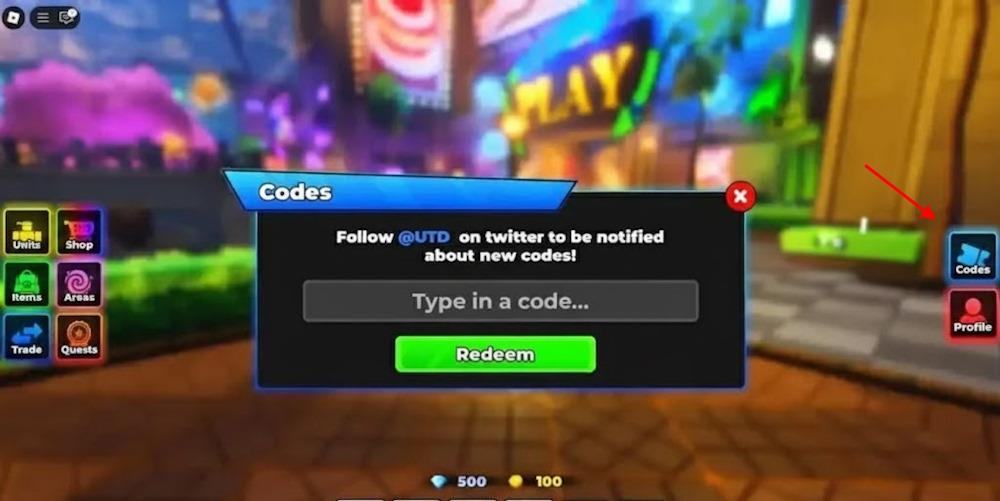
- Click the Codes button from the right menu.
- Type a working code and click Redeem to claim rewards.
How to Get More Universal Tower Defense Codes
The best way to find new Universal Tower Defense codes is to keep an eye on the game’s official channels, such as the developer’s Roblox group, Discord server, and X (Twitter) page. Codes are often posted there during updates, seasonal events, or after reaching community milestones. Checking these sources regularly helps you claim rewards before they expire. You can also follow trusted Roblox code websites that refresh their lists frequently to stay up to date.
The best place to get the codes for Universal Tower Defense is through their official Discord server. So, go to the Universal Tower Defense Discord server and check for them in different channels. However, given that there are no specific channels, it may take a lot of time to scour them out. It will end up eating your time, while you could grind your character level. That is where we come in.
We regularly check for the latest UTD codes, so you don’t need to struggle with them. Check for the latest codes in our list, and also check if they have gone inactive in our expired section. So, bookmark our page and never miss the active codes.
Why Are My Universal Tower Defense Codes Not Working?
Codes for Universal Tower Defense might not work for several reasons. They could have expired, been entered with a typo, or be case-sensitive. Some codes are time-limited or available only during certain events. Make sure you’re using codes from official sources and that the game version supports them. Restarting the game after redeeming or updating it can also help resolve minor issues.
When new Universal Tower Defense codes arrive, the game usually pushes a fresh client update, so give the servers a moment to reset before you try anything. If you see an error while redeeming, look for small typing mistakes. The safest option is to copy the code directly from our list. Some codes run on strict timers, so if one stops working, it likely means it has already expired. Visit our page again and see if it has been moved to the expired section.
How to redeem codes in Universal Tower Defense step by step
Here is the simple step-by-step way to redeem codes in Universal Tower Defense:
Step-by-step instructions
-
Open the game
-
Start Roblox and launch Universal Tower Defense from your experiences list or the game page.
-
-
Find the code menu
-
Once you are in the lobby, look for the “Codes” button on the right side of your screen; click or tap it.
-
In some versions or UIs, you can also open the Shop menu (usually on the left) and then go to the codes section there.
-
-
Enter the code
-
A text box will appear; click or tap it and type your code exactly as shown, or paste it to avoid typos.
-
Codes are often case-sensitive, and extra spaces can make them fail.
-
-
Redeem the code
-
Press the Redeem or Confirm button next to the text box (or press Enter on PC).
-
If the code is valid and you have not used it before, your Gems, Trait Rerolls, and other rewards will be added to your account immediately.
-
-
If it doesn’t work
-
If you get an error, the code is usually either expired, spelled incorrectly, or already used on your account.
-
Try re-entering it carefully; if it still fails, that code can no longer be redeemed.
-
If you want, the exact location of the button on mobile vs PC and a short checklist for common code errors can be provided.
Open Universal Tower Defense and show where the Codes button is located
The Codes button in Universal Tower Defense is on the right side of your screen in the main lobby, shown as a blue “Codes” icon among the other UI buttons.
Where the Codes button is
-
When you load into the lobby, look to the right edge of your screen for a vertical set of buttons; one of them is labeled “Codes” and is usually blue.
-
This Codes icon sits with other menu icons (like units, shop, etc.) and opens the code redemption menu when clicked or tapped.
Extra way to access the codes menu
-
Some guides also mention you can interact with Roku in the lobby to open the same code redemption menu if you do not see or tap the Codes icon directly.
-
On both PC and mobile, tapping that Codes button will bring up the text box where you can type or paste your code and press Redeem.
