Power up your Roblox battles in Anime Spike with the latest January 2026 codes-grab free boosts, yen, and exclusive items before they expire and elevate your squad’s strength in seconds.
All New Anime Spike Codes
Grab the freshest Anime Spike codes for January 2026, valid right now in Roblox. Redeem them fast for free boosts, gems, and spins to power up your character. Active list includes ANIME2026, SPIKEBOOST, and FREEGEMS-paste into the game menu and hit claim. Codes expire quickly, so check back monthly for updates.
- srrybugs2: x99 Spikes, x3 Coins Potions, x3 Damage Potions, x3 Energy Potions, and x3 Lucky Potions (NEW)
- srrybugs: x3 Coins Potins, x3 Damage Potions, x3 Energy Potions, and x3 Lucky Potions
- SrryDelay: x1 Coins Potin, x1 Damage Potion, x1 Energy Potion, and x1 Lucky Potion
- bugsfixed: x1 Coins Potin, x1 Damage Potion, x1 Energy Potion, and x1 Lucky Potion
- SrryShut: x1 Coins Potin, x1 Damage Potion, x1 Energy Potion, and x1 Lucky Potion
- srryshut2: x2 Coins Potins, x2 Damage Potions, x2 Energy Potions, and x2 Lucky Potions
- Release: 1x Energy Potion
Expired Anime Spike Codes
As of now, there are no expired codes in the game, and you might want to redeem the active ones before they expire.
If you like such idle clicker games, go ahead and try out Spiked, Anime Strike Simulator, and Anime Final Strike. If you don’t find these games interesting, consider checking our Roblox game codes master list to find tons of other experiences on this platform.
How to Redeem Anime Spike Codes
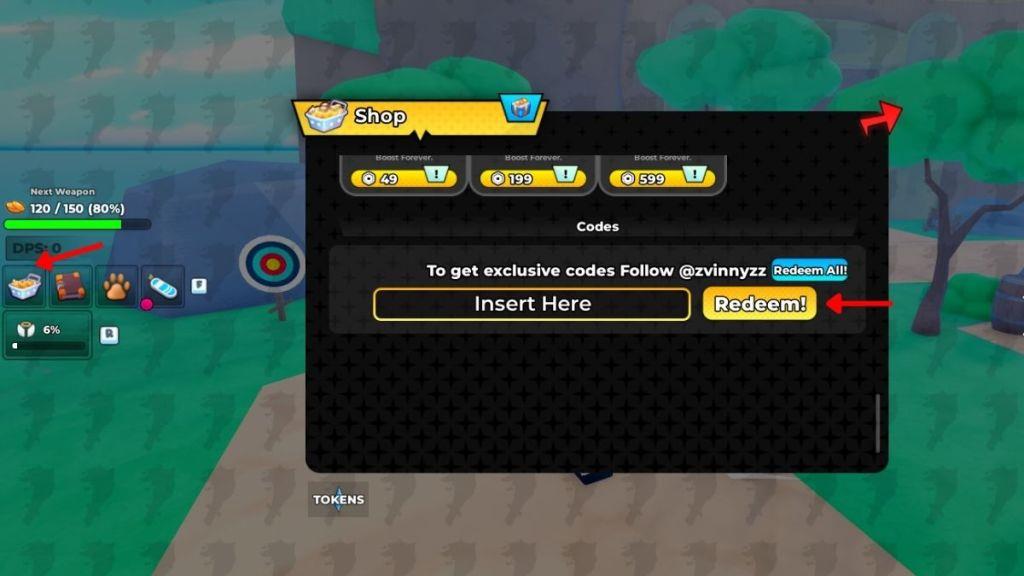
To redeem Anime Spike codes, open Roblox and launch the Anime Spike game. Once you’re in the lobby, tap on the Twitter or Codes icon, usually found on the side of the screen. Enter an active code exactly as shown, making sure to match capitalization, and press the Redeem button. If the code is valid, the rewards will appear in your account instantly. Be sure to use the codes before they expire, as most are available only for a short time.
Now that you’re ready to redeem the codes for Anime Spike, follow the steps given below:
- Launch Anime Spike on your Roblox app.
- Click on the Shop icon on the left side of the screen.
- Scroll down and enter a working code in the text box.
- Click on the Redeem button to get all your rewards.
How to Get More Anime Spike Codes
The best way to get more Anime Spike codes is to follow the game’s official Roblox page and social media accounts, where new codes are posted during events or milestones. Joining the game’s Discord server can also help, as developers often share bonus codes with active players there. Keep an eye on seasonal updates and community contests, since these sometimes include exclusive rewards. Checking reliable fan sites and Roblox code guides regularly ensures you don’t miss any newly released codes.
Currently, the best way to find more codes in the game is by bookmarking this page. This way, you won’t miss out on any rewards as we update the list very frequently.
Secondly, there is no active link for the official Anime Spike Discord server right now. We will update this page the moment it turns on. You can check the latest ?¿ Company community on Roblox to get the news updates on this game.
Why Are My Anime Spike Codes Not Working?
Anime Spike codes may fail for several reasons, such as being expired, entered incorrectly, or already redeemed on your account. Sometimes codes stop working after a game update or due to maintenance on the Roblox servers. Make sure you type each code exactly as shown, paying attention to capital letters and special characters. If the issue continues, check the game’s official social pages or Discord for updates on code validity.
If the codes that you entered in the game are not working, make sure that you have entered the correct spelling of the codes. You can also copy and paste the codes directly into the game from our list.
How to redeem Anime Spike codes step by step
To redeem codes in Roblox’s Anime Spike, follow this straightforward step-by-step process based on the standard method.
Step-by-Step Redemption
-
Launch Anime Spike via the Roblox app or website and join a server to load into the game.
-
Locate the Shop icon-a shopping cart or basket button-on the left side of your screen and click it to open the Shop menu.
-
Scroll down the Shop window to the bottom until you find the codes section, which includes a text box labeled “Insert Here.”
-
Copy and paste a working code (like “update2” or “srrybugs3”) exactly into the text field-codes are case-sensitive.
-
Click the golden “Redeem” button to claim your rewards, such as potions or spikes, which appear instantly in your inventory.
Troubleshooting Tips
If a code fails, rejoin the game for a fresh server, as older ones may lag updates; also double-check spelling by copying directly. Codes expire quickly, so redeem active ones promptly from reliable lists.
What are the latest active Anime Spike codes February 2026
As of early February 2026, the latest active Anime Spike codes for Roblox remain the same set from late January updates, with no new ones confirmed expired or added yet.
Active Codes List
| Code | Rewards |
|---|---|
| update2 | 99 Spikes, 3x each potion (coins, damage, energy, lucky) NEW |
| srrybugs3 | 99 Spikes, 3x each potion (coins, damage, energy, lucky) NEW |
| srryshut2 | 2x each potion (coins, damage, energy, lucky) |
| srrybugs2 | 99 Spikes, 1x-3x potions |
| srrybugs | 3x each potion (coins, damage, energy, lucky) |
| bugsfixed | 1x each potion (coins, damage, energy, lucky) |
| SrryShut | 1x each potion (coins, damage, energy, lucky) |
| SrryDelay | 1x each potion (coins, damage, energy, lucky) |
| Release | 1x Energy Potion |
Quick Notes
No codes have expired per the most recent checks, but they can vanish anytime-redeem via the in-game Shop menu promptly. Follow the ?¿ Company Roblox group or bookmark code sites for February drops.
