BlockSpin Codes for March 2025 bring fresh rewards for Roblox players eager to boost their progress. From rare spins to bonus coins, these codes can give you an edge in the fight for upgrades-before they expire.
If you want some too, then use our list of BlockSpin codes that grant you free cash in the game. You can use it to buy items and weapons.
All New BlockSpin Codes
Stay updated with the newest BlockSpin codes that grant you free spins, coins, and special bonuses for a boost in your gameplay. These fresh codes are released regularly by the developers, offering players new ways to earn rewards and progress faster. Make sure to redeem them quickly, as many codes expire after a short time.
- 4VA8KM: 500 Cash (NEW)
- 4B008X: 500 Cash (NEW)
- A745WK: 500 Cash
- 9AAM1S: 500 Cash
- XZK37U: 500 Cash
- 182870: 500 Cash
- 4OKJ3Q: 500 Cash
- 5OMI80: 500 Cash
- 17955S: 500 Cash
- D9RP5B: 500 Cash
- F3GKU4: 500 Cash
- K3P6K7: 500 Cash
- 892F4S: 500 Cash
- 0HJC50: 500 Cash
- 6GZ19D: 500 Cash
- 971L60: 500 Cash
- NWP2ZZ: 500 Cash
- GX1PFM: 500 Cash
- O4YEL6: 500 Cash
- U8203N: 500 Cash
- Y3VDI1: 500 Cash
- N9OSC8: 500 Cash
- 7BAO31: 500 Cash
- 6263R5: 500 Cash
- K8H5EA: 500 Cash
- VX49HE: 500 Cash
- CBE3C2: 500 Cash
- OJ7B81: 500 Cash
- Z8893Y: 500 Cash
- 92DV74: 500 Cash
- RP5TCW: 500 Cash
- C529KA: 500 Cash
- 0XGS83: 500 Cash
- 135S4O: 500 Cash
- CJ57A1: 500 Cash
- 9F11P4: 500 Cash
- 6KP824: 500 Cash
- 1S4R39: 500 Cash
- ROQ80F: 500 Cash
- 57W0I9: 500 Cash
- 41J25L: 500 Cash
- JAF7YJ: 500 Cash
- 1W9YX5: 500 Cash
- TE78RD: 500 Cash
- ULC52D: 500 Cash
- K276O1: 500 Cash
- 8I9IT0: 500 Cash
- U314BD: 500 Cash
- 51BU1E: 500 Cash
- U0HTU5: 500 Cash
- 709463: 500 Cash
- N77E67: 500 Cash
- DMA2R8: 500 Cash
- 3G8II5: 500 Cash
- L6RJP7: 500 Cash
- 742723: 500 Cash
- ZO40UO: 500 Cash
- 542SX4: 500 Cash
- PUQ371: 500 Cash
- K0K0G4Y: 500 Cash
- 3R197I: 500 Cash
- QZ6IF3: 500 Cash
- BU14NA: 500 Cash
- ODV5SO: 500 Cash
- 6F1776: 500 Cash
- 6T5VXY: 500 Cash
- O99LTG: 500 Cash
- M98A74: 500 Cash
- KHU619: 500 Cash
- 1VHY84: 500 Cash
- CG8X5B: 500 Cash
- XE9V6X: 500 Cash
- Q9P034: 500 Cash
- D35XFN: 500 Cash
- NE9UZQ: 500 Cash
- U42UD2: 500 Cash
- XOH53X: 500 Cash
- 1G2JKK: 500 Cash
- 9GHJ19: 500 Cash
- 21GLJ0: 500 Cash
- EQI49L: 500 Cash
- 1X21TB: 500 Cash
- PN8984: 500 Cash
- 3S221X: 500 Cash
- 0743O5: 500 Cash
- 38X143: 500 Cash
- EBP0C9: 500 Cash
- 966L1A: 500 Cash
- 788S95: 500 Cash
- X2ZDB0: 500 Cash
- E2L2ZS: 500 Cash
- 1NB049: 500 Cash
- OI1ZAD: 500 Cash
- K27601: 500 Cash
- 4B008X: 500 Cash
Expired BlockSpin Codes
As of writing this, there are no expired BlockSpin codes. However, that could also be since BlockSpin referral codes can only be possibly used once.
But don’t let that stop you from having fun. Our Roblox game codes master list is there for that. Want similar games where you can do whatever you want? Check out titles like Cali Shootout and Roblox Criminality.
How to Redeem BlockSpin Codes
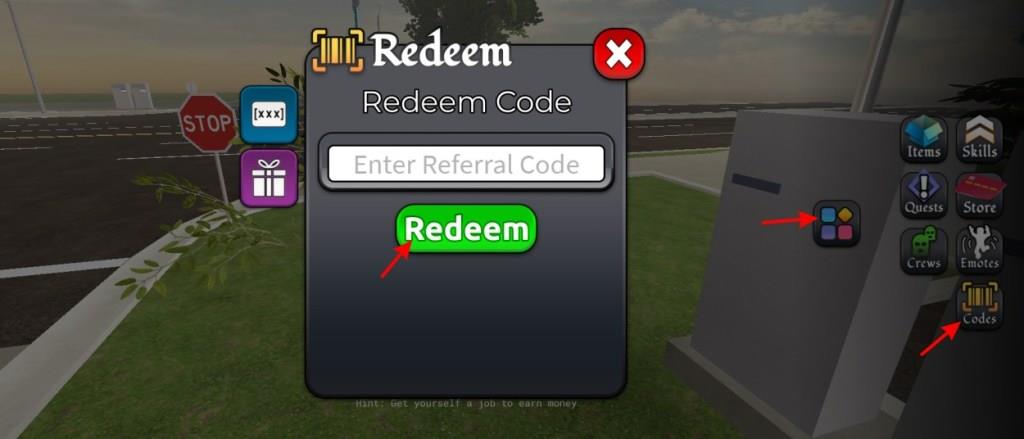
To redeem BlockSpin codes, launch the game on Roblox and tap the Codes button on the main screen. A text box will appear-type or paste your code exactly as shown, including any capital letters or numbers, then press Redeem. If the code is active and entered correctly, your rewards, such as coins or spins, will appear instantly in your account. Expired or invalid codes will trigger an error message, so check for typos or try another valid code.
Ready to redeem the codes for BlockSpin? Follow the steps below to do so:
- Launch BlockSpin on the Roblox app.
- Click on theblocks on the right side of the screen.
- Now, click on the codes button.
- Type in a working code in the text box.
- Finally, click the Redeem button to get your cash.
How to Get More BlockSpin Codes
Players can find new BlockSpin codes by checking the game’s official social media pages, such as Twitter, Discord, and YouTube, where developers post the latest rewards. Joining the game’s community groups on Roblox can also help, as codes are often shared during updates or special milestones. It’s smart to bookmark trusted fan sites or follow code update pages that compile active codes regularly. Staying active in events and promotions gives players more chances to grab fresh codes before they expire.
The best place to find the latest BlockSpin codes is this article itself, as we add them in real time. However, you should know that BloxSpin codes are referral codes, so they don’t expire. Nonetheless, there are ways to get the latest codes for this exerperience.
For starters, begin by joining the official BlockSpin Discord server. Once there, navigate to the ‘referral-codes‘ channel. You will the latest BlockSpin referral codes in this section. Want even more? Follow the developer Twitter. Lastly, do join the game’s official Roblox community to know everything about the game.
How to redeem BlockSpin codes step by step
To redeem codes in BlockSpin on Roblox, follow these straightforward steps derived from consistent guides across sources. Codes typically reward cash but can only be used once per account.
Redemption Steps
-
Launch BlockSpin via the Roblox app or website.
-
Locate the menu icon (colored blocks or four shapes) on the right side of the screen and click it.
-
Select the “Codes” tab or button from the menu.
-
Enter a valid code exactly as shown (case-sensitive; use copy-paste to avoid errors) into the text field.
-
Click “Redeem” to claim your reward, such as cash.
Troubleshooting Tips
New accounts may face an “Alt Account” validation error; play for 10-15 minutes first. Each code works once, and expired ones will fail-check for updates via the game’s Discord. Referral codes (separate tab) give 500 cash to you and 200 to the sharer.
Open the Codes menu in BlockSpin where is it located
In BlockSpin on Roblox, the Codes menu is accessed via a dedicated button on the right side of the screen. This button appears as a menu icon, often described as colored blocks, four shapes, or simply “the menu button”.
Exact Location
Look to the right edge of your gameplay screen for the menu button, typically near other UI elements like shop or inventory icons. Click it to open the menu, then select the “Codes” tab or option, which may include separate sections for standard codes (white field) and referral/blue codes.
Visual Tips
Guides consistently show it as a prominent icon in that position, even on mobile-tap if it doesn’t highlight on hover. If missing, ensure you’re not in a loading screen or private server, as UI can vary slightly by update.
