Grow your defenses and strengthen your garden-these new Plants Tower Defense codes for January 2026 bring a fresh wave of rewards to boost your strategy and keep the undead at bay.
Hence, here are the latest Plants Tower Defense codes that will help you get some free coins and gems to buy the plant packs in the game.
All New Plants Tower Defense Codes
Stay up to date with the latest Plants Tower Defense codes for February 2026 and claim your rewards before they expire. These codes give you free coins, gems, and other bonuses that help you upgrade your plants and strengthen your defense against tougher enemies. Check back often, as new codes are released regularly with each update or event.
- 0326: 160 gems (NEW)
- gem: 20 gems (NEW)
- newyear: 1126 coins
- primitive: 300 coins
Expired Plants Tower Defense Codes
As of now, there are no expired codes in the game yet, so I would recommend that you redeem the ones available right away before they expire.
If you’re fond of such tower defense games, you might consider checking out the Garden Tower Defense, Grow Garden Tower Defense, and Universal Tower Defense as well. Moreover, do check out our Roblox game codes master list because it consists of more such great games that you will love exploring on the platform.
How to Redeem Plants Tower Defense Codes
To redeem codes in Plants Tower Defense, open the game in Roblox and press the Twitter or Codes button on the main menu. Enter a valid code into the text box exactly as shown, then hit the Confirm or Redeem button. If the code is active, your rewards such as coins, gems, or boosts will be added to your account instantly. Make sure to check for typos or expired codes, as these won’t work.
Redeeming the codes for Plants Tower Defense is really easy, as all you have to do is follow the steps below:
- Launch Plants Tower Defense on your Roblox app.
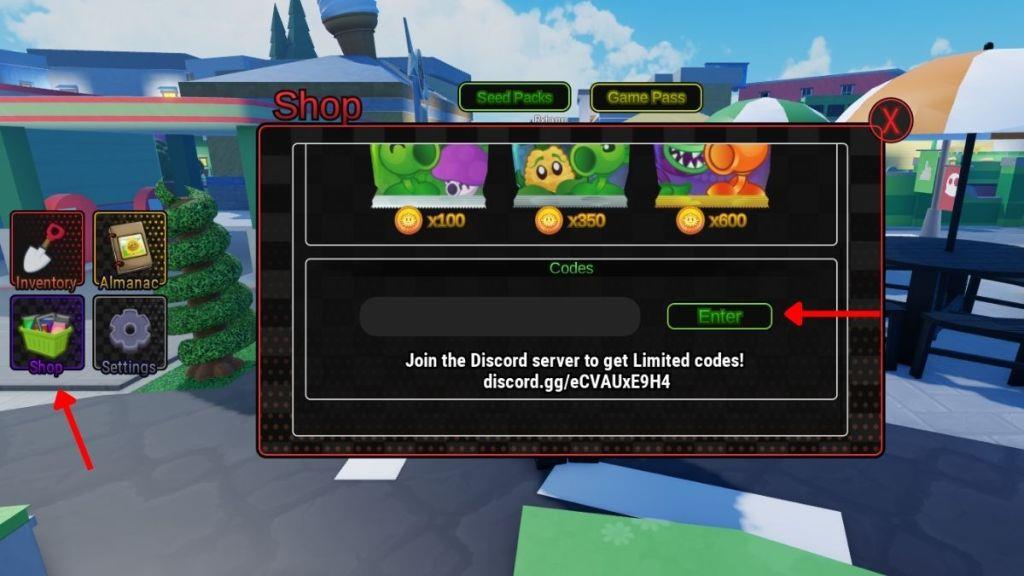
- Click on the Shop icon on the left side of the screen.
- Scroll down and enter a working code in the text box of the pop-up window.
- Press the Enter button to get all your rewards.
How to Get More Plants Tower Defense Codes
You can get more Plants Tower Defense codes by following the game’s official Roblox page and joining the developer’s Discord server, where new codes are often posted during updates or special events. Checking the game’s Twitter or community group can also help you spot limited-time codes before they expire. Many players share active codes on fan forums and YouTube channels, so it’s worth keeping an eye on those sources for new rewards.
The best place to get more codes in this game is by bookmarking our page, as we update our list from time to time. This way, you will never miss out on any cool rewards before they expire.
Also, do join the Plants Tower Defense Discord server, as here you will find the working codes in their ‘codes‘ channel. Finally, you can also join the official Plants Tower Defense Team community on the Roblox platform to stay updated on their regular announcements.
Why Are My Plants Tower Defense Codes Not Working?
If your Plants Tower Defense codes aren’t working, they may have expired or been entered incorrectly. Double-check for typos, make sure you’ve copied the exact capitalization, and confirm that the code hasn’t been removed by the developers. Sometimes, only new servers or updates accept recent codes, so restarting the game or checking for updates can help.
Now, if any of the working codes do not work in your game, it might be possible that you’re on an older server. So, exit the game, refresh your internet connection, and rejoin. If it still doesn’t work, consider selecting a new server from their server list where you find the maximum number of people.
How to redeem codes in Plants Tower Defense step by step
Here is a clear step-by-step guide to redeem codes in Plants Tower Defense.
Step-by-step redeem guide
-
Open the game
-
Launch Roblox, search for Plants Tower Defense, and join a server.
-
-
Open the Shop/settings menu
-
Once you are in the lobby, look at the left side of your screen and click the Shop button (some versions may show a Settings button instead, both work for codes).
-
-
Scroll to the code box
-
A shop window pops up; scroll all the way down until you see the text box for entering codes.
-
-
Enter your code carefully
-
Click the box and type or paste a working code (for example: primitive, newyear, gem, 0326) with no extra spaces before or after it.
-
-
Redeem the code
-
Press Enter on your keyboard (or the on-screen Enter/Confirm button if shown) to submit the code.
-
-
Check your rewards
-
The game often does not show a success pop-up, so watch your Coins and Gems totals before and after; if the numbers go up, the code worked.
-
If your code doesn’t work
-
Make sure you typed it exactly (capitalization and spelling matter).
-
You can only redeem each code once per account.
-
If you are on an old server, rejoin or restart the game and try again.
What are the latest working codes for Plants Tower Defense February 2026
Here are the latest working Plants Tower Defense codes for early February 2026, plus what they give you.
Latest working codes (February 2026)
As of February 1, 2026, these are still listed as the newest active codes for the latest update.
| Code | Reward | Status note |
|---|---|---|
| primitive | 300 Coins | Marked as new and active in multiple February 2026 code lists. |
| newyear | 1,125-1,126 Coins (small rounding difference between sites) | Still flagged as a new/working code after the latest update. |
| gem | 20 Gems | Some February lists now mark this as expired, so it may or may not still work on your server. |
| 160 Gems | Likewise reported as expired in at least one February guide, but still mentioned in “latest update” Q&A. |
Because a February guide now moves gem and into the expired section while another still lists them as active, you may need to try them yourself; if they fail, only primitive and newyear are guaranteed for February 2026.
Quick reminder on redeeming
-
Open Plants Tower Defense, click the Shop/Settings button on the left, scroll down to the code box, type the code exactly, and press Enter.
-
If a code doesn’t work, switch to a newer server by rejoining, since older servers sometimes don’t accept the newest codes.
