New month, new loot-January 2026 brings a fresh set of My Fishing Brainrots codes packed with free rewards for your Roblox adventures. Grab these before they expire and reel in some serious in-game boosts.
You need to upgrade your hatched brainrots using in-game currency, and codes can be very useful if you’re new to this game. In this guide, you’ll learn about all the My Fishing Brainrots codes and how you can redeem them.
All New My Fishing Brainrots Codes
Keep your game rewards up to date with the newest My Fishing Brainrots codes released for February 2026. These codes can grant you coins, boosts, and other helpful items to make your fishing sessions more rewarding. Make sure to redeem them quickly, as they may expire soon and be replaced with new ones in future updates.
- DISCY: one spin (NEW)
- LUCKY: double luck for ten mins (NEW)
Expired My Fishing Brainrots Codes
There are no expired codes yet due to the redemption system being new to this Roblox game. Make sure to redeem the active codes promptly before they expire.
While My Fishing Brainrots is a unique brainrot game on Roblox, you can also try similar titles like Steal a Brainrot or Escape Tsunami for Brainrots. After enough brainrotting, try checking out The Forge or 99 Nights in the Forest. For a relaxing experience, try Grow a Garden, Fisch, and Prospecting. Apart from chill games, you can try out other cool games on this platform by looking at our Roblox game codes master list.
How to Redeem My Fishing Brainrots Codes
To redeem your My Fishing Brainrots codes, launch the game on Roblox and select the Twitter or Codes icon from the main menu. Enter a valid code in the text box exactly as shown, then press the Redeem button to claim your reward. If the code is active, the rewards will be added to your account instantly; expired or mistyped codes will not work, so double-check your entry before submitting.
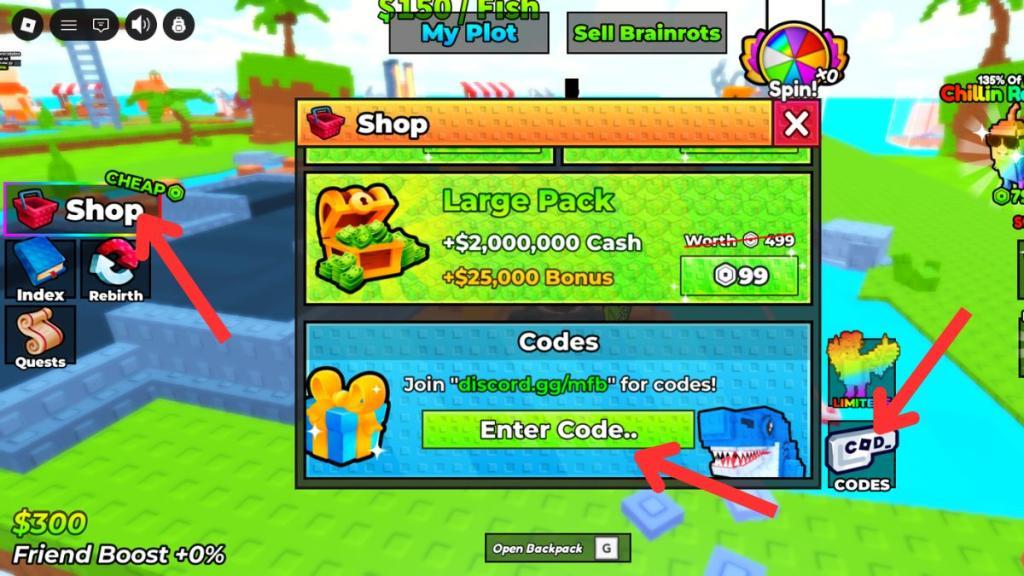
Redeeming codes for My Fishing Brainrots is simple. Here is how you can do it and claim the free rewards:
- Launch My Fishing Brainrots on Roblox.
- Click the Shop option on the left side.
- Click on the Codes option.
- Enter a working code in the ‘Enter Code..’ area.
- Hit Enter to get the rewards.
Where to Get More My Fishing Brainrots Codes
Check the official My Fishing Brainrots Discord server and Roblox group page for new codes. Follow the game’s developer on X (formerly Twitter) at their verified handle. Join the Roblox My Fishing Brainrots community hub for announcements. Watch the latest YouTube updates from the creators, as they often drop codes in video descriptions or pinned comments. Bookmark reliable code sites like Pro Game Guides or Beebom that track updates.
The best place to learn about new codes for My Fishing Brainrots is right here. We are always on the lookout for new codes, constantly checking whether the developers have finally added a code system in the game or not. So, you don’t have to burden yourself with this task and can rely on us instead. We can assure you that the moment a code is released for this game, you will find it first on our list above.
But if you would much rather look for codes yourself, then join the My Fishing Brainrots Discord server. This is the best place to await the announcement of new codes while you have fun discussions with other players in the community. Other than that, join the My Fishing Brainrots Roblox community to be notified of game-related updates.
Why Are My Fishing Brainrots Codes Not Working?
Codes fail to redeem if they’ve expired, since developers release new ones monthly. Check for typos by copying directly from a reliable list. Your account might already claim the reward, or the game could be glitching-restart Roblox or the app. Ensure you’re playing the correct My Fishing Brainrots experience on Roblox, as codes tie to specific versions. Contact support through the game’s Discord if issues persist.
When new My Fishing Brainrots codes arrive, the game usually pushes a fresh client update, so give the servers a moment to reset before you try anything. If you see an error while redeeming, look for small typing mistakes. The safest option is to copy the code directly from our list. Some codes run on strict timers, so if one stops working, it likely means it has already expired. Visit our page again and see if it has been moved to the expired section.
How to redeem codes in My Fishing Brainrots step by step
Here’s a simple step-by-step guide to redeem codes in My Fishing Brainrots:
-
Open Roblox and launch My Fishing Brainrots.
-
Wait until you fully load into the game’s main area.
-
Look on the left side of your screen and click the Shop button.
-
In the shop menu, either:
-
Click the Codes button (usually at the bottom-right of the shop menu), or
-
Scroll all the way down until you see the Codes section.
-
-
Click the code text box that says something like “Enter Code…”.
-
Type an active code (for example, DISCY or LUCKY).
-
Press Enter/Return on your keyboard or the on-screen redeem button.
-
If the code is valid and not expired, a message will pop up telling you what reward you received, and it is added to your account instantly.
-
Repeat steps 5-8 for any other active codes you want to use.
Extra tip: Codes are not case sensitive in this game, so you don’t have to worry about using capital letters correctly.
What are the active codes for My Fishing Brainrots February 2026
Active codes remain unchanged.
As of February 1, 2026, the active My Fishing Brainrots codes are still DISCY (1 spin) and LUCKY (2x luck for 10 minutes), with no new codes reported.
Redemption Reminder
Follow the same steps from before: Launch the game, hit Shop on the left, go to Codes at the bottom, enter the code, and press Enter.
Why No New Codes?
Developers release codes sporadically during updates or events; check the game’s Discord or Roblox page for announcements, as January lists haven’t been updated yet.