Roblox players are buzzing about the latest Control Codes update from December 2025 – a new batch of codes packed with free money, rare fragments, and hidden rewards that can boost your gameplay faster than ever. Here’s what’s active this month and how to claim every bonus before they vanish.
The fight between survival and defeating the unnatural is the key, and to do so, you will need money and fragments. Here is the list of all the latest Control codes that will help you with free money and fragments.
All New Control Codes
The December 2025 update introduced a fresh set of control codes that players can use to gain extra money and fragments in Roblox. These codes were released with the latest event patch, bringing limited-time bonuses for active users. Each code grants specific rewards, from currency boosts to rare in-game items, adding more excitement to gameplay sessions. Be sure to redeem them soon, as most codes expire quickly after release.
- FIXES: 5000 Money (NEW)
- UPDATE01: 25 Fragments (NEW)
- BUGFIXES01: 2000 Money
- RELEASE: 2000 Money
Expired Control Codes
There are no expired codes yet in this game. While waiting, you can try the most popular Roblox games such as The Forge and 99 Nights in the Forest.
Now that you have checked out this game, go and try out Survive the Elevator and Dead Sails. But if these are worth your time, you can check our Roblox game codes master list to find the best ones to try on this platform.
How to Redeem Control Codes
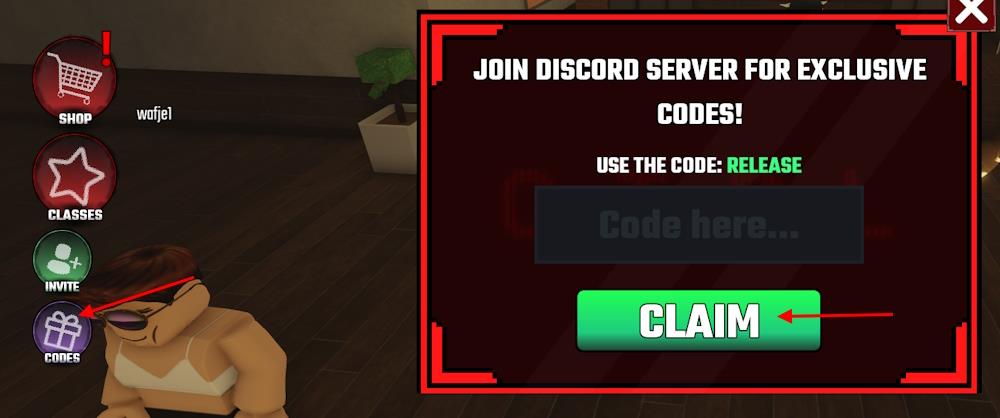
To redeem control codes, open Roblox and launch the specific game that offers them. Find the dedicated “Codes” or “Rewards” section, usually accessible from the game’s main menu or settings icon. Enter the active code exactly as shown, paying attention to capital letters and numbers, then press the confirm or redeem button. If the code is valid, your free rewards-such as money, fragments, or bonus items-will be added to your account instantly.
All you need to do to get the latest rewards is follow the steps below and redeem the codes for Control:
- Open the Control game on Roblox.
- Click the Codes option from the bottom left.
- Type a working code in the pop-up.
- Click the Claim button to acquire rewards.
Where to Get More Control Codes
You can find new control codes through official Roblox social media pages, including X (formerly Twitter), YouTube, and Discord, where developers often post updates and time-limited promotions. Checking event announcements within the game’s own news section also helps you stay informed about newly released codes. Some community forums and fan-run websites regularly track active codes, but always verify sources to avoid expired or unsafe links.
The first method of getting more codes for Control in this game is by bookmarking this page right now. You will not miss out on any new rewards since we keep updating this list frequently. We also remove the inactive codes so there is no confusion during the new update.
You can also join the official Control Discord server and check the ‘codes‘ channel to find the list of new codes. Lastly, go ahead and join the Roblox Control Corporation community on the platform for some exclusive in-game rewards.
Why Are My Control Codes Not Working?
Control codes in Roblox’s Control game fail due to unstable internet connections that interrupt redemption. A single misspelled letter or extra space blocks entry since codes require exact matches. Copy codes directly, restart the Roblox app, or check for expiration if issues persist.
Sometimes a code refuses to work, even when it should. Make sure your connection is stable, then double-check the spelling since a single wrong letter can break it. The safest option is to copy the codes from our list and paste them straight into the game. If the problem sticks around, restart your Roblox client and confirm that the Control codes are not already expired.
How to redeem Control codes step by step in-game
Redeeming Control codes in Roblox follows a straightforward in-game process. Players must join the official Control Corporation group first for codes to work. Follow these exact steps for success.
Step-by-Step Guide
-
Launch Roblox and enter the Control game from the Roblox homepage.
-
Join the Control Corporation group via the game’s Roblox page or group link if not already a member.
-
Once in-game, locate the Codes button on the bottom left side of the screen and click it.
-
Enter the code exactly as listed (case-sensitive) into the text field that appears.
-
Press the Claim button to receive your money or fragments instantly.
Troubleshooting Tips
Codes fail if not group-joined or entered incorrectly. Verify active codes from reliable lists, as they expire with updates. Check the game’s Discord for the latest announcements.
Open the Codes menu location inside Control game
In the Roblox game Control, the Codes menu opens via a dedicated button on the game’s user interface. This allows quick access to redeem promo codes for free money and fragments. The exact location remains consistent across updates.
Menu Location
The Codes button appears on the bottom left side of the screen once you’re in-game and have joined the Control Corporation group. It resembles a typical Roblox code icon (often a gift box or scroll).
How to Open
Load into a match or the main lobby area. Look at the lower-left corner of your HUD-tap or click the Codes button directly to expand the input field. No exploration or puzzles are needed; it’s immediately accessible.
