Power up your anime adventure with the newest Roblox Anime Story codes for December 2025 – grab fresh boosts, spins, and rewards before they expire and keep your character ahead in every battle.
In this Anime Story codes guide, you’ll get all the free rewards like gems and tokens, which you can use to build your favorite characters.
All New Anime Story Codes
Grab the freshest Anime Story codes for December 2025 right here. Redeem them fast in Roblox to claim free boosts, gems, and summons that power up your heroes. These limited-time rewards help you progress quicker through epic battles and story quests. Check back often as new ones drop with updates.
- HappyThanksgiving: 5k Gems (NEW)
- TournamentOfPower!: 3k Gems (NEW)
- Mui: 10 Trait Tokens (NEW)
- UltraEgo: 10 Red Stars and 3k Gems (NEW)
- SorryForShutdown: 5 Trait Tokens (NEW)
Expired Anime Story Codes
- 11kmembers
- 2kccu
- nextweekhype
- shinytransfer
- 10kmembers
- 1mvisits
- balance
- Delay
- update
- free
- hype
- anime
- sorry4delay
- release
- boosts
- discord
- 20boosts
- 3kmembers
- 4kmembers
- rewards
- crafting
- 9kLIKES
- BLEACHUPDATE
- ANIMESTORYONTOP
- UPDATE2
- quickrestart
- 30kmembers
- 13klikes
- Evosupdate
- Lust
- Pride
- Greed
- Wrath
- Envy
- Gluttony
- Sloth
While you wait for more codes, try out similar anime games like Anime Rangers X or Anime Shadow 2. If you are tired of playing anime games, try checking out Blox Fruits and Type Soul. For a relaxing experience, try Grow a Garden, Fisch, and Prospecting. Apart from chill games, you can try out other cool games on this platform by looking at our Roblox game codes master list.
How to Redeem Anime Story Codes
Open the Anime Story game on Roblox and locate the Settings menu, usually in the top-right corner. Tap the Codes or Redeem button to bring up the input field. Enter a valid code from the active list exactly as shown, without spaces or extras, then hit Redeem. Rewards appear right away if the code works-check your inventory for items like gems or boosts. Codes expire quickly, so claim them soon after release.
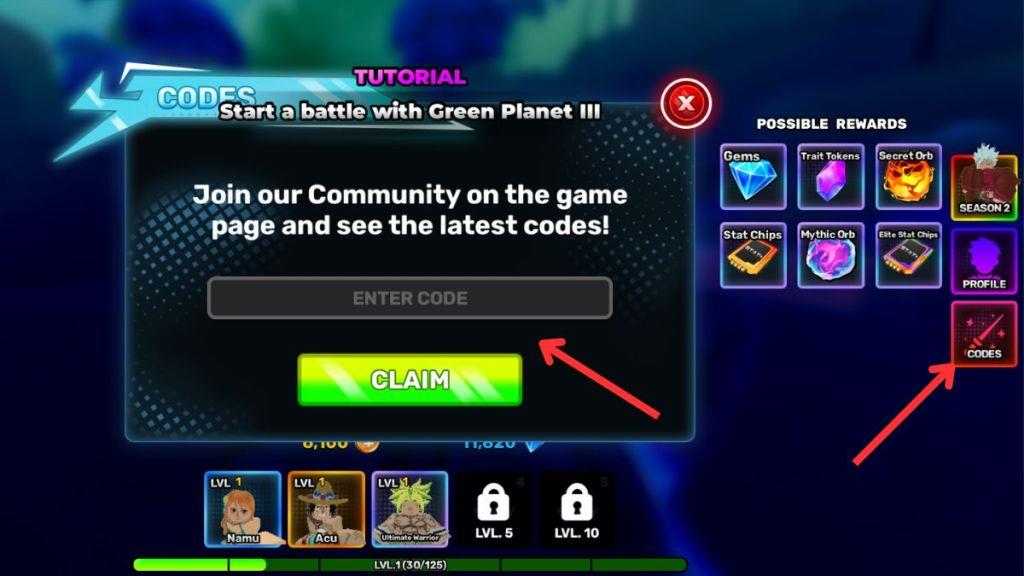
Redeeming codes for Anime Story is a lot easier than you think. Follow the steps below to redeem them:
- Open the Anime Story experience on Roblox.
- Click on the Codes option on the right side of your screen.
- Type a working code from our list in the empty space.
- Click the Claim button to get your free rewards.
How to Get More Anime Story Codes
Players can find new Anime Story codes by following the game’s official Roblox page, joining the developer’s Discord server, and checking social media platforms like X or YouTube where creators often share fresh updates. Keeping an eye on special events or milestones such as holidays, collaborations, or major game updates can also lead to exclusive reward codes. It’s a good idea to visit community forums or fan groups where players regularly share active codes before they expire.
Looking for the best way to get more codes for Anime Story? Bookmarking this page is your best bet, as we are always on the lookout for new codes and updates. So, when in doubt for new Roblox game codes, check back, and you’ll find them here.
If you want to take matters into your own hands, then you should join the official Anime Story Discord Server. Once you’re in the server, head to the #codes channel to find all the working codes. You can even join the Anime Story Lab Roblox community for the latest news. However, if you are looking for other socials, sadly, none exist yet.
Why Are My Anime Story Codes Not Working?
If your Anime Story codes aren’t working, they may have expired or been entered incorrectly. Double-check for typos, extra spaces, or capitalization errors before trying again. Some codes are time-limited or only valid for specific updates, so make sure you’re using the latest ones released by the developers. If issues persist, restarting the game or switching to a different server might help refresh your session.
When new Anime Story codes arrive, the game usually pushes a fresh client update, so give the servers a moment to reset before you try anything. If you see an error while redeeming, look for small typing mistakes. The safest option is to copy the code directly from our list. Some codes run on strict timers, so if one stops working, it likely means it has already expired. Visit our page again and see if it has been moved to the expired section.
How to redeem Anime Story codes step by step
To redeem codes in Roblox’s Anime Story, follow this straightforward in-game process.
Step-by-Step Guide
Launch Anime Story on Roblox and load into a server.
Click the Codes button (often marked as a red or labeled tab) on the right side of your screen to open the redemption menu.
Enter a valid code exactly as listed (case-sensitive, no extra spaces) into the Enter Code text box that appears.
Hit Claim or Redeem to instantly receive your rewards, such as Gems or Trait Tokens, if the code is active.
Troubleshooting Tips
Skip the tutorial if prompted, as codes work from the main menu.
Codes redeem once per account and expire over time-check recent lists from prior conversation for active ones like 6kccu or 5kccu.
If invalid, copy-paste precisely or try another, as Roblox sensitivity to typos is common.
Show where the Codes button is located in the game UI
In Anime Story on Roblox, the Codes button appears directly in the game’s user interface once loaded.
Button Location
The Codes button sits on the right side of the screen in the main UI panel, typically as a labeled rectangular icon (often red or highlighted with “CODES” text) among other menu tabs like Settings or Inventory.
It remains visible from the spawn area or main hub, not buried in submenus.
Tap or click it to expand the code entry box without needing to navigate further.
Visual Identification
Look for it vertically aligned with player stats or shop buttons on the right edge-avoid confusing it with the top bar’s leaderboard or bottom chat.
On mobile, it may stack slightly lower but stays prominent on the right.