Mystery swirls around the Steal a Brainrot Admin Machine Guide as random events collide with Roblox’s hidden corridors, where every click could rewrite the rules.
What Is Steal a Brainrot Admin Machine?
Steal a Brainrot Admin Machine refers to a chaotic Roblox random event where players grab a glitchy admin tool that floods the server with absurd commands and meme effects. This machine spawns during rare outbreaks, letting the holder spam brainrot antics like forcing everyone into T-pose dances or spawning endless rage comics. It lasts until a timer runs out or another player swipes it, turning matches into total mayhem.
The admin machine is a new mechanic in Steal a Brainrot. Unlike Fuse Machine or the Fishing, where you can still choose your fate, this one is all random, full of fun. The admin machine is set beside the Robux Shop in the main lobby. Look at the machine to know what is coming next. Every hour, a new event pops up.
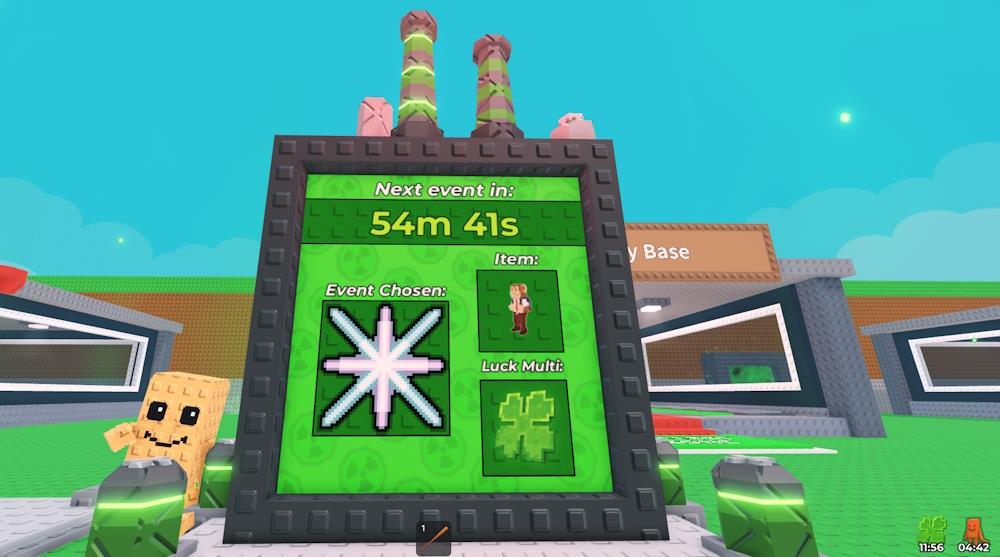
This event will be chosen by admins every hour, along with a new brainrot spawn and luck multiplier. The event chosen can be anything from the admin events. The same goes for brainrots and the luck multiplier. So, make sure you are online every hour to enjoy the admin machine benefits. Here are the benefits you get from the Steal a Brainrot admin machine:
- Random event
- Random brainrots
- Luck multiplier
How to Use Steal a Brainrot Admin Machine
To use the Steal a Brainrot Admin Machine, find it during random server events and interact with it by pressing the action key when it appears. Once activated, it generates a temporary admin terminal that lets you access limited admin controls, such as spawning random effects or triggering visual distortions. Keep an eye on the time limit, as the machine powers down after a short duration, requiring another event to reactivate it. Stay alert for event notifications to catch the next chance to use it.
Well, you don’t. The admin machine is randomized by the admins every hour. So look at the board and pray that it is your favorite event or brainrot coming next. After a new event starts, the refresh happens 30 seconds later.
Where to find official Steal a Brainrot guides
Official guides for Steal a Brainrot, a popular Roblox game, are primarily available through community-driven resources rather than a dedicated developer Trello board. The most reliable official hub is the game’s Discord server, which has over 1 million members and channels for news, leaks, codes, and updates.
Key Official Sources
-
Discord Server: Join via links shared in-game or community posts; check channels like bombardiro-news for announcements and skibidi-leaks for upcoming content. No direct link provided here to avoid outdated invites, but search “Steal a Brainrot Discord” in Roblox or recent guides.
-
Roblox Game Page: Visit https://www.roblox.com/games/109983668079237/Steal-a-Brainrot/ for patch notes, events, and developer updates directly from BRAZILIAN SPYDER.
Community Guides
Fan wikis and sites offer detailed breakdowns of mechanics like brainrot tiers, events, and admin spawns, often mirroring official info:
-
Fandom Wiki at stealabrainrot.fandom.com for character lists and strategies.
-
Sites like stealabrainrot.best for tips on events and collecting.
For admin machine or random events, monitor Discord for live timings, as they tie into hourly server events. Always follow Roblox terms to avoid bans.
Join the official Steal a Brainrot Discord server link
The official Steal a Brainrot Discord server can be joined directly from the game’s Roblox page or via a simple invite code. Multiple guides confirm it’s the one with millions of members, verified by checking player count on the official game listing.
Easiest Join Methods
-
From Roblox: Go to https://www.roblox.com/games/109983668079237/Steal-a-Brainrot/, scroll to the bottom, and click the Discord icon. This opens an invite link automatically-press “Accept” or “Join”.
-
Direct Invite Code: In Discord, click “+” to add a server > “Join a Server” > enter brainrots (no spaces, with “s” at end) > Join. Complete rules verification to gain access.
Verification Steps
After joining, click “Complete” at top, read rules, check agreement box, submit, and verify phone if prompted. Channels include news, leaks, trading, and admin event alerts. Avoid unofficial links like discord.gg/sab to prevent scams.
